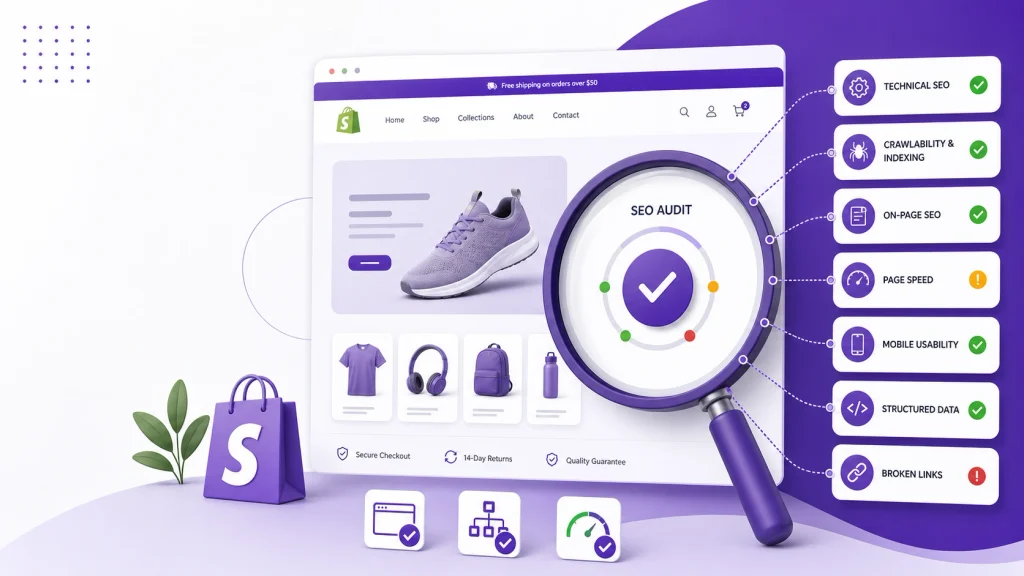
A Shopify SEO audit is a structured review of your store to find problems that can affect crawling, indexing, search visibility, page relevance, and the experience people have after clicking from Google.
The important part is not checking every SEO setting at random.
A useful audit starts with the pages that matter most and works from technical accessibility → indexing → site structure → on-page SEO → content → performance → structured data → monitoring.
For Shopify stores, this order matters because there is little value in rewriting product descriptions if important product pages cannot be properly crawled or indexed.
What Is a Shopify SEO Audit?
A Shopify SEO audit examines the technical and content signals that help search engines discover, understand, and potentially surface your store’s pages.
A typical audit covers:
- Crawlability and indexability
- XML sitemap
- Robots.txt
- Canonical URLs
- Duplicate content
- URL structure
- Internal linking
- Product pages
- Collection pages
- Page titles and meta descriptions
- Headings and content
- Images
- Page performance
- Mobile usability
- Structured data
- Redirects and broken links
- Google Search Console data
Google separates crawling, indexing, and serving into different parts of the search process, so an audit should do the same rather than treating “SEO” as one single setting.
What Should You Check in a Shopify SEO Audit?
1. Check Which Pages Google Can Crawl and Index
Start with your most important URLs.
For a Shopify store, that usually means checking:
- Homepage
- Main collections
- Important subcollections
- Priority product pages
- Important informational pages
- Blog posts that attract organic traffic
Use Google Search Console’s URL Inspection tool to investigate representative URLs.
Look for problems such as:
noindexdirectives- Unexpected canonical URLs
- Crawl errors
- Pages that are discovered but not indexed
- Pages that are crawled but not indexed
- Important pages missing from internal navigation
- Pages blocked by technical configuration
Do not assume every excluded URL is an error. Ecommerce sites naturally contain URLs that do not need to appear in search. The important question is whether valuable pages are being excluded unexpectedly.
For a deeper Shopify-specific indexing review, use the existing Shopify products not indexed guide and Shopify pages not indexed guide.
2. Review the XML Sitemap
Shopify automatically generates a sitemap, but that does not mean you should ignore it during an audit.
Check your store’s sitemap and confirm that important products, collections, pages, and blog content are represented appropriately.
Also check Google Search Console to make sure the sitemap has been submitted and can be processed.
Google recommends using sitemaps to tell it about URLs you want considered for search, but a sitemap does not guarantee that every listed URL will be indexed.
For a Shopify-specific explanation, see the Shopify sitemap SEO guide.
3. Check Robots.txt
Review your store’s robots.txt configuration for accidental restrictions affecting valuable content.
The key question is not:
“Does my robots.txt block anything?”
It is:
“Does it block something that search engines actually need to access?”
Remember that robots.txt controls crawling access; it is not a general replacement for noindex when your objective is to keep a page out of Google’s search results.
Be particularly careful after theme changes, app installations, migrations, or custom technical work.
4. Audit Canonical URLs
Canonicalization is especially important for ecommerce stores because the same product or similar content can sometimes be accessible through multiple URL paths.
Google uses canonicalization to select a representative URL from duplicate or very similar pages. A canonical is a signal rather than an absolute command, so Google can select a different canonical when other signals point elsewhere.
During your Shopify audit, check:
- Is the canonical present?
- Does it point to the correct page?
- Does the canonical URL return a valid response?
- Are there conflicting canonical tags?
- Are internal links pointing toward preferred URLs?
- Are redirects and canonical tags telling the same story?
For a deeper review, use the Shopify canonical URL guide.
5. Look for Duplicate Content
Duplicate content is common in ecommerce and does not automatically mean a Google penalty.
The more useful question is whether your store is creating multiple URLs that provide little additional value or make it harder for search engines to understand which page should be shown.
Check for duplication caused by:
- Product URL variations
- Collection paths
- Filters
- Sorting parameters
- Product variants
- Similar product descriptions
- Repeated collection copy
- Thin tag or filter pages
Google explains that duplicate content itself is not generally a spam-policy violation, but multiple URLs containing substantially similar content can complicate canonicalization and crawling.
Use the existing Shopify duplicate content guide when this becomes a major part of the audit.
6. Review Your URL Structure
Shopify gives stores a defined URL architecture, so the goal is not to fight the platform.
Instead, review whether individual handles are:
- Short
- Descriptive
- Stable
- Relevant to the page
- Free from unnecessary keyword repetition
Avoid changing URLs simply because you found another keyword variation.
When a URL genuinely needs to change, make sure the old URL is redirected appropriately.
You can also use the Shopify URL structure SEO guide for a more detailed review.
7. Check Internal Linking
Internal links help users move around the store and help search engines discover relationships between pages.
During the audit, ask:
- Can important products be reached through relevant collections?
- Can important collections be reached through navigation?
- Are important blog posts connected to commercial pages where appropriate?
- Are there valuable pages with very few internal links?
- Are internal links pointing to unnecessary duplicate URLs?
- Are anchor texts descriptive and natural?
Google recommends making important pages reachable through crawlable links and using relevant anchor text to help people and search engines understand linked pages.
For a broader site-architecture review, see the Shopify internal linking guide.
8. Audit Product Pages
Product pages are usually among the most commercially important URLs on a Shopify store.
Check whether important products have:
- Clear product names
- Unique SEO titles
- Useful meta descriptions
- One clear primary heading
- Original product descriptions
- Useful specifications
- Descriptive images
- Accurate alt text
- Clean URLs
- Correct canonical URLs
- Appropriate structured data
- Good internal links
- Correct availability information
- Good mobile usability
Do not judge a product page only by its keyword usage.
A useful product page should help both search engines and shoppers understand what the product is, who it is for, and why it may be relevant.
For a page-level audit, use the Shopify product page SEO checklist.
9. Audit Collection Pages
Collection pages can play an important role in Shopify’s site architecture because they connect broader search intent with individual products.
Review:
- Collection title
- SEO title
- Meta description
- H1
- Introductory copy where useful
- Product selection
- Internal links
- Breadcrumbs
- Pagination
- Filters
- Duplicate or thin collection pages
- Mobile usability
Do not add large blocks of copy simply because you think a collection needs “more words.”
The copy should help explain what the collection contains and match the search intent behind the page.
For more detail, use the Shopify collection page SEO guide.
10. Review Page Titles and Meta Descriptions
Check your most important pages for:
- Missing titles
- Duplicate titles
- Unclear titles
- Keyword-stuffed titles
- Missing meta descriptions
- Duplicate meta descriptions
- Descriptions that do not accurately describe the page
The objective is not to force the primary keyword into every field.
A better title clearly tells the searcher what the page offers.
A better meta description gives useful context about the page and can support qualified clicks.
Use the Shopify meta title and description guide for a more detailed on-page review.
11. Check H1s and Page Content
Each important page should have a clear topic and useful content that satisfies its search intent.
Review:
- Missing H1s
- Multiple unnecessary H1s
- Generic headings
- Thin product descriptions
- Duplicate descriptions
- Collection pages with little useful information
- Blog content that does not answer the query
- Pages targeting the same search intent
For products, avoid copying manufacturer descriptions word for word when the same copy is used across many retailers.
The goal is not to make every page longer. It is to make every important page more useful and more specific.
12. Audit Images
Images affect both usability and performance.
Check:
- File sizes
- Image dimensions
- Appropriate formats
- Mobile loading
- Descriptive alt text
- Image quality
- Product image completeness
Alt text should describe what the image actually communicates rather than repeat a target keyword.
For example:
Better:
“Black leather backpack with two front pockets”
Poor:
“best leather backpack leather backpack backpack online”
For a broader review, use the Shopify image SEO guide.
13. Check Page Speed and Core Web Vitals
Performance should be part of every serious Shopify audit, but avoid treating a single Lighthouse score as the entire SEO diagnosis.
Look at:
- Largest Contentful Paint
- Interaction to Next Paint
- Cumulative Layout Shift
- Image loading
- JavaScript
- Third-party scripts
- App-generated code
- Theme assets
- Mobile performance
Google’s current Core Web Vitals include LCP, INP, and CLS.
For Shopify stores, third-party apps can be an important area to investigate because scripts added by apps may affect page performance.
You can use the existing Shopify speed and SEO guide for a more focused performance review.
14. Test the Mobile Experience
A mobile SEO audit should go beyond checking whether the theme is technically responsive.
Actually test the store on a phone.
Check:
- Navigation
- Search
- Product images
- Product variants
- Add-to-cart controls
- Collection filters
- Pop-ups
- Text size
- Checkout flow
- Page speed
- Sticky elements
If important information or actions become difficult to use on smaller screens, the issue is both an SEO and usability concern.
See the Shopify mobile SEO guide for a more detailed mobile review.
15. Review Structured Data
Structured data can help Google understand information such as products, prices, availability, and other supported entities.
For ecommerce stores, review whether appropriate Product structured data exists and whether it accurately matches the visible page.
Google’s merchant listing documentation specifically supports Product and Offer structured data for eligible shopping experiences. Google also recommends validating structured data and monitoring issues through Search Console.
Do not add schema simply because a markup type exists.
The structured data should accurately represent visible, supported content.
For Shopify-specific implementation, see the Shopify product schema guide.
16. Find Broken Links and Redirect Problems
Crawl the site and look for:
- 404 pages
- Broken internal links
- Redirect chains
- Redirect loops
- Links pointing to old URLs
- Redirects to irrelevant pages
If an important page has moved, the internal links should generally be updated to point directly to the current URL rather than repeatedly sending users and crawlers through redirects.
Pay particular attention after:
- Product deletions
- Collection changes
- Website redesigns
- URL changes
- Shopify migrations
- Theme changes
17. Review Your Google Search Console Data
An audit should not rely entirely on a crawler.
Search Console can tell you what Google is actually seeing.
Review:
- Search queries
- Impressions
- Clicks
- CTR
- Top landing pages
- Indexing issues
- Page experience data
- Core Web Vitals
- Structured-data reports where applicable
Look for patterns.
For example, a page receiving plenty of impressions but relatively few clicks may deserve a closer look at its search-result presentation and intent alignment.
A valuable page with no meaningful impressions may need a deeper investigation into indexing, internal linking, content relevance, or demand.
Use the Shopify Google Search Console guide for the Shopify-specific workflow.

What Should You Fix First?
This is where many SEO audits become less useful.
They produce 100 issues and leave the store owner to decide what matters.
A better prioritization model is:
| Priority | What to Check | Why It Comes First |
|---|---|---|
| 1 | Crawlability and indexability | Important pages need to be accessible and eligible for indexing |
| 2 | Canonicals and serious duplication | Prevents conflicting URL signals |
| 3 | Broken links and redirects | Fixes accessibility and navigation problems |
| 4 | Site architecture and internal links | Helps discovery and page relationships |
| 5 | Product and collection relevance | Improves the pages that matter commercially |
| 6 | Titles, headings and metadata | Improves page clarity and search-result relevance |
| 7 | Performance and mobile UX | Improves usability and page experience |
| 8 | Structured data | Helps search engines understand eligible content |
| 9 | Content expansion | Adds depth where users actually need it |
| 10 | Ongoing monitoring | Confirms whether fixes solved the underlying problem |
This is a prioritization framework, not a universal rule. A store with a serious checkout or indexing problem may need a different order.
The key principle is simple:
Fix problems that prevent valuable pages from being discovered, understood, indexed, or used before polishing lower-impact details.
Shopify SEO Audit Checklist
Use this as a quick final pass:
Technical SEO
- Important pages can be crawled
- Important pages are indexable
- No accidental
noindexdirectives exist - Robots.txt is not blocking important content
- XML sitemap is available
- Sitemap is submitted in Search Console
- Important URLs appear appropriately in the sitemap
- Canonical URLs are correct
- Duplicate URL problems are understood
- Broken internal links are fixed
- Important redirects work correctly
Site structure
- Important products are linked from relevant collections
- Important collections are easy to reach
- Valuable content is internally linked
- No important pages are effectively orphaned
- Internal links generally point to preferred URLs
- Anchor text is natural and descriptive
On-page SEO
- Important pages have clear titles
- Titles are not unnecessarily duplicated
- Meta descriptions are useful
- H1s clearly identify the page topic
- Product descriptions provide useful original information
- Collection pages match their search intent
- URLs are readable and stable
- Images have meaningful alt text
Performance and mobile
- Core Web Vitals have been reviewed
- Large images are optimized
- Unnecessary app scripts have been investigated
- Mobile navigation works properly
- Product and collection pages work well on phones
- Important buying actions are easy to use
Ecommerce SEO
- Product structured data has been reviewed
- Product information matches visible content
- Product availability is accurate
- Product variants have been reviewed
- Out-of-stock and discontinued products have a clear strategy
- Collection structure makes sense for shoppers
Measurement
- Google Search Console is connected
- Organic impressions are monitored
- Organic clicks are monitored
- Important landing pages are reviewed
- Indexing issues are monitored
- Changes are measured after implementation
How Often Should You Audit a Shopify Store?
There is no single schedule that fits every store.
A larger store, frequently changing catalog, active marketing team, or major technical environment may need more frequent checks.
A useful approach is:
Mini checks:
Monitor important indexing, performance, broken-link, and Search Console issues regularly.
Full audit:
Run a broader review periodically and after major technical changes.
Immediate audit:
Investigate promptly after a major traffic drop, migration, theme change, large product import, URL change, or significant app installation.
Shopify’s current technical audit guidance similarly recommends recurring audits and additional reviews after major site changes.

Common Shopify SEO Audit Mistakes
Checking everything but prioritizing nothing
A 100-item report is not useful if the store owner cannot tell what should be fixed first.
Focusing only on the homepage
Ecommerce SEO depends heavily on product and collection pages. Audit the templates that actually drive search visibility.
Treating every excluded URL as a problem
Some URLs should not be indexed. Investigate why a page is excluded before deciding that the exclusion is wrong.
Chasing a perfect speed score
Performance matters, but removing useful store functionality solely to improve a laboratory score may create a worse shopping experience.
Changing URLs unnecessarily
A URL should not be changed simply because another keyword variation looks attractive.
Adding keywords everywhere
SEO titles, product descriptions, headings, and alt text should help users understand the page. They are not keyword storage fields.
Installing more SEO apps instead of fixing the cause
Apps can be useful, but adding another tool does not automatically solve a technical problem. First identify what is actually broken.
Frequently Asked Questions
What is included in a Shopify SEO audit?
A Shopify SEO audit typically covers technical SEO, crawlability, indexability, canonicalization, duplicate content, site structure, internal links, product and collection pages, metadata, images, performance, mobile usability, structured data, redirects, and Search Console data.
How do I audit a Shopify store for SEO?
Start by establishing which pages matter most. Then review crawlability and indexing, sitemap and robots.txt, canonicals, duplicates, internal links, product and collection pages, metadata, performance, mobile usability, structured data, and Search Console data.
What is the most important part of a Shopify SEO audit?
There is no universal single issue, but crawlability and indexability are sensible starting points. If important pages cannot be properly accessed or indexed, improving lower-level on-page elements will not solve the main problem.
Does Shopify automatically handle SEO?
Shopify provides several SEO-related foundations, but store owners still need to audit how their theme, apps, catalog, content, URLs, internal links, and customizations affect search visibility. Shopify’s current audit guidance specifically notes that theme changes, catalog changes, and migrations can introduce crawl and indexing problems.
How often should a Shopify store have an SEO audit?
The appropriate frequency depends on the store’s size and how frequently it changes. Perform additional audits after migrations, major theme changes, large catalog updates, or unexplained organic-search problems.
Final Takeaway
A Shopify SEO audit should answer a practical question:
Can search engines reliably discover, understand, and index the pages that matter to the business?
Start with crawlability and indexability. Then investigate canonicalization, duplication, internal linking, product and collection pages, on-page SEO, performance, mobile usability, structured data, and Search Console data.
Most importantly, don’t treat every finding as equally important.
An audit becomes useful when it turns a long list of SEO issues into a clear sequence of actions.
Fix the problems that block or confuse important pages first. Then improve relevance, content, performance, and search-result presentation. Finally, monitor the store to make sure the changes actually solved the problem.