If you’re new to Shopify SEO, the hardest part usually isn’t finding things to optimize. It’s deciding which problems deserve your attention first.
You could spend hours rewriting product descriptions, changing image alt text, installing SEO apps, editing technical settings, researching keywords, or trying to improve page speed. But not every SEO task has the same impact.
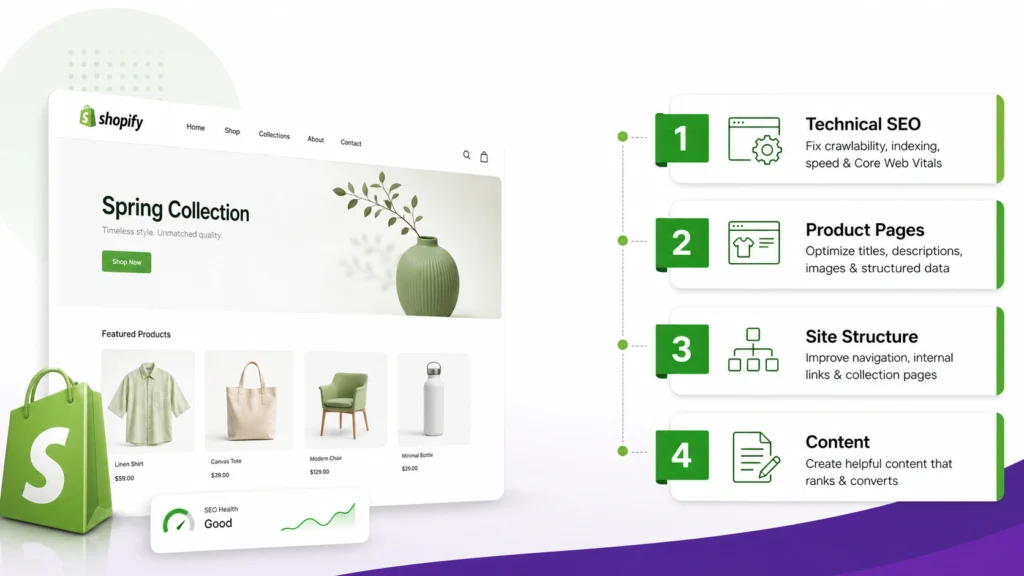
For most Shopify stores, a better approach is to work from the foundation upward:
- Make sure Google can discover and index the pages that matter.
- Improve your most important product and collection pages.
- Fix titles, headings, meta descriptions, and page content.
- Strengthen your internal linking and site structure.
- Investigate duplicate URLs and canonical issues.
- Improve mobile usability and significant performance problems.
- Review images and structured data.
- Build useful supporting content around your products and collections.
The goal isn’t to complete an enormous SEO checklist. It’s to fix the problems that are most likely to prevent important pages from being discovered, understood, or useful to shoppers.
The Short Answer: What Should You Fix First?
If you’re starting Shopify SEO from scratch, use this priority order:
| Priority | What to fix | Why it matters |
|---|---|---|
| 1 | Indexing and crawlability | Google needs to find the pages you want in Search |
| 2 | Important products and collections | These pages are closest to commercial search intent |
| 3 | Titles, headings and meta descriptions | They help communicate what each page is about |
| 4 | Product and collection content | Shoppers need useful information before they buy |
| 5 | Internal linking | Helps users and search engines discover important pages |
| 6 | Duplicate and canonical issues | Ecommerce stores can expose multiple URL versions |
| 7 | Mobile experience and performance | Poor usability can hurt the shopping experience |
| 8 | Images and structured data | Helps search engines understand products and visual content |
| 9 | Supporting content | Builds topical coverage around your products and categories |
Shopify already provides several technical SEO features automatically, including sitemap generation and canonicalization. That means beginners shouldn’t start by changing technical settings simply because an SEO checklist says they should.
Instead, first find out whether there is an actual problem.
1. Check Whether Google Can Find and Index Your Store
Before worrying about keyword placement, make sure Google can access the pages you actually want to appear in Search.
Shopify automatically generates a sitemap.xml containing links to products, collections, pages, and blog posts. Shopify recommends submitting the sitemap through Google Search Console to help Google discover the store’s URLs.
Start by checking:
- Is the store publicly accessible?
- Is the domain verified in Google Search Console?
- Has the Shopify sitemap been submitted?
- Are important products indexed?
- Are important collection pages indexed?
- Are valuable pages unexpectedly excluded?
- Did a recent migration change or remove important URLs?
- Are old URLs properly redirected where necessary?
If you’re dealing with a new store, don’t assume that every URL should be indexed immediately. Google doesn’t guarantee a specific indexing timeframe.
What matters more is whether the important pages are discoverable and indexable.
Start with your important URLs
Don’t review hundreds of URLs randomly.
Begin with:
- Homepage
- Main collections
- Best-selling products
- High-margin products
- Important landing pages
- Important blog posts
- Recently migrated URLs
If one of your most important products isn’t being indexed, that deserves attention before rewriting the meta description of a page that’s already performing well.
For a deeper troubleshooting process, see the Shopify products not indexed guide.

2. Fix Your Most Important Product and Collection Pages
Once indexing looks healthy, move to the pages that matter most to the business.
For many ecommerce stores, that means product and collection pages.
The exact priority depends on the store, but don’t assume every URL deserves equal optimization effort.
For example, imagine a Shopify store has:
- 500 products
- 25 collections
- 5 products responsible for a large share of sales
It would be inefficient to spend the same amount of time optimizing all 500 product pages.
Start with the pages that combine meaningful business value and realistic search intent.
Product pages
Review whether important product pages clearly explain:
- What the product is
- Who it is for
- The main benefits
- Key specifications
- Materials or ingredients where relevant
- Size or compatibility information
- Important buying considerations
- Shipping or other useful purchasing information
Avoid relying entirely on manufacturer descriptions if you can provide more useful information for your own customers.
Google’s current ecommerce guidance also emphasizes matching pages to search intent and creating useful product content rather than simply repeating keywords.
If you need a more detailed product-page workflow, use the Shopify product page SEO guide.
Collection pages
Collection pages deserve attention too.
A collection should make it immediately clear:
- What products are included
- Who the collection is for
- What makes the products different
- Which search intent the collection serves
A collection titled “Women’s Running Shoes” should not just display a grid of products with no useful context.
Give shoppers enough information to understand what they’re looking at.
For a deeper optimization process, see the Shopify collection page SEO guide.
3. Fix Titles, Headings and Meta Descriptions
After identifying your priority pages, review their basic on-page SEO elements.
For each important page, ask:
Is the title descriptive?
A product title should tell users what the product actually is.
Does the H1 make sense?
The primary heading should clearly communicate the page topic.
Is the meta description useful?
The meta description should accurately summarize the page and give searchers a reason to understand what they’ll find.
Don’t force the same keyword into every field.
For example, if a product is a “Women’s Waterproof Hiking Jacket,” you don’t need awkward variations such as:
Women’s Waterproof Hiking Jacket | Waterproof Hiking Jacket for Women | Best Women’s Hiking Jacket
A clearer title is usually more useful:
Women’s Waterproof Hiking Jacket | Brand Name
The objective is clarity, not repetition.
4. Improve Product and Collection Content
Once the basic SEO fields are in place, look at the actual content.
Ask a more useful question than:
“How many times did I use my keyword?”
Ask:
“Does this page give the shopper enough information to make a decision?”
Thin product content can leave important questions unanswered.
For example, a clothing product might need:
- Fabric information
- Fit
- Sizing guidance
- Care instructions
- Use cases
- Available colors
- Important product differences
A technical product might need:
- Compatibility
- Dimensions
- Specifications
- Supported devices
- Included accessories
- Installation requirements
The exact information depends on what you’re selling.
Don’t add text just to make a page longer
More words aren’t automatically better.
If 150 useful words explain a product better than 700 repetitive words, use the 150 useful words.
The same principle applies to collection pages.
5. Strengthen Internal Linking and Site Structure
Internal links are one of the most useful areas for Shopify SEO because they help both shoppers and search engines move through the store.
Shopify recommends a logical hierarchy that generally moves from:
Homepage → Collections → Products
It also recommends using descriptive internal links between related pages.
Google’s ecommerce guidance similarly explains that it uses relationships between linked pages to understand site structure and relative importance.
Think about your store as a connected system rather than a collection of isolated URLs.
A simple internal-link structure
Your homepage can link to important collections.
Collections can link to relevant products.
Products can connect to relevant collections or related products.
Blog posts can link to relevant products and collections when the link genuinely helps the reader.
For example:
Blog article → relevant collection → relevant product
This creates a clearer journey for both shoppers and crawlers.
You can also review your store using this Shopify internal linking guide.
Don’t bury important pages
If a high-value product can only be reached through a complicated series of clicks, consider whether it deserves stronger navigation or contextual links.
Google specifically recommends making important ecommerce pages reachable through crawlable links and using site navigation to expose categories and products.
6. Check Duplicate URLs and Canonicals
Duplicate URLs become more complicated in ecommerce because products, variants, filters, collections, and other URL patterns can create multiple paths to similar content.
The important point for beginners is:
Don’t assume every duplicate-looking URL requires manual intervention.
Shopify already provides canonical URL functionality, and its current documentation explains that canonical URLs are automatically set on pages.
Instead, investigate actual problems.
Look for situations such as:
- Important pages showing unexpected canonical URLs
- Old URLs still receiving traffic after a migration
- Broken redirects
- Multiple versions of an important page
- Filter URLs creating unwanted indexable pages
- Internal links pointing to inconsistent URL versions
If duplicate URLs are a major concern, see the Shopify duplicate content guide and Shopify canonical URL guide.
Don’t start editing Shopify’s technical files just because an SEO tool reports something unusual. First determine whether the reported issue actually affects search visibility or user experience.
7. Improve Mobile Experience and Important Performance Problems
Once your core pages and structure are in good shape, review the shopping experience.
Open your important pages on an actual mobile device.
Check:
- Are product images easy to view?
- Are buttons easy to tap?
- Does navigation work smoothly?
- Are filters usable?
- Is important information visible without excessive scrolling?
- Do intrusive popups interfere with the page?
- Does the page feel unnecessarily slow?
Page speed is worth investigating, but don’t turn it into a race for a perfect score.
A speed audit can identify useful opportunities, but the goal is a faster and better shopping experience rather than an arbitrary score.
For Shopify-specific performance work, see the Shopify speed SEO guide.

8. Review Images and Product Structured Data
Images matter for ecommerce because shoppers need to see products clearly, and search engines can use image information to better understand visual content.
Start with the basics:
- Use descriptive image filenames.
- Use useful alt text where appropriate.
- Use high-quality product images.
- Avoid unnecessarily huge image files.
- Make sure important product images are accessible.
You can learn more about this in the Shopify image SEO guide.
What about structured data?
Structured data can help Google understand ecommerce content.
Google’s current ecommerce documentation identifies Product, ProductGroup, BreadcrumbList, Organization, and other structured data types as potentially relevant depending on the page and business.
For product pages specifically, Google says Product structured data can make pages eligible for richer product search experiences, although structured data does not guarantee that a rich result will appear.
So structured data is worth reviewing, but it shouldn’t be your first Shopify SEO task if your important pages aren’t indexed or your product content is weak.
For a more focused resource, see the Shopify product schema guide.
9. Build Supporting Content Around Your Products
Once the commercial pages are in good shape, you can expand your SEO coverage with useful content.
This is where blog posts and guides become valuable.
For example, a store selling hiking equipment could publish content such as:
- How to choose a hiking backpack
- What size hiking boots should you buy?
- Hiking jacket materials explained
- How to prepare for a winter hike
- Waterproof vs water-resistant hiking gear
These articles shouldn’t exist simply to generate more URLs.
They should answer questions that potential customers genuinely have.
Then, where appropriate, connect those articles to relevant collections and products.
This creates a stronger relationship between informational and commercial content.
If your store has a blog, the Shopify blog SEO guide can help with the next stage.
What Shopify SEO Problems Should Beginners NOT Fix First?
Knowing what not to prioritize can save just as much time as knowing what to fix.
Don’t start with keyword density
Repeating the same keyword doesn’t make a product page more relevant.
Write naturally and make the page genuinely useful.
Don’t edit robots.txt without a specific reason
Shopify already provides a configured robots.txt system.
If you find a technical recommendation telling you to change it, first understand:
- What is currently happening?
- Which URLs are affected?
- Why should they be crawled or blocked?
- What will change after the edit?
Technical changes should solve actual problems.
Don’t install multiple SEO apps just because you’re a beginner
An SEO app can’t automatically create:
- Better product positioning
- Useful descriptions
- Good site architecture
- Strong internal links
- Better search intent alignment
Tools can help identify problems, but they don’t replace strategy.
Don’t chase a perfect SEO audit score
A technical score is only one signal.
A page can score well in an audit tool while still being a poor result for the searcher.
If a product page has perfect technical settings but doesn’t explain sizing, compatibility, materials, or important buying information, the technical score hasn’t solved the real problem.
Don’t optimize every URL equally
Your time is limited.
Prioritize pages using factors such as:
- Business importance
- Search intent
- Existing organic traffic
- Search Console impressions
- Revenue potential
- Product or collection importance
- Existing ranking opportunities
A page that already performs well may need less attention than an important page that Google barely discovers.
A Simple 30-Day Shopify SEO Plan
You don’t need to turn SEO into a full-time project.
Use a staged approach.
Week 1: Indexing and Technical Foundation
Focus on:
- Google Search Console
- Sitemap submission
- Indexing
- Important URL discovery
- Redirects
- Major technical problems
If you’re troubleshooting Search Console specifically, use the Shopify Google Search Console guide.
Don’t spend the entire week rewriting hundreds of product descriptions.
Week 2: Products and Collections
Choose your highest-priority pages.
Review:
- Product titles
- Collection titles
- H1s
- Meta descriptions
- Product descriptions
- Collection descriptions
- Images
- Important buying information
Work deeply on a manageable group of pages rather than making tiny changes across the entire store.
Week 3: Internal Linking and Navigation
Review how users move through the store.
Check whether:
- Important collections are linked from navigation
- Products are accessible through collections
- Related products are connected where useful
- Blog content links to relevant commercial pages
- Important pages are not buried
Week 4: Performance, Images and Content
Now review:
- Mobile experience
- Page speed
- Images
- Structured data
- Supporting content opportunities
- Search Console performance
At the end of the month, compare actual changes in Search Console and your store analytics rather than assuming every SEO edit produces an immediate result.
How Do I Know What to Fix First?
Use this rule:
Fix the problem that prevents an important page from being discovered or understood before fixing a problem that merely makes an already-good page slightly better.
For example:
High priority
A best-selling product isn’t indexed.
High priority
A key collection has weak content and isn’t well connected to the rest of the store.
High priority
A recent migration broke important URLs.
Medium priority
A product title could be clearer.
Medium priority
Several important product images need better alt text.
Lower priority
A page that already performs well could use a slightly different meta description.
This approach helps beginners spend SEO time where it has a clearer purpose.
Shopify SEO Beginner Checklist
Use this checklist when reviewing a new store.
Foundation
- Store is publicly accessible
- Domain is verified in Google Search Console
- Shopify sitemap is submitted
- Important pages can be crawled
- Important products can be indexed
- Important collections can be indexed
- Migration redirects work where applicable
Product and Collection Pages
- Priority products have descriptive titles
- Priority collections have clear titles
- H1s accurately describe the page
- Meta descriptions are useful
- Product information answers important buyer questions
- Collection pages provide useful context
Site Structure
- Main collections are easy to find
- Important products are reachable through navigation or relevant links
- Related pages are connected
- Internal links use descriptive text
- Important pages aren’t unnecessarily buried
Technical SEO
- Important duplicate URL issues have been investigated
- Canonical signals make sense
- Broken links have been addressed
- Important redirects work
- Mobile experience is usable
- Major performance issues have been investigated
Growth
- Product images are optimized
- Product structured data is reviewed
- Supporting content opportunities have been identified
- Informational content links to relevant commercial pages
- Search Console performance is monitored
- Underperforming important pages are improved
Frequently Asked Questions
Is Shopify good for SEO?
Shopify provides several SEO foundations automatically, including sitemap generation, canonical functionality and a structured ecommerce environment. But those built-in features don’t replace useful product content, logical navigation, internal linking, or search-intent-focused optimization.
What is the first thing I should do for Shopify SEO?
Start by checking whether Google can discover and index the pages that matter most.
Verify your domain in Google Search Console, submit your sitemap, and inspect important products and collections before spending significant time on lower-priority optimizations.
Should I optimize product pages or collection pages first?
There isn’t one universal answer for every store.
Start with the pages that have the strongest combination of business value, search demand, and realistic search intent.
For some stores, that means important collections. For others, specific products may deserve attention first.
Do I need an SEO app for Shopify?
Not necessarily.
SEO apps can provide useful features, but they aren’t a prerequisite for having a well-optimized Shopify store.
First understand what problem you’re trying to solve. Then decide whether an app is actually necessary.
Should I change Shopify’s robots.txt?
Don’t change it simply because an SEO checklist recommends doing so.
Shopify provides a preconfigured robots.txt system. A customization should have a specific technical purpose and should be evaluated carefully before implementation.
How long does Shopify SEO take?
There is no universal timeframe.
Google needs to crawl and process changes, while results also depend on factors such as competition, site quality, content, authority, search intent, and the specific query.
Focus on making measurable improvements rather than expecting every change to produce an immediate ranking change.
Should I fix page speed before product content?
Usually, don’t let a minor speed issue delay major improvements to important product and collection pages.
Investigate serious performance problems, especially when they affect mobile usability, but prioritize problems that prevent important pages from being discovered, understood, or useful.
Final Takeaway
Shopify SEO becomes much easier when you stop treating it as one enormous checklist.
You don’t need to fix everything at once.
Start with the foundation:
Can Google find and index the right pages?
Then ask:
Are the pages that matter most useful and well optimized?
Then improve:
Site structure, internal links, duplicate URLs, performance, images, structured data, and supporting content.
The most effective beginner approach isn’t about changing the greatest number of settings.
It’s about fixing the right problems in the right order.
If you have limited time, prioritize the issues that affect your most important pages first. Once those foundations are sound, move toward broader content and technical improvements.