A Shopify product page has two jobs: help search engines understand what you sell and give shoppers enough useful information to make a confident decision.
That means product-page SEO is not just about adding a keyword to the title. You also need to look at the product description, search snippet, images, URLs, variants, internal links, structured data, mobile experience, indexability, and the overall usefulness of the page.
Use this Shopify product page SEO checklist to audit individual products and identify the highest-priority improvements.
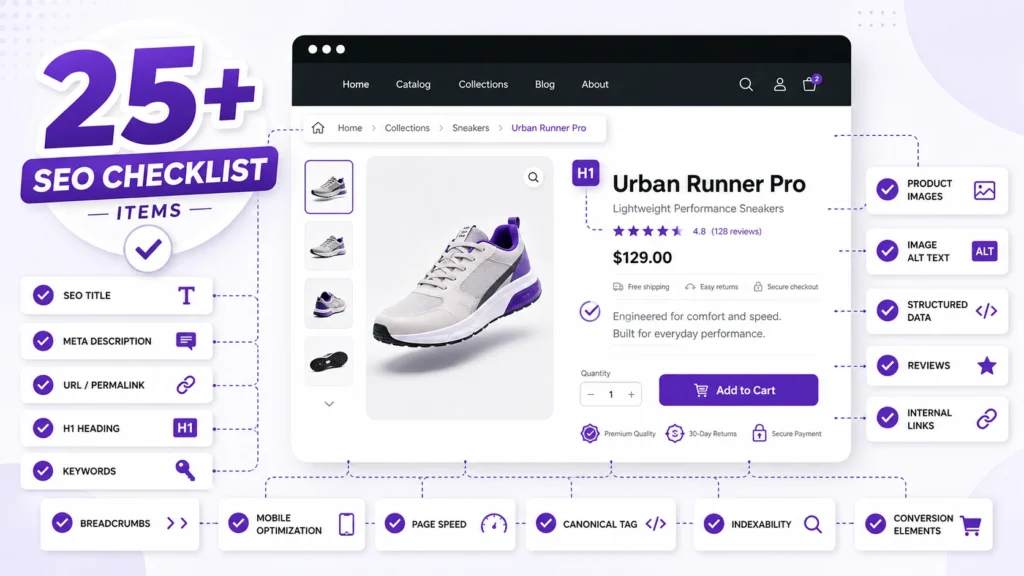
Quick Shopify Product Page SEO Checklist
Before going through the details, check whether each product page has:
- A clear product name that matches how customers search
- A unique SEO title
- A useful meta description
- One clear H1
- A unique and helpful product description
- Important product attributes clearly explained
- Descriptive image alt text
- High-quality product images
- A short, readable URL handle
- A correct canonical URL
- Proper handling of product variants
- Relevant internal links
- Valid Product structured data
- Accurate price and availability information
- Genuine customer reviews where applicable
- Good mobile usability
- Fast-loading product images and page assets
- A crawlable, indexable page
- Links to relevant collections or related products
- Helpful FAQs when shoppers genuinely need them
- Appropriate Google Merchant Center product information
- Google Search Console monitoring
- A clear path to purchase
The rest of this guide explains what to check and why.
1. Match the Product Page to Search Intent
Start with the query, not the SEO field.
Ask:
What would someone searching for this product expect to see?
For example, someone searching for:
“women’s waterproof hiking boots”
will probably expect information about:
- Waterproofing
- Material
- Fit
- Sizes
- Sole
- Weight
- Intended terrain
- Weather conditions
- Available colors
- Shipping and returns
A product page that simply says “Premium Hiking Boots” gives search engines and shoppers much less context.
The page should naturally describe the product using the terminology customers actually use.
Don’t force keywords into every sentence. Make the product itself the subject of the page.


2. Optimize the Product Title
Your visible product title should identify the product clearly.
Instead of:
“Explorer Pro”
consider whether shoppers would understand:
“Men’s Waterproof Hiking Boots – Explorer Pro”
The exact format depends on the product and brand, but a useful title should communicate the product’s identity and important distinguishing characteristics.
Avoid turning the title into a list of keywords.
A product title should still look natural on the actual product page.
3. Write a Strong SEO Title
The SEO title appears in search results and helps communicate what the page is about.
Shopify allows you to customize the page title through the product’s SEO settings. Shopify recommends using a unique, descriptive title and placing important terms naturally in it.
For example:
Weak:
Explorer Pro | Store Name
Better:
Men’s Waterproof Hiking Boots | Explorer Pro
The strongest wording depends on what shoppers actually search for.
Don’t create a different keyword-heavy title merely to target every possible variation.
4. Create a Useful Meta Description
The meta description should explain what the shopper will find on the page and give them a reason to click.
For example:
Shop men’s waterproof hiking boots with durable soles, breathable materials and multiple sizes. View features, fit information and available colors.
Keep it natural.
Don’t turn the description into:
Hiking boots, waterproof hiking boots, men’s hiking boots, hiking shoes, outdoor boots…
Shopify lets merchants edit meta descriptions for individual product pages. Google may also choose different text for the search result when it considers another part of the page more relevant to the query.

5. Write a Unique Product Description
One of the most important product-page improvements is replacing thin or copied descriptions with useful original information.
Don’t simply paste the manufacturer’s description if dozens of other retailers are using the same copy.
Explain:
- What the product is
- Who it is for
- Important features
- Materials
- Dimensions
- Compatibility
- Use cases
- Care instructions
- What’s included
- Limitations
- Relevant specifications
For example, instead of:
High-quality stainless steel water bottle with leak-proof design.
A more useful description could explain capacity, insulation, materials, lid type, intended use and cleaning instructions.
The goal isn’t to make every description artificially long. The goal is to provide the information a shopper needs.
Shopify also recommends unique product descriptions rather than copying manufacturer-provided text.
6. Make Product Information Easy to Scan
Shoppers rarely read ecommerce pages word for word.
Break important information into:
- Short paragraphs
- Bullet points
- Specification tables
- Descriptive subheadings
- Highlighted benefits
- Clear shipping information
- Clear returns information
For products with many technical specifications, a structured specification section can be much more useful than another paragraph of marketing copy.
7. Optimize Product Images and Alt Text
Product images serve both shoppers and search engines.
Use multiple useful images where appropriate:
- Main product image
- Different angles
- Close-up details
- Product in use
- Size comparison
- Important features
- Packaging
- Color variations
Write alt text that describes what the image actually shows.
For example:
Black waterproof hiking boot with orange sole
is more useful than:
best hiking boots waterproof hiking boots men’s boots
Alt text should describe the image, not act as a keyword field.
Google’s merchant listing documentation also recommends crawlable product images that accurately represent the marked-up product and supports providing multiple high-resolution images.
For more detailed image optimization, see the Shopify image SEO guide.

8. Keep the Product URL Clean
Use a short, readable product handle.
For example:
Good:
/products/waterproof-hiking-boots
Less useful:
/products/mens-best-waterproof-hiking-boots-for-outdoor-adventure-2026
Don’t repeatedly change product URLs just to insert slightly different keywords.
When a URL genuinely needs to change, make sure the old URL is properly redirected.
Shopify allows the product URL handle to be edited from the product settings.
Learn more in the Shopify product handles SEO guide.
9. Check Canonical URLs
Shopify can expose the same product through different URL paths.
For example, a product may be accessible through a direct product URL and a collection-based URL.
Your audit should confirm that the preferred product URL is canonical and that internal links point to the preferred version where practical.
Shopify’s current documentation explains that collection-based product URLs can be canonicalized to the direct /products/ URL.
Check for:
- Multiple canonical tags
- Incorrect canonical destinations
- Canonical URLs returning errors
- Canonicals pointing to redirected URLs
- Conflicting SEO-app/theme implementations
- Collection URLs being used unnecessarily in internal links
For a deeper audit, see the Shopify canonical URL guide.
10. Handle Product Variants Correctly
Variants such as:
- Size
- Color
- Material
- Pattern
can make product SEO more complicated.
First determine whether variants are simply selections on one product page or whether each important variant has its own crawlable URL.
Don’t automatically create separate SEO pages for every minor variation.
If variants have distinct URLs, review their:
- Canonicals
- Titles
- Descriptions
- Structured data
- Availability
- Images
- Internal links
Google’s current product-variant documentation supports ProductGroup and Product structured data for products that vary by attributes such as color, size, material or pattern.
For Shopify-specific variant issues, see the Shopify product variants SEO guide.
11. Add Relevant Internal Links
Internal links help shoppers discover related products and help search engines understand relationships between pages.
Useful product-page links can include:
- Relevant collections
- Related products
- Buying guides
- Product comparison articles
- Installation guides
- Care guides
- Supporting educational content
For example, a product page for hiking boots could naturally link to a relevant hiking footwear collection or a guide explaining how to choose hiking boots.
Don’t add a large block of unrelated links just to increase internal-link count.
Use the Shopify internal linking guide when auditing the broader site structure.
12. Optimize Product Structured Data
Structured data helps search engines understand product information.
Depending on the page and implementation, product markup can communicate information such as:
- Product name
- Image
- Brand
- Price
- Availability
- Reviews
- Product variants
- Shipping information
- Return information
Google supports Product structured data for product pages and has separate documentation for product snippets and merchant listings.
Don’t add structured data simply because a field exists.
The markup should accurately represent information visible and relevant to the product.
Shopify-supported themes already include structured data functionality, but you should still audit the implementation, especially if the store uses a heavily customized theme or SEO apps.
After changes, validate the markup using Google’s relevant testing tools.
For more detail, see the Shopify product schema guide.
13. Add Genuine Reviews and Useful Product Information
Customer reviews can add information that isn’t present in the manufacturer’s description.
Useful reviews may discuss:
- Fit
- Durability
- Real-world use
- Sizing
- Quality
- Installation
- Compatibility
Don’t manufacture reviews or add review markup for ratings that aren’t genuinely supported.
The same principle applies to testimonials and product claims.
Use real customer-generated information where it is available and appropriate.
14. Improve Mobile Product-Page UX
A product page needs to work well on small screens.
Check:
- Product images
- Variant selectors
- Add-to-cart controls
- Product description
- Specifications
- Reviews
- Sticky elements
- Pop-ups
- Navigation
- Shipping information
- Checkout transition
Make sure important information isn’t hidden behind an unnecessarily complicated interface.
Google and Shopify both emphasize mobile and overall user experience as part of ecommerce optimization.
15. Improve Product Page Performance
Large product images, third-party apps, tracking scripts and poorly optimized themes can slow down ecommerce pages.
Check:
- Image dimensions
- Image formats
- Unnecessary scripts
- App-generated code
- Theme JavaScript
- Third-party widgets
- Font loading
- Above-the-fold content
Don’t remove useful functionality merely to chase a perfect performance score.
Instead, identify the resources that create real performance problems while preserving important shopping functionality.
Use real-device testing alongside tools such as PageSpeed Insights.
16. Handle Out-of-Stock and Discontinued Products Carefully
Don’t automatically delete a product page whenever inventory reaches zero.
If the product is temporarily unavailable, consider keeping the page accessible with clear availability information and useful alternatives.
If a product is permanently discontinued, determine whether:
- The page should remain as an informational resource
- A relevant replacement exists
- A redirect is appropriate
- The product should eventually return a suitable status
The correct solution depends on the product’s lifecycle and whether a useful replacement exists.
Avoid redirecting every discontinued product to the homepage.
17. Check Indexability
A technically perfect product page cannot perform organically if search engines cannot properly crawl or index it.
Check:
noindex- Robots.txt restrictions
- Canonical tags
- HTTP status
- Internal links
- Sitemap inclusion
- JavaScript rendering
- Login requirements
- Accidental theme/app changes
For stores with many products, compare your important product inventory against the URLs that search engines can actually discover and index.
Shopify automatically generates sitemaps, but store owners should still monitor whether important products are being discovered and indexed as expected.
If products are not being indexed, see the Shopify products not indexed guide.
18. Connect Products With Relevant Collections
Collections provide important context around individual products.
A product page for a waterproof hiking boot might belong to collections such as:
- Hiking Boots
- Waterproof Footwear
- Men’s Outdoor Shoes
The collection structure should make sense for shoppers rather than being created solely for SEO.
Use descriptive navigation and logical hierarchy.
Shopify recommends a structure that moves from broader pages toward individual products, such as homepage → collections → products.
For collection-specific optimization, see the Shopify collection page SEO guide.
19. Add Helpful FAQs Where They Add Value
FAQs can be useful when customers genuinely have recurring questions about a product.
Examples:
- Does this product fit true to size?
- Is it compatible with model X?
- What material is it made from?
- How should it be cleaned?
- What is included?
- Does it come with a warranty?
Don’t create a large FAQ section simply to insert additional keywords.
Answer real purchasing questions.
20. Connect Product Data With Google Merchant Center
For ecommerce businesses, organic search isn’t the only search surface that matters.
Product information can also be used in Google’s shopping experiences.
Product structured data can help Google understand information such as price and availability, while Merchant Center provides another route for product visibility across Google’s shopping ecosystem.
Make sure important product information is consistent, especially:
- Product name
- Price
- Availability
- Images
- Brand
- GTIN where applicable
- Variant information
- Shipping information
21. Monitor Product Pages in Google Search Console
SEO isn’t finished when the product page is published.
Monitor:
- Impressions
- Clicks
- CTR
- Search queries
- Indexed pages
- Excluded pages
- Canonical selection
- Crawl issues
- Rich-result issues
Look for products that receive impressions but few clicks.
That can indicate an opportunity to improve:
- Search title
- Meta description
- Product positioning
- Search intent alignment
Also look for products receiving no impressions at all. Those pages may require a deeper technical, content or internal-linking review.
A Practical Shopify Product Page SEO Audit Order
If you have hundreds or thousands of products, don’t optimize every field on every page at random.
Prioritize the work.
Priority 1: Technical accessibility
Check:
- Indexability
- Canonicals
- Status codes
- Internal links
- Sitemap presence
- Variant URL behavior
Priority 2: Search-result relevance
Check:
- Product title
- SEO title
- Meta description
- URL
- Search intent
Priority 3: Product content
Check:
- Product description
- Features
- Specifications
- Use cases
- Unique information
Priority 4: Images and UX
Check:
- Image quality
- Alt text
- Mobile layout
- Page speed
- Product selectors
Priority 5: Structured data and shopping visibility
Check:
- Product schema
- Variant markup
- Price
- Availability
- Reviews
- Merchant Center information
Priority 6: Internal linking
Check:
- Collection links
- Related products
- Supporting guides
- Buying resources
This order helps prevent a common mistake: spending hours rewriting product descriptions when important product pages aren’t even being indexed correctly.
Common Shopify Product SEO Mistakes
Copying supplier descriptions
If competitors sell the same products and use the same manufacturer copy, your page provides little unique information.
Creating keyword-stuffed product titles
Adding every keyword variation to the title can make it harder for shoppers to understand the product.
Ignoring variants
Color and size variants can create technical and structured-data complications when implemented poorly.
Creating unnecessary product URLs
Don’t create indexable pages for every combination of filters and minor product variations without a clear search purpose.
Using generic image alt text
Alt text should describe the image rather than repeat the product keyword.
Linking only to products
Product pages can also benefit from links to relevant collections and genuinely useful educational content.
Ignoring discontinued products
Deleting product URLs without considering replacements, redirects and historical search value can create unnecessary SEO problems.
Adding schema without validation
Structured data should be tested and kept consistent with the actual product information.
Optimizing only for rankings
A product page that attracts a click but fails to answer basic buying questions isn’t fully optimized.
Final Shopify Product Page SEO Checklist
Use this before publishing or updating a product:
Product targeting
- Search intent is understood
- Product name is clear
- Important product attributes are included naturally
- Page matches the searcher’s expected product
On-page SEO
- SEO title is unique
- Meta description is useful
- H1 clearly identifies the product
- URL is short and readable
- Product description is original
- Product specifications are easy to find
Images
- Main product image is high quality
- Supporting images add useful information
- Alt text accurately describes images
- Images are appropriately optimized
Technical SEO
- Page returns a successful HTTP status
- Product can be indexed
- Canonical URL is correct
- Variant URLs have been reviewed
- No unnecessary duplicate URLs are being promoted
- Product is discoverable through internal links
- Product appears in the appropriate sitemap
Structured data
- Product markup is present where appropriate
- Product information matches the visible page
- Price is accurate
- Availability is accurate
- Variant markup is appropriate
- Structured data has been validated
Internal linking
- Product links to its relevant collection
- Related products are genuinely relevant
- Useful supporting guides are linked where appropriate
- Anchor text is natural
UX and conversion
- Page works well on mobile
- Variant selection is clear
- Add-to-cart process is easy
- Shipping information is understandable
- Returns information is accessible
- Reviews are genuine
- Important product information isn’t hidden unnecessarily
Measurement
- Product is monitored in Google Search Console
- Search impressions are reviewed
- CTR is monitored
- Indexing issues are checked
- Product rich-result issues are monitored
Final Takeaway
Shopify product page SEO is not one setting you switch on.
The strongest product pages combine clear search intent, useful product information, technically sound URLs, appropriate structured data, helpful images, relevant internal links and a friction-free shopping experience.
Start with the pages that matter most to the business, fix technical problems before polishing copy, and then improve the product information based on what shoppers actually need to make a decision.
A useful product page should work for both sides of the search journey: search engines should be able to understand the product, and shoppers should be able to understand whether it is right for them.