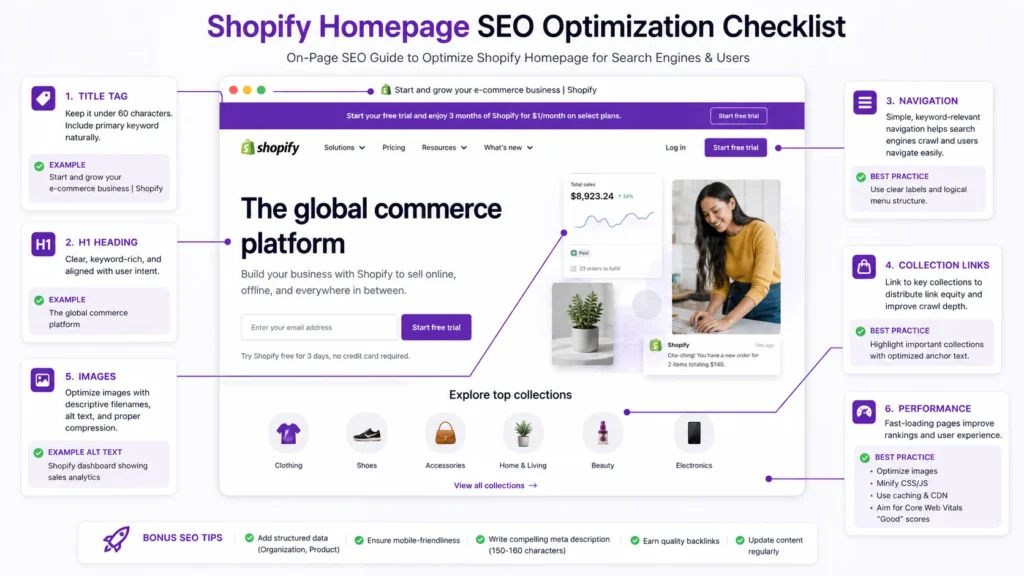
Your Shopify homepage has two jobs that need to work together: help shoppers understand your store quickly and help search engines understand what your business sells.
That does not mean filling the homepage with keywords or writing thousands of words beneath the hero section.
Effective Shopify homepage SEO is about getting the important signals right: your title tag, meta description, H1, visible content, navigation, internal links, images, page performance, and the relationship between your homepage and deeper collection and product pages.
The homepage should establish the store’s primary topic. More specific search intent should usually be handled by collection, product, and informational pages.
What Should You Optimize on a Shopify Homepage?
The most important homepage SEO elements are:
- Homepage title tag
- Meta description
- H1 heading
- Main homepage copy
- Navigation and collection links
- Internal linking
- Featured collections and products
- Image filenames and alt text
- Mobile usability and page performance
- Brand and trust information
- Structured data where appropriate
- Search intent and keyword targeting
The goal is not to optimize every element equally. Focus first on the elements that clarify what the store sells and help visitors reach the pages that matter.
1. Choose What Your Homepage Should Represent
Before editing your homepage title or H1, decide what the homepage is actually supposed to communicate.
A common mistake is trying to make the homepage rank for every important keyword.
For example, a store selling hiking equipment might have:
- Hiking backpacks
- Hiking shoes
- Camping tents
- Trekking poles
- Sleeping bags
The homepage should not try to become the primary SEO landing page for all five categories.
A better structure might be:
Homepage → overall brand/store topic
Collection pages → specific product categories
Product pages → individual products
Blog or guides → informational searches
This prevents different pages from competing unnecessarily for the same search intent.
Your homepage should answer three questions quickly:
- What does this store sell?
- Who is it for?
- Where should the visitor go next?
Google’s ecommerce guidance similarly recommends building clear relationships between important pages through navigation and internal links.

2. Optimize the Shopify Homepage Title
The homepage title is one of the first things to review because it helps communicate what the page represents in Google Search.
Avoid a title such as:
Home | Store Name
A stronger title explains the business or product category while keeping the brand identifiable.
For example:
Organic Coffee Beans & Specialty Coffee | Brand Name
Or:
Handmade Leather Bags & Accessories | Brand Name
The exact wording should depend on what the store actually sells and what the homepage is intended to represent.
Google recommends descriptive, concise page titles and specifically advises against vague titles such as “Home.”
Where to edit it in Shopify
For the homepage, Shopify provides dedicated homepage SEO settings rather than treating it exactly like an individual product or collection.
Review the homepage title and make sure it accurately reflects the store.
Don’t repeatedly change the title just to insert additional keyword variations.
3. Write a Useful Meta Description
Your meta description should give searchers a clear reason to consider the page.
It should communicate what the store offers rather than becoming a list of keywords.
For example:
Shop premium organic coffee beans, freshly roasted in small batches. Explore single-origin and espresso blends for home brewing.
This is more useful than:
Buy coffee online, best coffee beans, cheap coffee beans, organic coffee, coffee shop online.
The second version is written for keywords rather than people.
Also remember that Google may generate a different search-result snippet depending on the query and page content. A meta description is useful, but it is not a guarantee of what Google will display.
4. Give the Homepage a Clear H1
Your homepage should have a clear primary heading that tells visitors what the store is about.
Avoid relying on:
Welcome to Our Store
or an overly clever slogan that provides no useful context.
Instead, make the main heading meaningful.
For example:
Sustainable Outdoor Gear for Weekend Adventures
or:
Handmade Silver Jewelry for Everyday Wear
The H1 does not need to exactly duplicate the title tag.
The title tag is designed for the search result and browser context. The H1 is part of the visible page experience.
The important thing is that both communicate the same overall topic without creating unnecessary repetition.
Shopify’s own SEO guidance recommends clear headings and a logical heading hierarchy.
5. Add Enough Homepage Copy to Explain the Store
A homepage needs some meaningful text, but it does not need to become an SEO essay.
A short introduction can explain:
- What you sell
- What makes the products relevant
- Who they are designed for
- What visitors can explore next
For example:
We make lightweight hiking equipment for weekend hikers and long-distance trekkers, with collections covering backpacks, trekking poles, hydration gear, and outdoor accessories.
That gives visitors and search engines useful context.
Then let the rest of the homepage provide more specific information through collection sections, product links, buying guides, brand information, and other relevant content.
Don’t add text just to hit a word count
There is no SEO benefit to turning a clean ecommerce homepage into a 2,000-word block of generic copy.
If additional content does not help a shopper understand the store or make a decision, it probably doesn’t belong on the homepage.
Your existing Shopify SEO checklist follows the same principle: the homepage should explain the store and guide visitors toward relevant categories rather than becoming a giant block of SEO copy.
6. Optimize Homepage Navigation
Navigation is one of the most important parts of an ecommerce homepage.
A visitor should be able to move from the homepage to important collections without having to search for them.
For example:
Home → Women’s Clothing → Dresses → Product
A navigation structure like this helps customers browse and also gives search engines clearer signals about the relationships between pages.
Google explains that it analyzes links between ecommerce pages to understand site structure and relative page importance.
Use descriptive navigation labels
Instead of:
- Products
- Shop
- Categories
- More
where more descriptive labels are possible, consider:
- Women’s Dresses
- Running Shoes
- Leather Backpacks
- Organic Skincare
The navigation should still be natural and easy to use. Don’t turn menu labels into awkward keyword strings.
Shopify also recommends optimizing online store menus and using descriptive link text.
7. Link to Your Most Important Collections
Your homepage is often the starting point for the rest of the store.
Use it to introduce important collections that deserve visibility.
For example:
Explore our hiking backpacks
can link directly to the relevant collection.
This is more useful than a generic:
Click here
Google recommends descriptive anchor text because it helps users and search engines understand the destination of a link.
Don’t link to everything
The homepage doesn’t need links to every product.
Prioritize:
- Important collections
- Best-selling or strategically important products
- Key buying guides
- Useful brand information
- Important supporting pages
The purpose is to create a clear path through the store, not a wall of links.

8. Feature Important Products Carefully
Featured products can be useful on the homepage, particularly when they help visitors discover important products quickly.
But don’t treat every featured product as an SEO target.
Use product sections to support merchandising and customer discovery.
For example:
Best Sellers
- Product A
- Product B
- Product C
New Arrivals
- Product D
- Product E
- Product F
The homepage should support the broader site architecture rather than replacing product and collection pages.
Google’s ecommerce guidance specifically notes that linking to important products from the homepage can help Google understand their importance within the site.
9. Keep Homepage Content Stable When Possible
Many Shopify stores rely heavily on rotating hero banners.
This can create a practical SEO problem when the entire meaning of the homepage changes every few weeks.
For example, your homepage might show:
Summer Sale
then:
Black Friday Deals
then:
Christmas Gifts
then:
New Year Collection
The promotional message can change, but the underlying description of the business should remain clear.
A better structure is:
Stable H1
Sustainable Running Shoes for Everyday Training
Changing promotional banner
Save 20% on selected styles this weekend
The promotional content can change without removing the core topic of the homepage.
This is particularly useful for stores that run frequent campaigns.
10. Optimize Homepage Images
Images are essential for ecommerce, but they should not replace meaningful page content.
Review:
- Image dimensions
- File sizes
- File names
- Alt text
- Image quality
- Mobile rendering
- Lazy loading where appropriate
- Whether decorative images add unnecessary weight
Use descriptive filenames.
Better:
women-leather-crossbody-bag.jpg
Less useful:
IMG_8392.jpg
Alt text should describe the image when the image conveys useful information.
For example:
Brown leather crossbody bag with adjustable shoulder strap
is better than:
best leather bag buy leather crossbody bag online
Google’s image guidance recommends relevant, representative images and descriptive supporting information rather than generic or misleading image metadata.
For more detailed Shopify image optimization, you can also reference the existing Shopify image SEO guide.
11. Make the Homepage Mobile-Friendly
A homepage can look excellent on a desktop screen and still provide a poor mobile experience.
Check:
- Navigation
- Hero sections
- Font sizes
- Buttons
- Product cards
- Image cropping
- Horizontal scrolling
- Pop-ups
- Sticky elements
- Collection sections
- Forms
Pay particular attention to the first screen visitors see.
If a mobile visitor has to close several pop-ups before reaching the navigation or main offer, the design needs attention even if the page technically works.
Mobile usability should be evaluated as part of the entire shopping journey, not just the homepage.
12. Improve Homepage Performance
Large ecommerce images, autoplay video, animations, apps, tracking scripts, and third-party widgets can make a Shopify homepage unnecessarily heavy.
Review the elements that provide genuine business value.
Ask:
- Does this video improve understanding?
- Does this animation help the shopper?
- Does this app need to load on the homepage?
- Can this image be compressed?
- Are multiple apps performing similar functions?
- Are third-party scripts loading before they are needed?
Don’t optimize performance around an arbitrary score alone.
Look at actual user experience and real-world performance data where available.
For a Shopify-specific performance review, see the existing Shopify speed SEO guide.
13. Use Internal Links as Part of the SEO Strategy
Internal linking is more than adding a few links to the footer.
The homepage can help distribute users and authority toward important parts of the store.
A useful structure could look like:
Homepage → Collection
Homepage → Important Product
Homepage → Buying Guide
Buying Guide → Collection
Collection → Product
This creates a connected ecommerce ecosystem.
For example, a homepage selling running equipment might link to:
Trail Running Shoes
The trail running collection can then link to individual products and relevant buying guides.
That gives visitors a logical journey while helping search engines discover and understand important pages.
For a broader Shopify internal-linking strategy, see the existing Shopify SEO checklist and the relevant internal-linking guidance within it.
14. Connect the Homepage to Your Broader Shopify SEO Strategy
Homepage SEO should not be treated as an isolated task.
The homepage is one part of the site’s architecture.
A stronger Shopify SEO structure might look like:
Homepage
↓
Main Collections
↓
Subcollections where genuinely useful
↓
Products
And supporting content can connect into that structure:
Blog / Buying Guide
↓
Relevant Collection
↓
Relevant Product
This allows each page to target a more specific intent.
For example:
| Search intent | Best page type |
|---|---|
| Brand/store search | Homepage |
| Broad category | Collection |
| Specific product | Product |
| Product comparison | Guide |
| How-to question | Blog/guide |
| Buying advice | Guide or collection |
This is one of the most important principles in Shopify SEO: don’t make one page try to rank for every search.
For a broader implementation framework, use the existing Shopify SEO checklist for new stores.
15. Add Brand and Trust Information
Your homepage should make the business feel legitimate and understandable.
Depending on the store, useful elements can include:
- Short brand story
- About section
- Customer support information
- Shipping information
- Returns information
- Reviews
- Certifications where applicable
- Contact information
- Links to policies
These elements aren’t simply SEO tricks.
They help shoppers decide whether they trust the business enough to continue.
Shopify’s own site-quality guidance recommends clear branding, navigation, contact information, policies, and product organization as part of creating a trustworthy store experience.
Check: Shopify product page SEO
16. Don’t Hide Important Information Inside Images
A common ecommerce design pattern is placing all important messaging inside a banner image.
For example, a hero image might contain:
Premium Organic Skincare
100% Natural Ingredients
Free Shipping
Shop Now
If the important information exists only as part of the image, you lose some of the benefits of having that information as normal page content.
Where appropriate, use real HTML text for:
- Main headings
- Product/category descriptions
- Important promotional information
- Supporting copy
- Navigation
- Calls to action
Images should enhance the content rather than carry the entire meaning of the page.
17. Review Structured Data
Structured data can help Google understand certain types of information on your site.
For an ecommerce store, relevant structured data may include product information on product pages and organization information on the homepage.
Google specifically recommends organization structured data on the homepage or another page that describes the organization.
However, don’t add schema simply because an SEO checklist says every page needs it.
The markup should accurately represent the visible information and follow Google’s structured-data guidelines.
If your Shopify theme or apps already provide structured data, check what they generate before adding another implementation that could create conflicts or duplication.
18. Keep Homepage SEO Separate From Collection SEO
One of the easiest ways to waste time is trying to force every commercial keyword onto the homepage.
Suppose you sell:
- Men’s running shoes
- Women’s running shoes
- Trail running shoes
- Road running shoes
- Running socks
The homepage could establish the overall store topic:
Running Shoes and Gear for Everyday Training
Then your collection pages can target more specific searches:
Men’s Running Shoes
Women’s Running Shoes
Trail Running Shoes
Road Running Shoes
This creates clearer page targeting.
Your homepage introduces the store.
Your collections handle category-level demand.
Your product pages handle product-specific demand.
Your supporting content answers informational questions.
That division is much more sustainable than trying to make the homepage rank for everything.
19. Avoid These Common Shopify Homepage SEO Mistakes
Using “Home” as the title
A vague title gives little information about what the page represents.
Using a slogan as the only H1
A clever slogan may be good branding but poor topical communication.
Stuffing keywords into every section
Repeated keywords do not automatically make a page more relevant.
Adding huge blocks of generic copy
More text is not automatically better SEO.
Linking to every product
The homepage should prioritize important destinations rather than becoming a product directory.
Using image-only hero sections
Important information should not exist exclusively inside images.
Ignoring mobile navigation
A beautiful desktop layout does not compensate for difficult mobile browsing.
Installing multiple SEO apps unnecessarily
If several apps modify similar SEO elements, you may create unnecessary complexity.
Changing the homepage title constantly
Seasonal campaigns do not require rebuilding the core SEO message every time.
Trying to make the homepage rank for every category
Specific search intent usually belongs on specific pages.
Want to see: Shopify collection page SEO
20. A Practical Shopify Homepage SEO Checklist
Before considering the homepage optimized, review the following.
Search targeting
- The homepage has a clear primary topic
- The homepage is not competing with a collection for the same primary intent
- Important category searches have appropriate collection pages
- Informational searches are handled by useful content where appropriate
On-page SEO
- Homepage title accurately describes the store
- Meta description is useful and relevant
- One clear primary H1 is present
- Supporting headings are logical
- Homepage copy explains the business naturally
- Important keywords appear naturally rather than repeatedly
Navigation
- Main collections are easy to find
- Important products are discoverable
- Menu labels are descriptive
- Links use useful anchor text
- Important pages are reachable through crawlable links
Images
- Images are appropriately sized
- Important images have descriptive filenames
- Useful images have accurate alt text
- Images do not carry all important page information
- Large media isn’t unnecessarily slowing the homepage
UX and performance
- Homepage works well on mobile
- Navigation is easy to use
- Buttons are easy to tap
- Pop-ups don’t overwhelm visitors
- Heavy apps and scripts have been reviewed
- Large images and videos are optimized
Trust
- Brand information is clear
- Contact information is accessible
- Shipping information is easy to find
- Returns information is available
- Important trust signals are visible where appropriate
Technical
- Homepage is indexable
- Canonical signals are correct
- Important links are crawlable
- Structured data is accurate where used
- There are no accidental indexing restrictions
21. How to Prioritize Homepage SEO Improvements
If you have limited time, don’t try to fix everything at once.
Start here:
Priority 1: Clarify the page
Make sure the title, H1, introductory copy, and overall design clearly communicate what the store sells.
Priority 2: Fix navigation
Make important collections and products easy to discover.
Priority 3: Improve internal linking
Connect the homepage to the pages that matter most.
Priority 4: Improve mobile UX
Make sure customers can browse and interact with the store easily on smaller screens.
Priority 5: Review performance
Reduce unnecessary images, apps, scripts, video, and animations.
Priority 6: Review supporting SEO
Check images, metadata, structured data, canonical signals, and other technical details.
This order keeps the focus on the things that directly affect understanding and usability rather than chasing minor SEO tweaks first.
Also Check: Shopify technical SEO checklist
22. Homepage SEO Is About the Whole Store
A well-optimized Shopify homepage does not need to rank for every valuable keyword.
Its bigger role is to establish the store’s identity, communicate its main topic, help visitors navigate, and connect search engines with the important pages deeper in the site.
Think of the homepage as the starting point of an information architecture:
Homepage → Collections → Products
with supporting content connecting into that structure.
When the homepage, collection pages, product pages, and supporting content each have a clear purpose, SEO becomes easier to manage and the shopping experience becomes more coherent.
If you’re auditing a store rather than optimizing a single page, a broader Shopify SEO audit can help identify issues across technical SEO, content, navigation, indexing, and page targeting.
Final Takeaway
Shopify homepage SEO is not about adding more keywords or turning the homepage into a long-form article.
Focus on the fundamentals:
- Give the homepage a clear purpose.
- Write a descriptive title and meta description.
- Use a meaningful H1.
- Explain what the store sells in natural language.
- Link to important collections and products.
- Use descriptive navigation and anchor text.
- Keep important content accessible as real page text.
- Optimize images without sacrificing quality.
- Make the experience work well on mobile.
- Reduce unnecessary performance overhead.
- Add accurate structured data where appropriate.
- Let collection and product pages target more specific searches.
The strongest homepage is not necessarily the one with the most SEO elements. It is the one that makes the store easy to understand, easy to navigate, and clearly connected to the pages that satisfy specific customer needs.