Shopify handles canonical URLs automatically in most standard themes, so seeing multiple URLs for the same product does not automatically mean your store has an SEO problem.
The real issue is conflicting canonical signals.
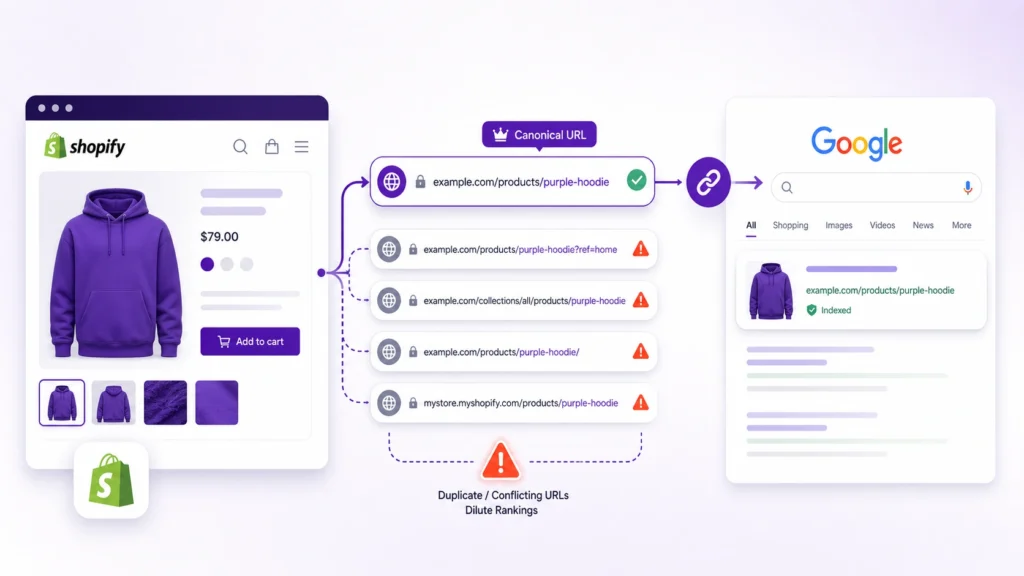
A Shopify product may be accessible through a direct product URL, a collection-based URL, or a URL containing parameters. If Shopify’s canonical tag, internal links, sitemap, redirects, and theme code consistently point to the same preferred URL, Google can usually consolidate those versions correctly. If those signals disagree, however, canonicalization problems can appear.
This guide explains how Shopify canonical URLs work, which problems are worth fixing, how to diagnose them, and when you should leave them alone.
What Is a Canonical URL in Shopify?
A canonical URL is the URL you want search engines to treat as the preferred version when substantially similar content is available at more than one URL.
For example, a Shopify product might be accessible through:
https://example.com/products/blue-shirtand:
https://example.com/collections/shirts/products/blue-shirtThe preferred version will normally be:
https://example.com/products/blue-shirtA canonical tag communicates that preference through the page’s HTML:
<link rel="canonical" href="https://example.com/products/blue-shirt">Google treats rel="canonical" as a strong signal, but not an absolute command. Google considers canonical declarations alongside other signals, including redirects, sitemap URLs and internal links.
Are Shopify Canonical URL Problems Actually Common?
There is an important distinction here.
Multiple Shopify URLs do not automatically mean something is broken.
Shopify’s first-party themes automatically provide canonical URLs, and Shopify’s canonical_url object is designed to return the preferred URL for the current page. Shopify specifically documents collection-based product URLs and variant URLs as situations where the canonical can point back to the standard product URL.
The problem begins when the signals disagree.
For example:
- The canonical says
/products/blue-shirt - The sitemap lists
/collections/shirts/products/blue-shirt - Internal links repeatedly point to the collection URL
- A custom app adds another canonical
- The canonical points to a redirected URL
That is a genuine technical SEO issue worth investigating.

How Shopify Creates Multiple Product URLs
1. Direct product URLs
The standard Shopify product URL looks like:
/products/blue-shirtThis is normally the preferred product URL.
2. Collection-based product URLs
The same product may also be accessible through:
/collections/shirts/products/blue-shirtIf the product belongs to several collections, additional collection-based URLs may exist.
For example:
/collections/shirts/products/blue-shirt
/collections/sale/products/blue-shirt
/collections/new-arrivals/products/blue-shirt
These URLs can represent the same product content.
Shopify’s canonical URL logic is designed to point these versions back toward the standard product URL.
3. Variant URLs
Products can also be accessed with variant parameters:
/products/blue-shirt?variant=123456789The selected variant may change what the shopper sees, but it does not necessarily represent a separate search result that should have its own canonical URL.
Shopify’s canonical_url output normally removes the selected variant and points back to the base product URL.
4. Tracking parameters
Marketing campaigns can produce URLs such as:
/products/blue-shirt?utm_source=emailor:
/products/blue-shirt?utm_campaign=saleThese parameters can create many URL variations without creating genuinely different content.
A canonical can consolidate those versions toward the preferred product URL.
How Shopify Canonical URLs Normally Work
Shopify exposes the current canonical URL through its Liquid canonical_url object.
A theme can output it with:
<link rel="canonical" href="{{ canonical_url }}">Shopify says canonical URLs are included automatically in first-party themes, so most stores should not need to manually add canonical tags.
That means manually changing canonical code should not be your first response to a Search Console notification.
First determine whether the canonical is actually wrong.
9 Common Shopify Canonical URL Problems
1. The canonical tag is missing
View the HTML source of a representative product page and search for:
rel="canonical"If there is no canonical where one is expected, investigate the theme.
This can happen after:
- A custom theme rebuild
- Theme code changes
- App integrations
- Template modifications
- Incorrect conditional Liquid code
Do not assume the missing tag is the problem across the entire site. Test representative URLs from each important template.
2. The canonical points to the wrong URL
Suppose the product page is:
/products/blue-shirtbut the canonical says:
/collections/shirts/products/blue-shirtThat deserves investigation.
The preferred canonical should represent the version you actually want search engines to index and users to find.
3. Multiple canonical tags exist
A page should not have several competing canonical declarations.
For example:
<link rel="canonical" href="/products/blue-shirt">
<link rel="canonical" href="/collections/shirts/products/blue-shirt">
This creates conflicting instructions.
Multiple canonicals can be introduced by:
- Theme code
- SEO apps
- Page builders
- Custom snippets
- App-injected head elements
If you find more than one canonical tag, identify which component generated each one before deleting anything.
4. The canonical points to a redirect
Suppose:
Product URL → Canonical URL → 301 redirect → Final URLThis is weaker than having the canonical point directly to the final destination.
Google recommends keeping canonical signals consistent and using the final preferred URL wherever possible.
If the preferred page has moved permanently, a redirect may be the appropriate solution. But avoid creating a canonical chain.
5. The canonical points to a 404 page
A canonical should not point to a page that no longer exists.
For example:
/products/blue-shirtshould not declare:
/products/old-blue-shirtif that URL returns 404.
Check the canonical target’s HTTP status and confirm that the target page is accessible.
6. The canonical points to a noindex page
The canonical target should be an indexable version of the content.
If:
/products/blue-shirtpoints canonically to another page that is blocked from indexing, the signals are contradictory.
Review:
- Canonical tag
noindex- Robots directives
- HTTP status
- Sitemap inclusion
The preferred canonical should be technically eligible to serve in Search.
7. Collection URLs are being used everywhere internally
This is one of the most important Shopify-specific checks.
Your canonical may correctly point to:
/products/blue-shirtwhile your collection pages, recommendations or custom product cards repeatedly link to:
/collections/shirts/products/blue-shirtThe canonical still provides a strong signal, but your internal linking should reinforce the URL you actually want search engines to understand as primary.
Shopify’s current SEO guidance specifically recommends checking whether internal links, breadcrumbs and product cards consistently use the preferred product URL.
Where your theme allows it, a product link can use:
{{ product.url }}rather than generating a collection-context URL unnecessarily.
Do not change theme code blindly, however. First confirm how your current theme handles product URLs and whether collection context is required for a legitimate user experience.
8. Sitemap and canonical URLs disagree
Your sitemap should reinforce your preferred URLs.
For example, if:
Canonical: /products/blue-shirtbut your sitemap repeatedly lists:
/collections/shirts/products/blue-shirtyou have conflicting signals.
Google describes sitemap inclusion as a weaker canonicalization signal than a rel="canonical" declaration, but it still contributes to Google’s understanding of your preferred URLs.
For Shopify, verify that important product URLs in the sitemap correspond to the URLs you actually want indexed.
9. Apps or custom code are injecting conflicting canonicals
Shopify’s standard functionality is only one part of a store’s technical setup.
An installed SEO app, page builder, translation tool, custom theme modification or other application may add or modify canonical information.
If a canonical problem appeared after:
- Installing an SEO app
- Changing themes
- Adding a page builder
- Implementing international SEO
- Customizing Liquid
- Adding a URL-management application
compare the page source before and after the change if possible.
The objective is not to add more canonical code. It is to make sure one coherent canonical signal exists.

Shopify Canonical URL Problems vs Normal URL Variations
Not every alternate URL needs to be eliminated.
| Situation | Usually a problem? | What to do |
|---|---|---|
| Collection product URL has correct canonical | No | Usually leave it |
| Variant URL canonicalizes to base product | No | Usually leave it |
| Tracking parameter canonicalizes correctly | No | Usually leave it |
| Missing canonical | Potentially | Investigate |
| Wrong canonical target | Yes | Correct it |
| Multiple canonical tags | Yes | Identify and remove conflict |
| Canonical points to 404 | Yes | Fix target |
| Canonical points to redirect | Potential issue | Prefer final URL |
| Internal links use non-canonical URLs | Worth auditing | Align important links |
| Sitemap conflicts with canonical | Worth auditing | Align sitemap signals |
The key question is not:
“How many duplicate URLs does Shopify have?”
The better question is:
“Do the alternate URLs consistently consolidate toward the URL I actually want Google to index?”
How to Check a Shopify Canonical URL
You can check the canonical without changing your theme.
Step 1: Open the page
Open a representative Shopify product page.
Step 2: View the page source
Use your browser’s page-source or inspection tools.
Step 3: Search for canonical
Look for:
rel="canonical"Step 4: Confirm there is one canonical
Check whether there is:
- Exactly one canonical
- A valid absolute URL
- The expected domain
- The preferred path
Step 5: Check the canonical target
Open the canonical URL.
Confirm that it:
- Returns a successful response
- Contains the expected product/content
- Is indexable
- Is not simply redirecting elsewhere
Step 6: Test alternate versions
For products, test examples such as:
/products/product-name
/collections/collection-name/products/product-name
/products/product-name?variant=123
The exact URLs available will depend on your Shopify store.
How to Check Canonicals in Google Search Console
Google Search Console can show you how Google interpreted a URL.
Use URL Inspection for a representative URL and compare:
- User-declared canonical
- Google-selected canonical
- Indexing status
- Crawling information
This distinction matters because declaring a canonical does not guarantee Google will select it. Google evaluates the canonical alongside other signals.
If Google selects the same canonical you intended, that is generally a positive sign.
If Google repeatedly selects a different URL, investigate why the signals disagree.

What Does “Alternate Page With Proper Canonical Tag” Mean?
This is one of the most misunderstood Shopify Search Console statuses.
Seeing an alternate URL does not automatically mean you have an SEO error.
Google’s Search Console documentation explains that an alternate page can correctly point to another canonical page and therefore does not need to be indexed separately.
For example:
/products/blue-shirtmight be the indexed canonical while:
/collections/shirts/products/blue-shirtis treated as an alternate.
If the canonical relationship is correct, you generally do not need to force the alternate URL into Google’s index.
The situation becomes important when Google selects a URL you do not want as canonical, or when your own canonical signals are incorrect or inconsistent.
What About “Duplicate Without User-Selected Canonical”?
This status means Google found a duplicate or substantially similar URL and did not receive a preferred canonical declaration that it chose to follow.
Google may select another URL as canonical.
This is not automatically a catastrophic SEO issue. Google’s documentation describes the status as a situation where Google has chosen another URL as canonical and is therefore not serving the duplicate URL.
The appropriate response is to inspect examples.
Ask:
- Is the URL genuinely duplicate?
- Is the Google-selected canonical the URL you want?
- Does the duplicate have a valid reason to exist?
- Are your internal links pointing to the preferred URL?
- Does your sitemap contain the preferred URL?
- Is the declared canonical missing or incorrect?
Fix the underlying signal rather than trying to make every discovered URL indexable.
Canonical vs 301 Redirect: Which Should You Use?
A canonical and a redirect solve related but different problems.
Use a canonical when:
- Both URLs can remain accessible
- The pages are duplicate or substantially similar
- You want search engines to consolidate them
- Users may still legitimately access the alternate URL
Use a permanent redirect when:
- The old URL should no longer be accessible
- You permanently replaced a page
- You consolidated two URLs
- You want users and search engines sent to the final URL
Google considers redirects a stronger canonicalization signal than rel="canonical", while sitemap inclusion is weaker.
Do not use a canonical as a substitute for a redirect when a URL has genuinely been retired.
Should You Use Robots.txt to Fix Canonical Problems?
No.
Robots.txt is a crawling control mechanism, not a canonicalization tool.
Google explicitly recommends against using robots.txt for canonicalization because a blocked URL can still potentially be indexed without its content being crawled.
If two URLs represent substantially similar content, first determine whether you need:
- A canonical
- A redirect
- Different content
- A legitimate separate page
Do not simply block URLs because they look duplicated.
What About Shopify Collection Filters?
Filtered collection URLs can create many URL variations.
For example:
/collections/shirts?filter.v.option.color=blueand:
/collections/shirts?filter.v.option.color=blue&filter.v.option.size=mThese URLs may be useful for shoppers but may not deserve separate search visibility.
The important question is whether a filtered page represents a genuinely useful search destination or simply another combination of the same collection.
Audit:
- Filter parameters
- Sort parameters
- Pagination
- Internal links
- Canonicals
- Indexing signals
- Search Console URL patterns
Do not assume every filter URL should be indexed.
Shopify Canonical URL Audit Checklist
Use this checklist when auditing a Shopify store:
Canonical tags
- Important product pages contain a canonical tag
- There is only one canonical tag per page
- The canonical uses the preferred URL
- The canonical target returns a successful response
- The canonical target is indexable
- The canonical does not point to a 404
- The canonical does not unnecessarily point through a redirect
Product URLs
/products/handleis the intended product URL- Collection-based product URLs canonicalize correctly
- Variant URLs consolidate correctly
- Product cards use preferred URLs where practical
- Breadcrumbs do not create conflicting URL signals
Sitemap
- Important canonical URLs appear in the sitemap
- Sitemap URLs agree with canonical declarations
- Deleted or inappropriate URLs are not being treated as preferred pages
Internal linking
- Navigation links use preferred URLs
- Collection product links are reviewed
- Related-product links are reviewed
- Blog links use canonical product URLs
- Promotional links do not unnecessarily create parameter variants
Apps and theme
- Theme code does not add duplicate canonicals
- SEO apps do not conflict with Shopify’s canonical output
- Page builders do not replace canonical tags incorrectly
- Recent theme changes have been checked
- Custom Liquid has been reviewed where relevant
Google Search Console
- Representative product URLs have been inspected
- User-declared canonical has been checked
- Google-selected canonical has been checked
- Unexpected canonical selections have been investigated
- Search Console duplicate statuses have been interpreted rather than automatically treated as errors
Final Takeaway
Shopify canonical URL problems are less about the existence of multiple URLs and more about whether those URLs send consistent signals.
A healthy Shopify setup should generally make the preferred URL clear through:
- Canonical tags
- Internal links
- Sitemaps
- Redirects where appropriate
- Consistent theme code
Do not try to eliminate every alternate URL Shopify can generate. Some are normal parts of the platform.
Instead, identify which URL should represent the content, make the important technical signals agree with that choice, and use Google Search Console to verify how Google interprets the setup.
For most stores, the goal is simple:
One preferred URL, consistent signals, and no unnecessary canonical conflicts.