If your Shopify store is live but barely getting visitors, the problem may not be that you need to “do more SEO.”
First, you need to find out where the traffic problem actually occurs.
A Shopify store can have almost no traffic because Google has not discovered or indexed important pages. Another store may be fully indexed but target searches that nobody uses. A third may receive thousands of impressions but very few clicks because its pages are not compelling enough in the search results.
The fix depends on which situation you’re dealing with.
In this guide, you’ll learn how to diagnose why your Shopify store is not getting traffic and what to fix first.
The Short Answer: Why Isn’t My Shopify Store Getting Traffic?
The most common reasons include:
- Google has not indexed important pages.
- Your products or collections are difficult for search engines to discover.
- Your pages target the wrong search intent.
- Product descriptions are thin, generic, or copied.
- Collection pages are poorly optimized.
- Your store has duplicate or canonicalization issues.
- Technical SEO problems are limiting crawling or indexing.
- Your site is slow or difficult to use on mobile.
- Internal links do not adequately connect important pages.
- You rely entirely on product pages instead of building useful search-focused content.
- Your store has little authority compared with established competitors.
- Your pages appear in Google but do not earn enough clicks.
The important part is not to fix all 12 at once.
Start by finding out whether Google is actually showing your store in search.
First, Find Out What “No Traffic” Actually Means
Before changing product titles, installing another SEO app, or publishing 50 blog posts, open Google Search Console.
Google Search Console can show you impressions, clicks, queries, pages, indexing information, and other search-performance data. Its URL Inspection tool can also help you investigate individual pages.
Look at these four situations.
| What you see | What it probably means |
|---|---|
| Almost no impressions | Discovery, indexing, targeting, or demand problem |
| Lots of impressions but few clicks | Ranking position or CTR problem |
| Product pages are not indexed | Technical, quality, discovery, or canonical issue |
| Pages receive clicks but sales are poor | Conversion or product-market issue rather than purely SEO |
This distinction can save you weeks of unnecessary work.
For example, rewriting a meta description will not solve a page that Google has not indexed.
Likewise, building more backlinks will not solve a store that is targeting irrelevant keywords.

1. Your Shopify Store Isn’t Indexed Properly
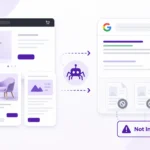
Google needs to be able to crawl and index your pages before they can appear in organic search.
Google’s technical requirements are straightforward: Googlebot must be able to access the page, the page should return a successful HTTP status, and it needs indexable content. Meeting those requirements does not guarantee indexing, but failing them can prevent a page from being eligible.
Check your important pages
Start with:
- Homepage
- Main collection pages
- Important product pages
- About page
- Contact page
- Important blog posts
Use the URL Inspection tool in Google Search Console.
You can also search Google for:
site:yourdomain.com
This is only a quick diagnostic. Search Console provides much better information about which URLs Google has actually processed.
Check your sitemap
Shopify automatically generates a sitemap, and Shopify recommends submitting it through Google Search Console.
A sitemap helps Google discover your URLs, but it is important to understand that submitting a sitemap does not guarantee indexing or rankings. Google explicitly says that a sitemap can help Google learn about a site but does not guarantee that URLs will be indexed.
If important products or collections are missing from the sitemap or consistently excluded from indexing, investigate before doing anything else.
2. Google Can’t Easily Discover Your Important Pages
Getting a URL into a sitemap is useful, but your site’s internal structure matters too.
Google explains that it uses relationships between pages and their links to understand ecommerce site structure and relative page importance. Google recommends making important pages reachable through navigation and internal links.
For an ecommerce store, a logical structure might look like:
Homepage → Collection → Subcategory → Product
For example:
Homepage → Running Shoes → Trail Running Shoes → Specific Product
If your most important products are buried several clicks deep with few internal links pointing toward them, they may receive less attention from both shoppers and search engines.
Improve Shopify internal linking
Link naturally between:
- Related collections
- Collection pages and products
- Products and relevant guides
- Blog posts and commercial pages
- Complementary products
- Category pages and supporting content
Don’t add links simply because you want more internal links. Each link should help the visitor understand what to do or read next.
3. Your Products Target the Wrong Search Intent
One of the biggest Shopify SEO mistakes is optimizing a product page for a keyword simply because that keyword has search volume.
The real question is:
What does someone expect to find when they search this phrase?
Consider these searches:
- “best running shoes for beginners”
- “women’s trail running shoes”
- “Nike trail running shoes”
- “buy trail running shoes”
They may all relate to the same general product category, but the search intent is different.
A product page may make sense for a transactional query.
A collection page may be more appropriate for a broader category search.
A buying guide may be better for a research query.
Google’s ecommerce documentation emphasizes making product and site information understandable so that relevant content can appear across Google Search and other ecommerce surfaces.
Match the page to the search
Instead of asking:
“How can I put this keyword on my product page?”
Ask:
“What page would genuinely satisfy someone searching this query?”
That change in thinking can improve the entire site’s information architecture.
4. Your Product Pages Are Too Thin or Generic
Many Shopify stores use manufacturer descriptions with little additional information.
That creates a weak experience.
Imagine 20 retailers selling the same product and all of them use essentially the same description supplied by the manufacturer.
Your page has very little distinctive information for a search engine or shopper to evaluate.
A stronger product page can include
- Clear product benefits
- Important specifications
- Materials
- Dimensions
- Sizing information
- Compatibility information
- Usage instructions
- Frequently asked questions
- Original photography
- Comparison information
- Shipping information
- Returns information
- Helpful buying guidance
- Relevant related products
The objective is not to make product descriptions artificially long.
The objective is to make the page more useful than a generic catalog entry.
If your product pages are indexed but consistently fail to gain visibility, compare them against the pages already ranking for the same searches.
You can also review Nightovvl’s existing guide on why product pages may not be ranking for a more focused product-page troubleshooting process.
5. Your Collection Pages Are Being Ignored
Shopify stores often focus heavily on individual products while neglecting collection pages.
That can be a mistake.
Collection pages can target broader commercial searches where a shopper wants to compare multiple products.
For example:
Weak collection page
Women’s Shoes
More useful collection page
Women’s Waterproof Hiking Shoes
The second page gives Google and shoppers a much clearer understanding of what the page is about.
Optimize important collections
Review:
- Collection title
- Page title
- Meta description
- Introductory copy
- Product organization
- Internal links
- Breadcrumbs
- Images
- Filters
- Supporting content
Don’t turn collection pages into giant blocks of keyword-heavy text.
A short, useful introduction explaining what the collection contains can be more valuable than several hundred words written purely for SEO.
6. Your Store Has Duplicate or Canonicalization Problems
Ecommerce websites naturally create multiple URL paths and variations.
Shopify stores can also generate different URL patterns and technical URLs that require careful handling.
Google may group similar pages together and select a canonical version based on multiple signals. Google notes that even when a site explicitly specifies a canonical URL, Google can select a different canonical when other signals indicate another URL is more appropriate.
This becomes important when you have:
- Similar product pages
- Product variants
- Collection-based product URLs
- Filtered URLs
- Parameter URLs
- Duplicate content
- Multiple versions of essentially the same page
If several URLs contain substantially the same content, Google may not treat every version as an independent ranking opportunity.
For a deeper explanation, Nightovvl already has a duplicate content SEO guide that can be used alongside this article.
Don’t panic about every duplicate URL
Not every duplicate-looking URL is automatically a ranking disaster.
The goal is to make your preferred pages clear, keep important pages internally linked, and avoid creating unnecessary indexable variations.

7. Your Shopify Store Has Technical SEO Problems
Shopify handles many technical SEO fundamentals automatically, but that doesn’t mean every Shopify store is technically perfect.
Theme changes, apps, custom code, URL changes, migrations, filters, and catalog growth can all introduce problems.
Check for:
- Broken links
- Incorrect redirects
- Important pages returning errors
- Unexpected
noindexdirectives - Blocked resources
- Poor internal linking
- Canonical problems
- Crawlable but low-value URLs
- Missing important pages
- App-generated URL clutter
Google recommends using Search Console reports and URL Inspection to investigate crawling and indexing problems.
Don’t blindly block URLs
Technical SEO fixes should be based on evidence.
For example, Nightovvl’s Shopify .atom URL guide covers one specific source of crawl noise.
However, robots.txt, noindex, canonical tags, redirects, and internal links solve different problems.
A URL that should not be indexed is not necessarily a URL that should be blocked from crawling.
Google specifically explains that a noindex directive must be accessible to Googlebot for Google to see and process it.
8. Your Store Is Too Slow or Difficult to Use
A beautiful Shopify theme can still create SEO problems if it loads unnecessary scripts, huge images, or too many app assets.
Google’s ecommerce guidance recommends paying attention to page experience and technical accessibility, while Shopify’s current SEO guidance also highlights site speed, mobile usability, broken links, redirects, and image optimization.
Check these areas
- Large product images
- Unnecessary apps
- Heavy JavaScript
- Slow third-party scripts
- Poor mobile navigation
- Layout instability
- Slow-loading product pages
- Difficult filtering
- Intrusive pop-ups
Don’t assume that a slow homepage automatically explains every traffic problem.
Test important templates individually.
Your product pages, collection pages, and blog pages can have very different performance characteristics.
9. Your Internal Linking Is Too Weak
Internal links do more than help visitors navigate.
They help search engines understand relationships between pages.
Imagine a Shopify store with 500 products but only a handful of links pointing to its most important products.
The site technically contains the pages, but its structure does not strongly communicate which pages matter most.
Build logical relationships
For example:
Blog guide → Collection → Product
or:
Collection → Related collection → Product
or:
Product → Complementary product → Buying guide
This creates a clearer content ecosystem.
Google’s ecommerce documentation specifically recommends linking from menus to category pages, from category pages to subcategories, and from subcategories to product pages.
10. You’re Relying Only on Product Pages
Not every shopper starts with a product name.
People search for:
- Problems
- Comparisons
- How-to information
- Product categories
- Features
- Alternatives
- Use cases
- Buying advice
For example, someone selling hiking equipment might create useful content around:
- How to choose hiking boots
- Hiking boots vs trail shoes
- How to waterproof hiking boots
- Best hiking gear for beginners
- What to pack for a day hike
These pages can attract people earlier in the buying journey and naturally connect them to relevant products.
The goal isn’t to create hundreds of blog posts.
Create content where there is a genuine search need and where your store can provide useful expertise.
Shopify’s current guidance similarly recommends keyword research, search-intent alignment, content creation, internal links, and original multimedia as part of ecommerce SEO.
11. Your Store Has Little Search Authority
Sometimes the technical SEO is fine.
The pages are indexed.
The content is relevant.
Yet established competitors continue to outrank the store.
One reason can be authority.
Google considers many signals when determining which indexed pages are most relevant and useful for a query. A new ecommerce domain competing against established websites may need time and genuine authority-building activities to become competitive.
Build authority naturally
Focus on earning relevant mentions and links through things such as:
- Useful original content
- Industry partnerships
- Supplier relationships
- Digital PR
- Original research
- Expert contributions
- Useful resources
- Genuine community participation
Avoid buying large quantities of low-quality backlinks simply because someone promises fast rankings.
The objective is not to accumulate the largest possible number of links.
It’s to build a website that other relevant websites have a reason to reference.
12. Your Pages Get Impressions but Not Clicks
This is a different problem from having no visibility.
Suppose Google Search Console shows:
- 10,000 impressions
- 200 clicks
Your store is getting visibility.
The next question is why searchers aren’t choosing your result often enough.
Review:
- Title tags
- Meta descriptions
- Search intent
- Brand recognition
- SERP competition
- Rich-result eligibility
- Page relevance
Google Search Console’s Performance report can help you compare impressions and clicks by query and page.
Improve the search result, not just the page
A title such as:
Running Shoes | Store Name
may be technically acceptable but not particularly informative.
A more descriptive title could communicate:
Women’s Trail Running Shoes | Waterproof & Lightweight Options
The exact wording should depend on the actual page and search intent.
Don’t add exaggerated claims or clickbait simply to increase CTR.
13. You’re Targeting Searches That Don’t Match Your Business
Another common problem is chasing high-volume keywords that are too broad.
Imagine you sell premium handmade leather bags.
Trying to rank for:
bags
may be unrealistic and may not even produce the right customers.
More specific searches could reveal stronger opportunities:
- handmade leather tote bag
- full grain leather laptop bag
- leather travel bag for men
- minimalist leather work bag
Long-tail searches often reveal clearer intent.
The point isn’t to avoid competitive keywords forever.
It’s to build a realistic path from specific, commercially relevant searches toward broader visibility.
14. You’re Publishing Products Without Building Topical Relevance
A store with 1,000 products is not automatically more authoritative than a store with 100 products.
If every page is isolated, the website may lack meaningful topical context.
Instead, organize the site around clear themes.
For example:
Running
- Running shoes
- Trail running shoes
- Running socks
- Hydration gear
- Running injury prevention guide
- How to choose running shoes
Now the site has relationships between commercial pages and helpful informational content.
That structure helps both users and search engines understand what the store specializes in.
How to Diagnose Your Shopify Traffic Problem Step by Step
Instead of trying random SEO fixes, use this sequence.
Step 1: Check Google Search Console
Look at:
- Total clicks
- Total impressions
- Average position
- Queries
- Pages
- Indexing reports
Search Console’s performance reports can show where traffic comes from and which queries and pages are producing impressions and clicks.
Step 2: Check Your Important URLs
Inspect:
- Homepage
- Top collections
- Best-selling products
- Highest-margin products
- Important guides
Ask:
Is this page indexed?
If not, investigate why before worrying about rankings.
Step 3: Check Your Sitemap
Confirm that important products, collections, pages, and blog content are being included appropriately.
Shopify generates sitemap files automatically, but you should still monitor their accessibility and how Google processes your URLs.
Step 4: Check Search Intent
For every important keyword, search Google manually.
Look at the results.
Are the ranking pages:
- Product pages?
- Collection pages?
- Buying guides?
- Reviews?
- Comparisons?
- Category pages?
Your page type should make sense for the query.
Step 5: Compare Your Page With the SERP
Don’t simply compare word counts.
Compare:
- Product information
- Page usefulness
- Search intent
- Originality
- Images
- Specifications
- Buying guidance
- Internal links
- Trust signals
- User experience
Ask:
“What does the ranking page give the searcher that my page doesn’t?”
That question is often more useful than asking how many keywords your competitor uses.
Step 6: Check Internal Links
Find your most important commercial pages.
Then ask:
How many relevant pages on my own website link to them?
If an important collection or product is barely connected to the rest of the site, strengthen the site’s architecture.
Step 7: Check Technical Performance
Test representative:
- Product pages
- Collection pages
- Blog pages
- Homepage
Review:
- Mobile performance
- Page loading
- Broken links
- Redirects
- Indexability
- Canonicals
- Structured data
Google provides Search Console reports specifically for indexing and page experience troubleshooting.
Shopify Traffic Troubleshooting Checklist
Use this checklist before making major SEO changes.
Indexing
- Google Search Console is verified
- Sitemap is submitted
- Important products are indexed
- Important collections are indexed
- Important pages are indexed
- No unexpected
noindexdirectives exist - Important URLs aren’t blocked from crawling
Site Architecture
- Important collections are linked from navigation
- Important products are reachable through internal links
- Related pages link to each other naturally
- No important pages are effectively orphaned
Product SEO
- Product titles describe the actual product
- Product descriptions provide useful original information
- Images are optimized
- Specifications are clear
- Relevant FAQs are included where useful
- Product structured data is valid where applicable
Google recommends sharing ecommerce product information through product structured data and Merchant Center where appropriate. Structured data can help Google understand product pages, although it does not guarantee a particular search appearance.
Collection SEO
- Collection titles match search intent
- Important collections have useful supporting copy
- Products are organized logically
- Collection pages receive internal links
Technical SEO
- Broken links are fixed
- Redirects are correct
- Canonicalization is reviewed
- Unnecessary crawlable URLs are investigated
- Mobile experience works properly
- Important pages load efficiently
Content
- Store targets relevant search demand
- Product and collection pages match search intent
- Supporting content answers useful customer questions
- Content provides information beyond manufacturer copy
- Old content is updated when necessary
Authority
- Relevant websites can discover and reference the store
- Brand mentions are growing naturally
- Useful resources give others a reason to link
- No artificial backlink schemes are being used
Frequently Asked Questions
How long does it take for a new Shopify store to get traffic?
There is no reliable universal timeframe.
Google says crawling and indexing can take time and that it cannot guarantee when or whether a particular URL will be crawled or indexed.
A new store should therefore focus first on making its important pages accessible, indexable, relevant, and useful rather than expecting traffic immediately after launch.
Does Shopify automatically do SEO?
Shopify handles several technical SEO fundamentals automatically, including generating sitemap files. But store owners still need to address content, search intent, internal linking, site architecture, performance, indexing issues, and other SEO factors.
Why are my Shopify products not showing on Google?
Possible reasons include:
The product is not indexed.
Google cannot properly access the page.
The page has indexing restrictions.
The product is too similar to other pages.
The page does not sufficiently satisfy the search intent.
The product targets queries that are not a good match.
The site lacks sufficient authority.
Use URL Inspection and the Page Indexing report in Search Console before assuming the problem is keyword optimization.
Do I need a Shopify SEO app?
Not necessarily.
An SEO app can make certain tasks easier, but installing an app does not automatically create search demand, improve product content, fix search intent, or build authority.
Diagnose the actual problem first.
Can backlinks increase Shopify traffic?
Relevant, quality backlinks can contribute to a site’s authority and help search engines discover pages. But backlinks are only one part of SEO.
If your pages are poorly optimized, technically inaccessible, or irrelevant to the searcher’s intent, more backlinks are unlikely to solve the underlying problem.
Should I publish more blog posts if my Shopify store has no traffic?
Only if those articles address genuine search needs that are relevant to your products and customers.
Publishing dozens of generic articles can create more content without creating more useful search visibility.
Focus on topics that support your customers’ buying journey and connect naturally to relevant commercial pages.
Final Takeaway
If your Shopify store isn’t getting traffic, don’t immediately assume you need more products, more blog posts, more backlinks, or another SEO app.
Diagnose the bottleneck first.
Check whether Google can find and index your important pages.
Then check whether those pages match the searches your customers actually make.
After that, improve product and collection content, strengthen internal linking, resolve technical problems, improve the shopping experience, build genuine authority, and use Search Console data to measure what changes.
The most useful question isn’t:
“How do I get more Shopify traffic?”
It’s:
“At which stage is my store losing potential search traffic?”
Once you know whether the problem is discovery, indexing, relevance, rankings, clicks, or conversion, your SEO work becomes much more focused.