
Want to Customize Your WordPress Website Without Touching CSS Code?
Building a beautiful website often sounds easy until you need to change a button color, adjust spacing, or fix a layout issue. Many WordPress users quickly discover that even simple design changes can require CSS knowledge. That’s where YellowPencil: Visual CSS Editor WordPress Plugin becomes useful.
The YellowPencil: Visual CSS Editor WordPress Plugin allows users to customize website designs visually instead of writing CSS manually. Whether you run a blog, business website, online store, or portfolio, this plugin provides a more user friendly way to control styling directly from the front end of your site.
If CSS feels like a foreign language, YellowPencil works like a translator. Instead of writing code, you click an element, adjust settings, and see changes instantly.
What Is YellowPencil: Visual CSS Editor WordPress Plugin?
YellowPencil is a premium WordPress plugin that enables visual CSS editing directly on the front end of a website. Users can select any element on a page and modify its appearance using a visual interface.
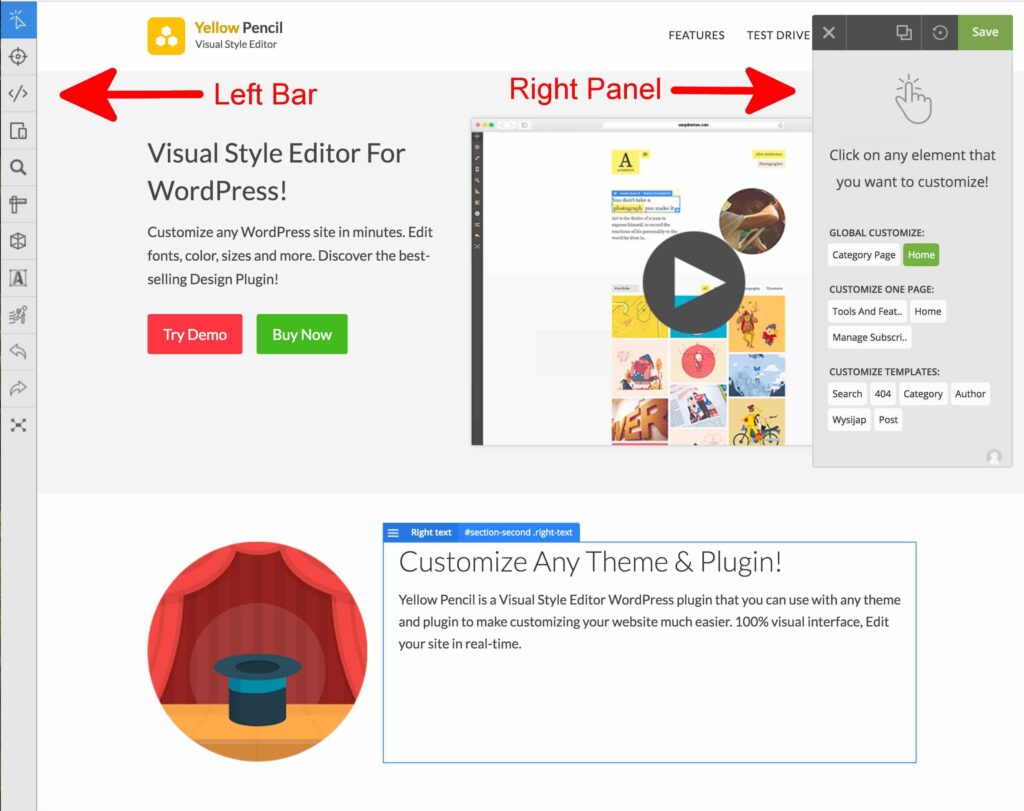
The plugin generates CSS automatically in the background. This means you can create custom designs without manually editing stylesheets.
Unlike traditional theme customization methods, YellowPencil allows you to see changes in real time. This visual workflow reduces guesswork and speeds up website customization.
Many website owners use it to modify:
- Fonts and typography
- Colors and backgrounds
- Margins and padding
- Borders and shadows
- Responsive layouts
- Navigation menus
- Buttons and forms
- WooCommerce elements
For users who want more design flexibility without hiring a developer, it serves as a practical solution.
Why Do WordPress Users Choose YellowPencil?
Most WordPress themes offer customization options, but they often come with limitations. Once you reach those limits, you usually need custom CSS.
YellowPencil bridges that gap.
Instead of searching through theme files or opening browser developer tools, users can click directly on page elements and customize them visually.
Some key reasons people choose this plugin include:
Real Time Visual Editing
Changes appear instantly while editing. You don’t need to refresh the page repeatedly.
Beginner Friendly Interface
The plugin focuses on visual controls rather than coding. Even users with no technical experience can make design adjustments.
Advanced Design Controls
Experienced users still gain access to detailed CSS controls when needed.
Works With Most Themes
YellowPencil is designed to work with many popular WordPress themes and page builders.
Responsive Editing
Users can customize layouts for desktop, tablet, and mobile devices separately.
This flexibility makes it appealing to freelancers, agencies, bloggers, and business owners.



How Does YellowPencil Visual CSS Editor Work?
The workflow remains simple.
After installing and activating the plugin, you open a page or post and launch the visual editor.
The plugin overlays design controls directly on top of your website.
You can then:
- Select any page element.
- Modify design settings.
- Preview changes instantly.
- Save custom styles.
The plugin automatically creates CSS rules behind the scenes.
This visual editing process eliminates much of the trial and error associated with traditional CSS customization.
What Features Make YellowPencil Stand Out?
Visual Element Selection
Users can click any visible element on a page.
This includes:
- Headings
- Images
- Buttons
- Containers
- Menus
- Forms
- Product pages
Once selected, customization options become available immediately.
Advanced Typography Controls
Typography strongly influences user experience and readability.
YellowPencil provides controls for:
- Font family
- Font size
- Font weight
- Letter spacing
- Line height
- Text alignment
These settings help create a more polished and professional design.
Drag and Drop Editing Experience
As a YellowPencil drag and drop CSS editor, the plugin simplifies layout adjustments.
Rather than manually calculating spacing values, users can visually move and modify elements.
This feature saves time and reduces frustration.
Responsive Design Editing
Modern websites must perform well on multiple screen sizes.
The YellowPencil responsive design editor allows users to create separate styling rules for:
- Desktop devices
- Tablets
- Smartphones
This helps maintain consistency across different screen resolutions.
Animation Support

Users can add CSS animations and visual effects without writing code.
Subtle animations often improve user engagement when used carefully.
Visual Measurement Tools
Spacing issues frequently affect website appearance.
YellowPencil includes tools that help users adjust:
- Padding
- Margins
- Width
- Height
- Positioning
These visual controls simplify layout optimization.
Is YellowPencil a Good CSS Customization Plugin for Beginners?
Yes, especially for users who want design freedom without learning CSS immediately.
A beginner often faces two choices:
- Learn CSS
- Hire a developer
YellowPencil introduces a third option.
Its visual approach helps users make professional looking adjustments while gradually understanding how CSS affects website design.
Many users even learn CSS concepts naturally through the editing process.
You begin by changing colors and spacing, then slowly recognize how styling rules work.
That’s a much less intimidating learning curve.



How Does YellowPencil Help With Website Design?
Website design involves more than aesthetics.
Good design improves:
- User experience
- Readability
- Navigation
- Conversion rates
- Brand perception
The YellowPencil WordPress design editor gives site owners greater control over these factors.
For example:
A call to action button that blends into the background may reduce conversions.
With YellowPencil, users can quickly adjust color, size, spacing, and typography until the button stands out appropriately.
Small visual improvements often create a stronger overall user experience.
Can YellowPencil Replace Manual CSS Coding?
That depends on your goals.
For many everyday customization tasks, yes.
The YellowPencil frontend CSS editor handles a wide range of styling needs visually.
However, advanced developers may still write custom CSS for highly specific functionality.
Think of YellowPencil as a productivity tool.
Even experienced developers often prefer visual editing for quicker design adjustments because it reduces repetitive coding tasks.
The plugin doesn’t remove CSS from the equation.
Instead, it makes CSS more accessible.
What Makes YellowPencil Useful for Freelancers and Agencies?
Freelancers frequently manage multiple client projects.
Speed matters.
YellowPencil can help agencies:
- Reduce development time
- Improve design workflows
- Deliver revisions faster
- Handle client requests more efficiently
Clients often ask for small visual changes.
Without a visual editor, each request may require manual CSS edits.
With YellowPencil, those updates become significantly faster.
Time saved on revisions often translates into higher profitability.



How Does YellowPencil Compare to Traditional Theme Customization?
Traditional theme customization usually depends on:
- Theme settings
- Custom CSS boxes
- Child themes
- Theme files
These methods can work well, but they often require technical knowledge.
YellowPencil introduces a more visual workflow.
Instead of hunting through settings panels, users customize elements directly on the page.
This direct interaction feels more natural for many website owners.
It’s similar to rearranging furniture in a room rather than reading instructions about furniture placement.
Is YellowPencil Useful for WooCommerce Stores?
Yes.
Store owners often need design adjustments that standard WooCommerce settings cannot provide.
YellowPencil allows customization of:
- Product pages
- Add to cart buttons
- Product grids
- Checkout elements
- Shop layouts
A better shopping experience can improve engagement and potentially increase conversions.
For ecommerce websites, visual consistency plays an important role in building trust.
Who Should Use YellowPencil?
The plugin works particularly well for:
Bloggers
Create unique layouts and improve content presentation.
Small Business Owners
Customize websites without hiring developers for every design change.
Freelancers
Speed up design revisions and project delivery.
Agencies
Manage client websites more efficiently.
Ecommerce Store Owners
Improve product presentation and shopping experiences.
Anyone seeking a YellowPencil website customization tool can benefit from its visual editing capabilities.
Does YellowPencil Have a Learning Curve?
Every design tool requires some learning.
However, YellowPencil remains relatively approachable compared to writing CSS from scratch.
Most users can begin making useful changes within a short time.
The interface relies heavily on visual controls, which reduces technical complexity.
As users gain experience, they often become more comfortable with advanced styling concepts.
What Are Some Alternatives to YellowPencil?
Users sometimes compare YellowPencil with other design tools and YellowPencil alternative plugins.
Common alternatives include:
- Elementor
- Brizy
- Beaver Builder
- WPBakery
- CSS Hero
Each solution serves slightly different purposes.
Some focus on page building, while others focus primarily on visual styling.
YellowPencil remains attractive because it specializes in visual CSS customization rather than full page construction.
Is YellowPencil Worth Using in 2026?
For users who want visual design control without extensive coding, the answer is often yes.
The plugin continues to offer practical advantages:
- Faster customization
- Real time editing
- Responsive design controls
- Improved workflow efficiency
- Reduced reliance on manual CSS
Its balance of simplicity and flexibility makes it useful for both beginners and experienced WordPress users.
Frequently Asked Questions
Is YellowPencil free or paid?
YellowPencil is a premium WordPress plugin. Users need to purchase a license to access its features and updates.
Can beginners use YellowPencil?
Yes. YellowPencil is designed for beginners and non-developers who want to customize website layouts, colors, fonts, and spacing through a visual interface.
Does YellowPencil require coding knowledge?
No. Most design changes can be made visually. Advanced users can still add custom CSS when needed.
How does YellowPencil work?
YellowPencil lets users click on any page element and edit its styling in real time. The plugin automatically generates the required CSS code.
Is YellowPencil compatible with Elementor?
Yes. YellowPencil works alongside Elementor and many other popular WordPress page builders.
Can YellowPencil edit WooCommerce pages?
Yes. Users can customize product pages, shop layouts, buttons, checkout sections, and other WooCommerce elements.
Does YellowPencil slow down a website?
YellowPencil generally has minimal impact on performance when used correctly. Website speed also depends on hosting, theme quality, plugins, and optimization practices.
Is YellowPencil better than CSS Hero?
Both plugins provide visual CSS editing. YellowPencil offers extensive styling controls, while CSS Hero focuses on a simplified editing experience. The better choice depends on user needs.
Is YellowPencil worth buying?
YellowPencil is worth considering for users who want advanced visual design customization without relying heavily on manual CSS coding.
Can YellowPencil replace custom CSS?
For many common design changes, yes. However, developers may still use custom CSS for highly specific styling requirements.
Who should use YellowPencil?
Bloggers, freelancers, agencies, ecommerce store owners, and small business owners can benefit from YellowPencil’s visual customization features.
Final Thoughts
The YellowPencil: Visual CSS Editor Plugin provides a practical way to customize WordPress websites visually. Instead of spending hours searching for CSS snippets or experimenting with code, users can edit designs directly on the page and see results immediately.
Whether you need a YellowPencil visual CSS editor, a YellowPencil CSS customization plugin, a YellowPencil visual style editor, or a solution for YellowPencil no code CSS editing, the plugin offers a flexible approach to website design.
For WordPress users who value efficiency, creative control, and a smoother design workflow, YellowPencil remains one of the most useful visual CSS editing solutions available today.