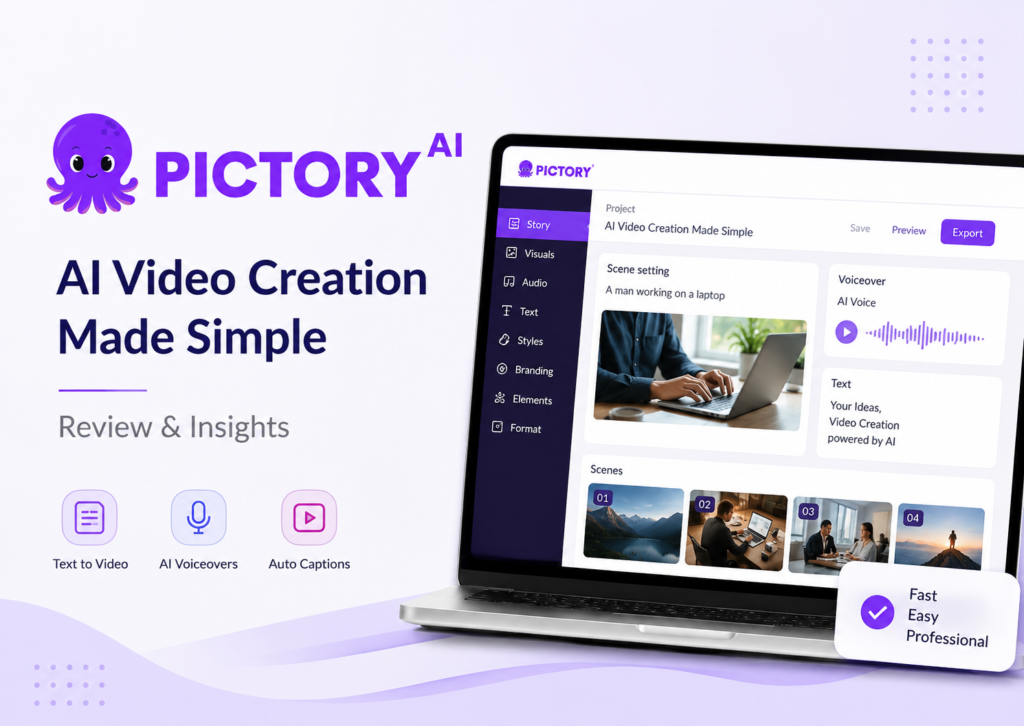
Creating videos used to require a decent camera, editing skills, and enough patience to survive a timeline full of cuts, transitions, and rendering errors. Today, AI-powered tools promise a much easier route. Among them, Pictory.ai has become one of the most talked-about options for creators, marketers, educators, and small business owners.
But does the platform actually deliver on its promises?
This Pictory AI review takes a close look at the platform’s free trial, core features, strengths, weaknesses, pricing, and real-world usability. If you’re wondering whether Pictory AI is worth it for your video editing needs, this guide will help you make an informed decision.
What Is Pictory.ai?
Pictory.ai is an AI-powered video creation platform that transforms text-based content into videos. Users can convert blog posts, scripts, articles, or written prompts into professional-looking videos without needing advanced editing skills.
Unlike traditional editing software that requires manual timeline editing, Pictory relies heavily on automation. The platform selects visuals, generates captions, creates voiceovers, and assembles scenes using artificial intelligence.
The goal is simple: help users create videos faster while reducing the learning curve associated with conventional editing tools.
For content creators, marketers, coaches, and business owners, that promise is attractive.
How Does the Pictory AI Free Trial Work?
One of the biggest questions people ask before subscribing is whether the Pictory AI free trial provides enough access to evaluate the platform properly.
At the time of writing, Pictory offers a free trial that allows users to test core features before purchasing a paid plan. Trial limitations may change over time, so checking the official website for the latest details is recommended.
The free trial generally lets users:
- Create AI-generated videos
- Test text-to-video functionality
- Experiment with AI voiceovers
- Generate automatic captions
- Explore the editing dashboard
- Preview video outputs
The trial is designed to showcase the platform’s workflow rather than serve as a long-term free plan.
For most users, the available features are enough to determine whether the software fits their content creation process.


Is Pictory Beginner Friendly?
Many AI video tools claim to simplify editing, but some still overwhelm new users with complicated settings.
Fortunately, Pictory AI beginner friendly design is one of its strongest advantages.
After signing up, users are presented with a clean dashboard and straightforward project options. The platform guides users through the video creation process step by step.
Typical workflow:
- Upload a script, article, or text prompt.
- Allow AI to generate scenes.
- Review suggested visuals.
- Customize text, branding, and audio.
- Export the finished video.
The interface avoids clutter and focuses on usability. Even users with no prior editing experience can create their first video within minutes.
While experienced editors may miss some advanced controls, beginners will likely appreciate the simplicity.
What Features Are Included in Pictory.ai?
A proper Pictory AI features review should focus on the capabilities that separate it from standard video editing software.
AI Text-to-Video Generation
The platform’s flagship feature is Pictory AI text to video conversion.
Users can paste blog posts, scripts, articles, or marketing copy into the system. AI then analyzes the content and generates scenes using stock footage, images, text overlays, and transitions.
This feature is particularly useful for:
- Bloggers
- Affiliate marketers
- Content agencies
- Course creators
- Social media managers
Instead of spending hours assembling clips manually, users can create draft videos within minutes.
Automatic Captions and Subtitles
Captions are increasingly important for engagement across social media platforms.
Pictory automatically generates subtitles and captions, helping improve accessibility and viewer retention.
This feature can save significant time compared to manual caption creation.
AI Voiceovers
The platform offers AI-generated voiceovers in multiple accents and voices.
Users who do not want to record their own narration can create professional-sounding audio directly within the platform.
While AI voices continue to improve, some users may still prefer human narration for a more natural feel.
Video Highlights and Summaries
Long-form content can be transformed into shorter clips using AI.
This feature is particularly valuable for:
- Podcasts
- Webinars
- Interviews
- Training sessions
The software identifies key moments and creates shorter videos suitable for social sharing.
Branding Tools
Businesses can add:
- Logos
- Brand colors
- Intro sequences
- Outro screens
This helps maintain consistent branding across video content.
Extensive Media Library
Pictory integrates with stock media libraries, giving users access to a large collection of images and videos.
The built-in media resources eliminate the need to search multiple platforms for visuals.
How Good Is the Video Quality?
One concern with AI-generated video platforms is whether the output feels robotic.
The answer depends largely on the content and customization level.
Pictory creates surprisingly polished videos for marketing, educational, and informational content.
However, users should not expect Hollywood-level production quality.
The AI-generated scene selection is generally relevant, but occasional mismatches can occur. Most projects benefit from a quick manual review before publishing.
The best results usually come from users who spend a few minutes refining visuals, captions, and scene transitions.
Think of Pictory as a highly efficient first draft creator rather than a complete replacement for professional editing expertise.



Can Pictory Help YouTube Creators?
A common search query involves Pictory AI for YouTube videos, and for good reason.
YouTube creators often need to publish content consistently while managing limited production time.
Pictory can help with:
- Faceless YouTube channels
- Educational videos
- List-style content
- Tutorial summaries
- News recaps
- Blog-to-video conversions
Creators who rely on script-based content may see the greatest benefits.
The platform is less suitable for creators producing highly cinematic videos, gaming content, or projects requiring extensive visual storytelling.
Still, for informational channels, Pictory can dramatically accelerate production.
What Are the Main Advantages of Pictory.ai?
Every review should examine strengths honestly.
Pros
The following benefits stand out during testing:
- Easy learning curve
- Fast video creation
- Strong text-to-video capabilities
- Automatic captions
- AI voice generation
- Large stock media library
- Suitable for beginners
- Cloud-based access
- Useful for content repurposing
- Minimal editing experience required
Many users will find that the time savings alone justify considering the platform.
What Are the Main Drawbacks?
No software is perfect, and a balanced Pictory AI pros and cons analysis must acknowledge limitations.
Cons
Some weaknesses include:
- Limited advanced editing controls
- Occasional irrelevant stock footage selections
- AI voiceovers can sound synthetic
- Customization options are less extensive than professional editors
- Export restrictions may vary by plan
- Premium features require a paid subscription
Advanced editors accustomed to software like Adobe Premiere Pro may find Pictory somewhat restrictive.
However, that trade-off is partly what makes the platform easier to use.
How Does Pictory Compare to Traditional Video Editors?
Traditional video editors offer maximum control.
Examples include:
- Adobe Premiere Pro
- Final Cut Pro
- DaVinci Resolve
These tools provide advanced color grading, motion graphics, audio mixing, and timeline editing.
Pictory takes a different approach.
Instead of focusing on creative control, it prioritizes speed and automation.
If your goal is producing content quickly, Pictory often wins.
If your goal is complete creative freedom, traditional software remains superior.
The right choice depends on your priorities.
What Does the Pricing Look Like?
A thorough Pictory AI pricing review should focus on value rather than just cost.
Pictory offers multiple subscription tiers that cater to different user groups.
Pricing structures may change, so always verify current plans directly through the official website.
Generally, higher-tier plans provide:
- More video minutes
- Additional AI features
- Larger usage limits
- Expanded customization options
For occasional users, the entry-level plans are usually sufficient.
Businesses and agencies creating videos regularly may benefit from premium plans that support higher production volumes.
When compared to hiring video editors or spending hours editing manually, the subscription cost can be relatively reasonable.
Is Pictory Suitable for Businesses and Marketers?
Absolutely.
Marketing teams often need a steady flow of content across multiple channels.
Pictory can help create:
- Social media videos
- Product explainers
- Promotional content
- Educational material
- Lead generation videos
- Training resources
Because content creation speed is a major competitive advantage, AI-powered video tools can offer substantial value for businesses with limited resources.
Small businesses may find the platform particularly useful because it reduces dependence on expensive production workflows.
Are There Better Pictory AI Alternatives?
Some users may want to compare other AI video generators before making a decision.
Popular Pictory AI alternatives include:
- Synthesia
- InVideo
- Lumen5
- VEED
- Canva Video
- Descript
Each platform has different strengths.
Synthesia focuses heavily on AI avatars.
Descript excels in audio and podcast editing.
Canva offers strong design integration.
InVideo provides extensive template options.
Pictory’s primary advantage remains its efficient text-to-video workflow and content repurposing capabilities.
The best platform depends on your specific content goals.
Who Should Use Pictory.ai?
The platform works particularly well for:
Bloggers
Transform written content into engaging videos.
Affiliate Marketers
Create supporting video content quickly.
YouTube Creators
Generate informational and faceless videos efficiently.
Coaches and Educators
Convert lessons and presentations into video format.
Small Businesses
Produce marketing content without hiring a full production team.
Agencies
Scale content creation for multiple clients.
These groups often gain the most value from Pictory’s automation features.
Who Might Not Like It?
Some users may find better alternatives.
Examples include:
- Professional filmmakers
- Motion graphics specialists
- Advanced video editors
- Documentary creators
- Users requiring frame-level editing precision
If your workflow depends heavily on advanced editing techniques, traditional software may remain the better option.
Is Pictory AI Worth It?
After testing the platform and evaluating its capabilities, the answer depends on your expectations.
If you expect AI to replace professional video editors entirely, you may be disappointed.
If you want a fast, beginner-friendly solution for creating marketing, educational, or social media videos, Pictory performs impressively well.
The software excels at turning text into publishable video content while reducing the time and effort traditionally required for editing.
For bloggers, marketers, educators, and content creators, the platform can significantly improve productivity.
The free trial offers a low-risk opportunity to evaluate the software firsthand before committing to a subscription.
Frequently Asked Questions
Is Pictory AI free to use?
Pictory AI offers a free trial that allows users to test its core video creation features. However, continued access to advanced tools and higher usage limits requires a paid subscription.
How long is the Pictory AI free trial?
The length and limitations of the Pictory AI free trial may vary over time. Users should check the official Pictory website for the most up-to-date trial details.
Is Pictory AI worth it?
Pictory AI is worth it for content creators, marketers, bloggers, and businesses that want to create videos quickly using AI-powered automation. It may be less suitable for professional editors who need advanced editing controls.
Can Pictory AI create YouTube videos?
Yes. Pictory AI can create YouTube videos from scripts, blog posts, and articles. It is especially useful for faceless YouTube channels, educational content, and marketing videos.
Does Pictory AI use text-to-video technology?
Yes. Pictory AI uses text-to-video technology that converts written content into videos by automatically selecting visuals, captions, and voiceovers.
Is Pictory AI beginner friendly?
Yes. Pictory AI is designed for beginners and does not require prior video editing experience. Its interface and automated workflow make video creation simple and accessible.
How much does Pictory AI cost?
Pictory AI offers multiple pricing plans based on video usage and features. Pricing may change over time, so users should visit the official website for current subscription details.
What are the best Pictory AI alternatives?
Popular alternatives to Pictory AI include InVideo, Synthesia, VEED, Canva Video, Lumen5, and Descript. Each platform offers different AI video creation capabilities.
Can Pictory AI add subtitles automatically?
Yes. Pictory AI automatically generates subtitles and captions, helping improve accessibility, viewer engagement, and social media performance.
Is Pictory AI good for content repurposing?
Yes. Pictory AI helps users repurpose blog posts, webinars, podcasts, and long-form content into shorter video formats suitable for social media and YouTube.
Does Pictory AI require video editing skills?
No. Most users can create videos with little to no editing experience because the platform automates much of the video creation process.
Final Verdict
So, is Pictory AI worth it?
For most content creators, the answer is yes.
This Pictory AI video editor review found that the platform delivers strong value through automation, ease of use, and efficient content repurposing. The AI-generated videos are not perfect, but they are often good enough to dramatically reduce production time.
The Pictory AI free trial provides a practical way to explore the platform’s capabilities without immediate financial commitment. Beginners will appreciate the simple interface, while marketers and creators can benefit from faster content production.
Although advanced editors may prefer more sophisticated software, Pictory remains one of the strongest AI-powered video creation platforms currently available for users focused on speed, convenience, and scalability.
For anyone seeking a reliable Pictory AI video creation tool that converts written content into engaging videos, it is certainly worth considering.