Contact Form 7 vs WPForms
When it comes to creating contact forms for WordPress websites, two popular plugins often come up in discussions: Contact Form 7 and WPForms. Both plugins offer robust features for building and managing forms, but they cater to different needs and preferences.
In this comprehensive comparison, we’ll delve into the key features, usability, customization options, performance, and support of Contact Form 7 and WPForms, helping you choose the best fit for your website.
Contact Form 7 vs WPForms
Contact forms are crucial for any website, providing a direct way for visitors to get in touch with you. Whether you need a simple contact form, a detailed feedback form, or a multi-step form, choosing the right plugin can make a significant difference in your site’s functionality and user experience. In this article, we’ll explore Contact Form 7 vs WPForms to help you decide which plugin aligns best with your requirements.
Overview of Contact Form 7

Contact Form 7 is one of the oldest and most widely used contact form plugins for WordPress. It’s known for its simplicity and effectiveness. The plugin offers a straightforward way to create and manage forms without needing to dive into complex code. Here’s a quick overview of its features:
- Ease of Use: Contact Form 7 has a user-friendly interface that allows you to create forms quickly using shortcodes.
- Customization: While it offers basic customization options, advanced users can extend its functionality with custom HTML and CSS.
- Integration: The plugin supports integration with various third-party services through additional add-ons.
Overview of WPForms
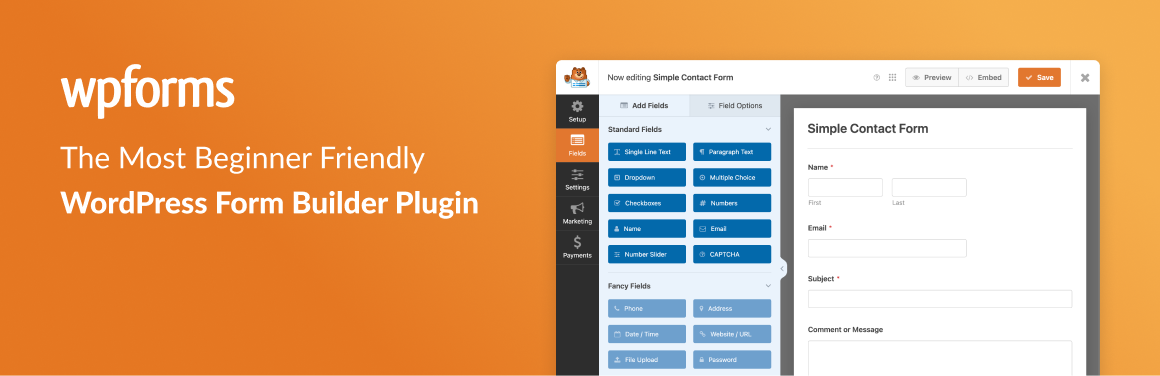
WPForms is a newer entrant but has rapidly gained popularity due to its user-friendly design and powerful features. It is designed to be an easy-to-use form builder that caters to both beginners and advanced users. Here’s a snapshot of its features:
- Drag-and-Drop Builder: WPForms provides a drag-and-drop form builder that simplifies the process of creating forms.
- Templates: The plugin comes with pre-built form templates that can be customized to meet your needs.
- Advanced Features: WPForms offers advanced features such as conditional logic, payment integrations, and marketing integrations right out of the box.


WPForms Lite vs Contact Form 7: A Quick Comparison
| Feature | WPForms Lite | Contact Form 7 |
|---|---|---|
| Ease of Use | Drag-and-drop builder, intuitive interface | Text-based editor, requires more coding knowledge |
| Form Fields | Variety of fields, including rich text, dropdowns, and file uploads | Basic fields, limited customization options |
| Conditional Logic | Show or hide fields based on user input | Requires custom coding or additional plugins |
| Integrations | Built-in integrations with popular services (e.g., Mailchimp, PayPal) | Limited integrations, requires additional plugins for most |
| Spam Protection | CAPTCHA, Honeypot, and other anti-spam measures | Basic spam protection, may require additional measures |
| Form Templates | Pre-designed templates for common form types | No built-in templates, requires custom creation |
| Payment Processing | Built-in payment processing capabilities | Requires additional plugins for payment processing |
| Form Submissions | View and manage submissions in the WordPress dashboard | View submissions in the WordPress dashboard, limited management options |
| Pricing | Free Version | Free Version |
| Additional Features | Advanced features available in premium versions | Limited features available in the free version |
User Interface and Usability
When comparing Contact Form 7 vs WPForms, one of the most noticeable differences is their user interface and ease of use.
Contact Form 7:
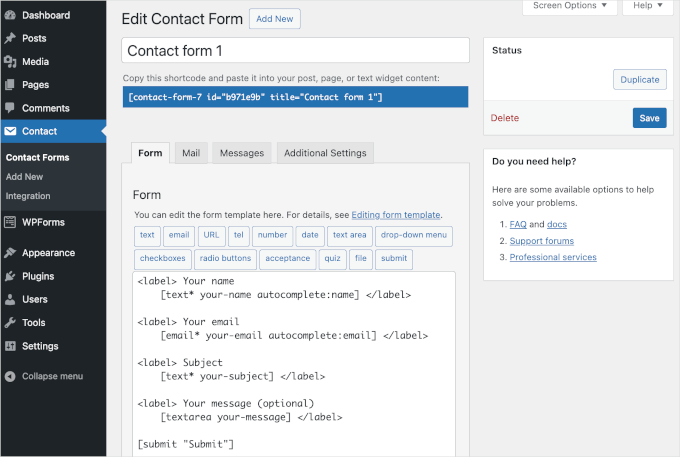
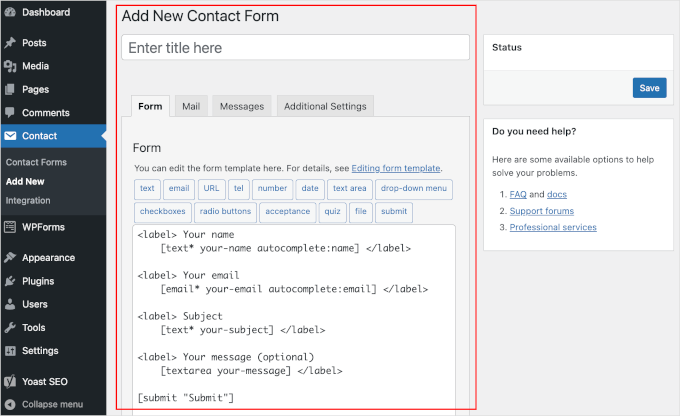
- Interface: The interface is quite basic, which might seem a bit dated. You create forms by entering shortcodes into the editor and configuring form fields using HTML-like tags.
- Learning Curve: It has a steeper learning curve for users unfamiliar with HTML or shortcode syntax. The lack of a visual builder can be challenging for beginners.
WPForms:
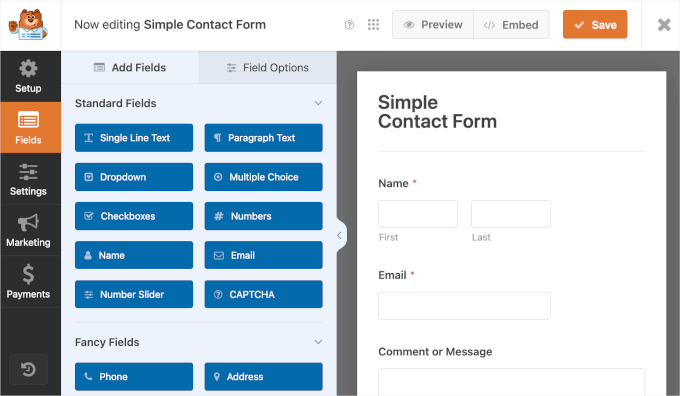
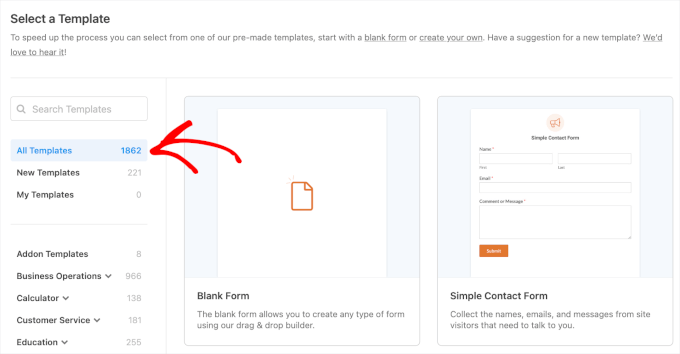
- Interface: WPForms boasts a modern, intuitive drag-and-drop builder. You can create and customize forms by simply dragging fields into place, making the process much more accessible.
- Learning Curve: It is designed for ease of use, making it suitable for beginners and experienced users alike. The visual interface simplifies form creation and customization.
Customization and Flexibility
Customization is a critical factor when choosing between Contact Form 7 vs WPForms. Both plugins offer customization options, but they differ in approach.
Contact Form 7:
- Basic Customization: You can customize the appearance of forms using CSS. The plugin also allows for basic field customization through HTML.
- Advanced Customization: For more advanced features, you may need to rely on additional plugins or custom coding.
WPForms:
- Built-in Customization: WPForms offers built-in customization options including form styling, field options, and conditional logic. It also supports custom CSS for further customization.
- Flexibility: The drag-and-drop interface allows for a high degree of flexibility in arranging and styling form elements.



Features and Functionality
Both Contact Form 7 vs WPForms offer a range of features, but WPForms tends to provide more out-of-the-box functionality compared to Contact Form 7.
Contact Form 7:
- Basic Features: Includes essential form elements like text fields, radio buttons, checkboxes, and email fields.
- Add-ons: Additional functionality can be added via various add-ons, but this often requires extra installation and configuration.
WPForms:
- Advanced Features: Comes with advanced features such as conditional logic, multi-step forms, payment integrations (Stripe, PayPal), and email marketing integrations (Mailchimp, AWeber).
- Form Templates: Offers a variety of pre-built form templates that can be customized to fit different use cases, from contact forms to registration forms.
Performance and Speed
The performance and speed of a form plugin can impact your site’s overall user experience. Let’s compare how Contact Form 7 vs WPForms perform in this aspect.
Contact Form 7:
- Performance: Generally lightweight and does not significantly impact page load times. However, performance can vary based on the complexity of the forms and the number of add-ons used.
- Speed: The plugin’s performance is stable, but complex forms with numerous fields may affect loading times.
WPForms:
- Performance: Optimized for speed and performance. The drag-and-drop builder is efficient, and the plugin is designed to handle a range of form functionalities without significant performance degradation.
- Speed: Tends to be faster and more efficient in handling forms due to its streamlined approach and fewer dependencies.
Contact Form 7 vs WPForms: Which WordPress Form Plugin Is Better in 2026?
If you’re stuck choosing between Contact Form 7 vs WPForms, you’re not alone. This is one of the most common comparisons in the WordPress ecosystem, and for good reason. Both plugins power millions of websites, but they solve problems in very different ways.
In this detailed Contact Form 7 vs WPForms comparison, you’ll get a clear, honest breakdown based on real features, usability, and performance, not hype. Let’s make sure you pick the right tool for your site (and avoid future headaches).
What Is Contact Form 7 and WPForms?
Contact Form 7
Contact Form 7 is one of the oldest and most widely used free contact form plugins for WordPress. It focuses on simplicity and flexibility, but it expects users to handle some technical aspects like HTML markup.
WPForms
WPForms is a beginner-friendly drag-and-drop form builder. It offers both free and premium versions, with a strong focus on usability, integrations, and modern design.



WPForms Lite vs Contact Form 7: A Quick Comparison
| Feature | WPForms Lite | Contact Form 7 |
|---|---|---|
| Ease of Use | Drag-and-drop builder, intuitive interface | Text-based editor, requires more coding knowledge |
| Form Fields | Variety of fields, including rich text, dropdowns, and file uploads | Basic fields, limited customization options |
| Conditional Logic | Show or hide fields based on user input | Requires custom coding or additional plugins |
| Integrations | Built-in integrations with popular services (e.g., Mailchimp, PayPal) | Limited integrations, requires additional plugins for most |
| Spam Protection | CAPTCHA, Honeypot, and other anti-spam measures | Basic spam protection, may require additional measures |
| Form Templates | Pre-designed templates for common form types | No built-in templates, requires custom creation |
| Payment Processing | Built-in payment processing capabilities | Requires additional plugins for payment processing |
| Form Submissions | View and manage submissions in the WordPress dashboard | View submissions in the WordPress dashboard, limited management options |
| Pricing | Free Version | Free Version |
| Additional Features | Advanced features available in premium versions | Limited features available in the free version |
User Interface and Usability
Why Compare Contact Form 7 vs WPForms?
Choosing the right form plugin affects more than just forms. It impacts:
- User experience
- Conversion rates
- Site performance
- Integration with marketing tools
That’s why this WPForms vs Contact Form 7 features comparison matters if you want a scalable website.
Which Plugin Is Easier to Use for Beginners?
WPForms Wins for Simplicity
WPForms uses a drag-and-drop builder. You can create a form in minutes without touching code.
- Visual interface
- Pre-built templates
- Instant preview
Even a complete beginner can build a professional form quickly.
Contact Form 7 Requires Technical Comfort
Contact Form 7 works differently. You build forms using shortcode and HTML-style tags.
- No visual builder
- Requires manual setup
- Learning curve for beginners
If you enjoy control and don’t mind coding, it works. Otherwise, it can feel outdated.
Verdict:
For WPForms beginner vs Contact Form 7 usability, WPForms clearly leads.
How Do Features Compare Between WPForms vs Contact Form 7?
WPForms Features
WPForms offers a wide range of built-in features:
- Drag-and-drop builder
- Multi-step forms
- Conditional logic
- File uploads
- Payment integrations (Stripe, PayPal)
- Email marketing integrations
- Spam protection tools
Contact Form 7 Features
Contact Form 7 keeps things minimal:
- Basic form fields
- Email notifications
- CAPTCHA support
- File uploads (basic)
To match WPForms features, you often need third-party plugins.
Verdict:
In terms of WPForms vs Contact Form 7 features, WPForms provides more functionality out of the box.
Contact Form 7 vs WPForms Pricing: Which One Offers Better Value?
Contact Form 7 Pricing
- 100% free
- No premium version
- Extra features require add-ons
It looks cost-effective, but adding multiple plugins can increase maintenance effort.
WPForms Pricing
- Free version (WPForms Lite)
- Premium plans available
- Advanced features included in paid plans
You pay for convenience, support, and built-in features.
Verdict:
For free vs premium contact form plugins WordPress, Contact Form 7 wins on price, but WPForms wins on value.
Which Plugin Performs Better?
Contact Form 7 Performance
- Lightweight core plugin
- Minimal scripts
- Performance depends on add-ons
If you keep it simple, it loads fast.
WPForms Performance
- Slightly heavier due to features
- Optimized for speed
- Smart loading of assets
In real-world use, the difference is small if configured properly.
Verdict:
For Contact Form 7 vs WPForms performance, both perform well, but Contact Form 7 may feel lighter in minimal setups.
What About Integrations?
WPForms Integrations
WPForms integrates easily with:
- Email marketing tools
- CRM systems
- Payment gateways
- Automation tools
Everything works out of the box or with simple setup.
Contact Form 7 Integrations
Contact Form 7 relies on third-party plugins for integrations.
- Mailchimp requires extra plugin
- CRM tools need connectors
- More setup time
Verdict:
For WPForms vs Contact Form 7 integrations, WPForms provides a smoother experience.
Which Plugin Is Better for Design and Customization?
WPForms Design
- Modern templates
- Easy styling options
- Mobile responsive by default
You can build forms that look professional without custom CSS.
Contact Form 7 Design
- Basic styling
- Requires CSS for customization
- No visual editing
It gives flexibility, but you need technical skills.
Verdict:
WPForms is better for users who want clean design without effort.
Contact Form 7 vs WPForms Pros and Cons
WPForms Pros
- Easy to use
- Powerful features
- Great integrations
- Professional design
WPForms Cons
- Advanced features require payment
- Slightly heavier plugin
Contact Form 7 Pros
- Completely free
- Lightweight
- Highly flexible with coding
Contact Form 7 Cons
- Not beginner-friendly
- Limited features without add-ons
- Outdated interface
Which Plugin Is Better for Beginners?
If you’re new to WordPress, WPForms feels like a breath of fresh air. You won’t struggle with syntax or formatting.
Contact Form 7, on the other hand, feels like assembling furniture without instructions, possible, but not fun.
Which Plugin Is Better for Developers?
Developers often prefer Contact Form 7 because:
- It offers full control
- Works well with custom code
- No restrictions
WPForms also supports customization, but it focuses more on ease than flexibility.
Are There Better Alternatives to Contact Form 7?
Yes, several plugins fall under Contact Form 7 alternatives WordPress:
- WPForms
- Ninja Forms
- Gravity Forms
- Fluent Forms
Each offers a more modern experience compared to Contact Form 7.
Which Plugin Is Best for Business Websites?
For business websites, WPForms usually performs better because:
- It supports payments
- Integrates with marketing tools
- Improves lead generation
Contact Form 7 works for simple contact forms, but it lacks built-in growth tools.
Which Plugin Is More Secure?
Both plugins follow WordPress security standards.
WPForms includes built-in spam protection and security features.
Contact Form 7 requires additional setup for advanced protection.
Which Plugin Helps With Conversions?
WPForms focuses on conversion-friendly features:
- Multi-step forms
- Conditional logic
- Smart notifications
Contact Form 7 lacks these tools unless extended.
Final Verdict: Contact Form 7 vs WPForms
The choice depends on your needs.
- Choose Contact Form 7 if you want a free, lightweight, developer-friendly tool
- Choose WPForms if you want ease of use, features, and scalability
For most users in 2026, WPForms offers a better balance of usability and performance.
Frequently Asked Questions
Is Contact Form 7 better than WPForms?
It depends on your needs. Contact Form 7 is better if you want a completely free, lightweight plugin and are comfortable with basic HTML. WPForms is better if you need a visual drag-and-drop builder, automatic entry storage, and advanced features like conditional logic or payment integration. For most beginners and business owners, WPForms offers a noticeably better experience.
Is Contact Form 7 free?
Yes, Contact Form 7 is completely free. There is no premium version from the original developer. However, if you need advanced features like conditional logic or payment processing, you will need separate third-party add-ons, which are sometimes paid.
Does Contact Form 7 save form submissions?
No, Contact Form 7 does not save form submissions to your WordPress database by default. It only sends email notifications. If an email fails to deliver, the submission is lost permanently. To save entries, you need to install Flamingo, a separate free companion plugin by the same developer.
Is WPForms worth the money?
Yes, WPForms is worth it for most business and professional websites. It saves significant time with its drag-and-drop builder, stores all form entries automatically, offers reliable integrations with email marketing tools, and includes strong spam protection. Building the same form in Contact Form 7 typically takes three to five times longer than in WPForms. IsItWP
Can I switch from Contact Form 7 to WPForms?
Yes, you can switch from Contact Form 7 to WPForms, but there is no automatic migration tool. You will need to rebuild your forms manually inside WPForms. The process is straightforward given WPForms’s drag-and-drop interface, and most simple forms can be recreated in minutes.
What is the best free contact form plugin for WordPress?
Contact Form 7 is the most installed free contact form plugin with over 5 million active installations. However, WPForms Lite is considered more beginner-friendly and includes built-in spam protection and entry backups even on the free plan. WPForms has crossed 6 million active installs and holds over 13,400 five-star reviews on WordPress.org. IvyForms
Does WPForms work without coding?
Yes, WPForms requires zero coding. Its drag-and-drop builder lets you add fields, configure notifications, and publish forms entirely through a visual interface. No shortcodes, no HTML, and no PHP knowledge is needed at any stage.
Why is Contact Form 7 not storing entries?
Contact Form 7 does not store entries by default because it was designed to work purely through email notifications. To store entries in your WordPress dashboard, you need to install the Flamingo plugin, which is free and built by the same developer.
Which is faster: Contact Form 7 or WPForms?
Contact Form 7 is lighter in terms of script and stylesheet size, giving it a small performance edge on very lean WordPress setups. WPForms carries more overhead due to its builder features, but with caching and optimized hosting, the real-world speed difference for site visitors is minimal and rarely significant.
What are the best alternatives to Contact Form 7?
The most popular alternatives to Contact Form 7 are WPForms, Gravity Forms, Fluent Forms, and Formidable Forms. WPForms is the most widely recommended for beginners and small businesses. Gravity Forms is preferred by developers who need deep customization and complex form logic.
Conclusion
The Contact Form 7 vs WPForms comparison comes down to one key question:
Do you value simplicity or control?
WPForms makes form creation effortless and powerful. Contact Form 7 gives you freedom but demands effort.
If your goal is growth, conversions, and ease, WPForms stands out among the best WordPress contact form plugins. If you prefer a minimal and free solution, Contact Form 7 still holds its ground.
Choose wisely, your forms are often your website’s first impression.