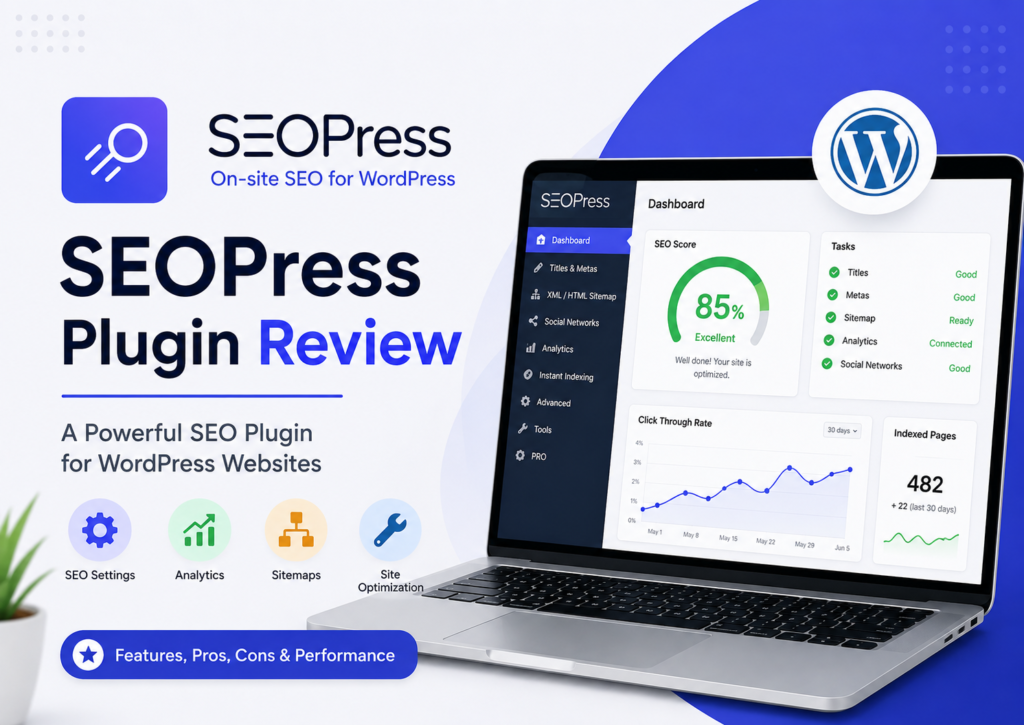
Choosing the right SEO plugin for WordPress is harder than ever. Every plugin promises better rankings, more traffic, and higher SEO scores. The reality is different. Most website owners only need a plugin that handles technical SEO correctly, stays lightweight, and doesn’t get in the way.
That is where SEOPress has built a strong reputation.
In this SEOPress Plugin Review, we’ll look at what the plugin actually offers, where it performs well, where it falls short, and whether it deserves a place on your website in 2026.
Unlike many reviews that simply repeat the feature list, this guide focuses on real functionality backed by official documentation and widely accepted SEO best practices. You’ll also see how SEOPress compares with plugins like Rank Math, Yoast SEO, and AIOSEO, helping you decide which one fits your website best.
Whether you’re a blogger, agency owner, WooCommerce store owner, or small business, this review will help you decide if SEOPress is the right SEO plugin for your WordPress site.
What is SEOPress?
SEOPress is a complete WordPress SEO plugin designed to help websites improve their visibility in search engines. It combines on-page SEO, technical SEO, structured data, XML sitemaps, redirects, local SEO, WooCommerce SEO, and analytics into one plugin.
The plugin was first released in 2017 and has continued to grow through regular updates. Today, thousands of websites rely on SEOPress because it offers powerful SEO features without unnecessary complexity.
Unlike some competitors, SEOPress keeps advertisements and upsells to a minimum inside the WordPress dashboard. That clean experience has made it a popular choice among developers, agencies, and experienced WordPress users.
Some of its core capabilities include:
- XML Sitemap generation
- HTML Sitemap
- Meta titles and descriptions
- Robots Meta management
- Schema Markup
- Open Graph and Twitter Cards
- Redirect Manager
- 404 Monitor
- Google Search Console integration
- Google Analytics support
- WooCommerce SEO
- Local SEO
- AI-powered metadata generation (supported versions)
Instead of installing multiple SEO plugins, SEOPress brings these tools together in one place.
Who Should Use SEOPress?
SEOPress works well for many types of websites.
It is particularly suitable for:
- Personal blogs
- Business websites
- Affiliate websites
- WooCommerce stores
- News websites
- Agency client websites
- Portfolio websites
- Local businesses
If you manage multiple WordPress sites, SEOPress also makes site management much easier because of its clean interface and import/export tools.


SEOPress Features
One reason many users choose SEOPress is its broad feature set. Instead of depending on several plugins, most SEO tasks can be handled directly inside SEOPress.
Let’s look at the major features.
On-Page SEO Optimization
Every page and post includes options for:
- SEO Title
- Meta Description
- Canonical URLs
- Robots Meta
- Focus keywords
- Open Graph settings
- Twitter Cards
These settings help search engines understand your pages while improving how your content appears in search results and on social media.
SEOPress also provides a Content Analysis tool that checks common SEO recommendations such as:
- Heading usage
- Meta title length
- Meta description
- Internal links
- Image ALT text
- Keyword placement
Remember, these suggestions are helpful guidelines—not direct Google ranking factors.
XML Sitemap & HTML Sitemap
Creating an XML Sitemap is one of the first steps for proper indexing.
SEOPress automatically generates:
- XML Sitemap
- Image Sitemap
- Video Sitemap
- News Sitemap (supported configurations)
- HTML Sitemap
You can also exclude specific pages, post types, categories, or tags.
This gives better control over what search engines crawl and index.
Schema Markup
Schema Markup helps search engines understand your content more clearly.
SEOPress supports several schema types, including:
- Article
- Blog Posting
- Product
- FAQ
- Local Business
- Organization
- Person
- Recipe
- Event
- Video
- Breadcrumb
- Review
- Service
You can also create custom schema using JSON-LD.
This makes SEOPress a strong option for websites targeting rich results in Google Search.
Meta Tags Management
Managing Meta Tags manually can become difficult as a website grows.
SEOPress simplifies this process by allowing dynamic variables.
Examples include:
- %%post_title%%
- %%sitename%%
- %%excerpt%%
- %%category%%
- %%currentdate%%
This helps automate metadata while keeping titles and descriptions unique.
Open Graph & Twitter Cards
Sharing content on Facebook, LinkedIn, X (formerly Twitter), and other platforms becomes much easier.
SEOPress lets you customize:
- Social titles
- Social descriptions
- Featured images
- Open Graph data
- Twitter Cards
Instead of relying on automatically generated previews, you can control exactly how your content appears.
Breadcrumbs
Breadcrumbs improve both navigation and crawlability.
SEOPress allows you to:
- Enable breadcrumbs
- Customize separators
- Control schema output
- Add breadcrumbs manually or automatically
Proper breadcrumb schema can improve search result appearance while making websites easier to navigate.
Robots.txt Management
Technical SEO often requires editing Robots.txt.
Instead of using FTP or file managers, SEOPress lets you manage Robots.txt directly inside WordPress.
You can:
- Block unnecessary URLs
- Allow important sections
- Manage crawl directives
- Improve crawl efficiency
For large websites, this saves considerable time.
Redirect Manager
Broken links create a poor user experience and waste crawl budget.
SEOPress includes a built-in Redirect Manager supporting:
- 301 Permanent Redirect
- 302 Temporary Redirect
- 307 Redirect
- 410 Gone
- 451 Redirect
You can redirect individual URLs without installing another plugin.
404 Monitor
Finding broken URLs manually is nearly impossible on large websites.
SEOPress includes a 404 Monitor that records missing pages.
This allows you to:
- Find broken URLs
- Create redirects
- Improve user experience
- Preserve link equity
If you migrate a website or change permalink structures, this feature becomes especially useful.
Google Search Console Integration
SEOPress integrates with Google Search Console, allowing you to verify your website easily.
While it doesn’t replace Search Console itself, it simplifies setup and lets you monitor indexing-related data more efficiently.
For technical SEO, combining Search Console with SEOPress is a practical workflow.
Google Analytics Integration
Many SEO plugins stop at metadata.
SEOPress also supports analytics integration.
Depending on your setup, you can connect:
- Google Analytics
- Google Tag Manager
- Google Consent Mode
- Custom tracking scripts
This reduces the need for extra plugins.
WooCommerce SEO
If you run an online store, WooCommerce SEO becomes important.
SEOPress includes features such as:
- Product Schema
- Product Meta Titles
- Product Meta Descriptions
- Product Open Graph
- Breadcrumb support
- Rich Snippets
These features help product pages appear more clearly in search results.
Local SEO
Businesses targeting local customers benefit from dedicated Local SEO settings.
SEOPress lets you configure:
- Business name
- Address
- Phone number
- Opening hours
- Geo coordinates
- Local Business Schema
These settings help search engines understand your business information more accurately.
AI Features
Recent versions of SEOPress include AI-assisted content tools.
These features can help generate:
- SEO Titles
- Meta Descriptions
- Alternative metadata suggestions
AI should be treated as a drafting assistant rather than a replacement for manual optimization. Reviewing AI-generated metadata ensures it matches your content and search intent.
SEOPress User Interface
One thing users consistently appreciate is the dashboard.
Many SEO plugins include promotional banners, upgrade notices, and feature advertisements throughout the admin panel.
SEOPress takes a different approach.
The interface feels:
- Clean
- Minimal
- Fast
- Well organized
Settings are grouped logically, making navigation easier even for large websites.
Advanced users can quickly find technical settings, while beginners are less likely to feel overwhelmed.
SEOPress Setup Guide
Getting started is straightforward.
Step 1: Install the Plugin
Install SEOPress from the WordPress Plugin Directory or upload the Pro version if you’ve purchased a license.
Step 2: Run the Installation Wizard
The setup wizard guides you through:
- Website type
- Organization details
- Social profiles
- XML Sitemap
- Indexing preferences
- Search appearance
Step 3: Import Existing SEO Data
If you’re moving from another plugin, SEOPress can import metadata from popular SEO plugins, helping reduce manual work during migration.
Step 4: Configure Search Appearance
Set default templates for:
- Posts
- Pages
- Categories
- Products
- Custom Post Types
Step 5: Connect Search Console
Verify your website with Google Search Console and submit your XML Sitemap to improve indexing.
Step 6: Review Content
Before publishing, check:
- Meta Title
- Meta Description
- Canonical URL
- Schema
- Open Graph Image
This routine helps maintain consistent optimization across your site.



SEOPress Free vs Pro
Many users begin with the free version before deciding whether to upgrade.
| Feature | Free | Pro |
|---|---|---|
| Meta Titles & Descriptions | ✅ | ✅ |
| XML Sitemap | ✅ | ✅ |
| HTML Sitemap | ✅ | ✅ |
| Open Graph | ✅ | ✅ |
| Twitter Cards | ✅ | ✅ |
| Content Analysis | ✅ | ✅ |
| Redirect Manager | ❌ | ✅ |
| 404 Monitor | ❌ | ✅ |
| Local SEO | ❌ | ✅ |
| WooCommerce SEO | ❌ | ✅ |
| Advanced Schema | Limited | ✅ |
| Google Analytics Integration | Basic | Advanced |
| AI Features | Limited | More comprehensive |
For hobby blogs or smaller websites, the free version covers many essential SEO tasks. However, businesses, agencies, eCommerce stores, and websites needing advanced schema, redirects, or local SEO will benefit more from SEOPress Pro.
SEOPress Pricing Review
Pricing often plays a major role when choosing an SEO plugin. While free versions are useful for basic optimization, advanced websites usually need features like redirects, structured data, WooCommerce SEO, and Local SEO.
SEOPress keeps its pricing straightforward. Instead of locking essential SEO tools behind multiple premium tiers, it offers a feature-rich Pro version with a generous site usage policy. Licensing details and current plans may change over time, so it’s always best to verify the latest pricing on the official SEOPress website before purchasing.
If you only need metadata, XML sitemaps, and basic on-page SEO, the free version is enough. However, if you manage client websites, online stores, or growing blogs, upgrading to SEOPress Pro makes much more sense.
Should You Buy SEOPress Pro?
SEOPress Pro is worth considering if you need:
- Advanced Schema Markup
- WooCommerce SEO
- Local SEO
- Redirect Manager
- 404 Monitor
- Google Analytics integration
- White-label options for agencies
- AI-assisted metadata generation (supported versions)
For websites that generate revenue, these features can save time and reduce the need for additional plugins.
SEOPress Performance Review
One question appears frequently in Google searches:
Does SEOPress Slow Down WordPress?
In normal use, no.
SEOPress is generally regarded as a lightweight SEO plugin because it avoids loading unnecessary scripts across the WordPress dashboard. Like any plugin, performance also depends on your hosting, theme, installed plugins, caching, and how many optional features you enable.
Rather than trying to improve rankings through “SEO scores,” SEOPress focuses on generating clean metadata, structured data, XML sitemaps, and other technical SEO elements that search engines can understand.
Good website performance still depends on:
- Fast hosting
- Optimized images
- Caching
- CDN usage
- Efficient themes
- Core Web Vitals optimization
An SEO plugin supports technical SEO, but it cannot fix poor website performance on its own.



SEOPress vs Rank Math
This is one of the most searched comparisons among WordPress users.
| Feature | SEOPress | Rank Math |
|---|---|---|
| Clean Interface | ✅ | Good |
| Ads Inside Dashboard | Minimal | More promotional |
| XML Sitemap | ✅ | ✅ |
| Schema Support | ✅ | ✅ |
| Redirect Manager | Pro | Free/Premium (varies by feature) |
| WooCommerce SEO | Pro | Available |
| AI Features | Available | Available |
| Google Analytics | ✅ | ✅ |
| Local SEO | Pro | Available |
| Content Analysis | ✅ | Advanced |
Choose SEOPress if:
- You prefer a cleaner interface.
- You want fewer promotional notices.
- You value straightforward settings.
- You manage multiple client websites.
Choose Rank Math if:
- You like detailed optimization suggestions.
- You want an extensive content analysis workflow.
- You rely heavily on its AI-assisted writing features.
Neither plugin guarantees better rankings. High-quality content, technical SEO, backlinks, and user experience remain the biggest ranking factors.
SEOPress vs Yoast SEO
Yoast SEO has been one of the most recognized WordPress SEO plugins for years.
SEOPress, however, offers many comparable features while keeping the interface less cluttered.
| Feature | SEOPress | Yoast SEO |
|---|---|---|
| XML Sitemap | ✅ | ✅ |
| Schema | ✅ | ✅ |
| Breadcrumbs | ✅ | ✅ |
| Redirect Manager | Pro | Premium |
| Local SEO | Pro | Separate extension |
| WooCommerce SEO | Pro | Separate extension |
| Interface | Minimal | Familiar but feature-heavy |
| Ads | Minimal | More noticeable |
If you’re already comfortable with Yoast, there may be no urgent reason to switch. However, many users moving to SEOPress appreciate its simpler dashboard and broader built-in feature set.
SEOPress vs AIOSEO
All in One SEO (AIOSEO) is another established SEO plugin with a wide range of features.
SEOPress Advantages
- Cleaner interface
- Minimal dashboard promotions
- Strong technical SEO toolkit
- Flexible schema options
AIOSEO Advantages
- Beginner-friendly setup
- Extensive documentation
- Marketing-focused workflows
- Good feature discovery
For most experienced WordPress users, the decision often comes down to personal preference rather than major SEO differences.
Can You Migrate from Yoast or Rank Math?
Yes.
SEOPress includes import tools that can transfer metadata from several popular SEO plugins, including Yoast SEO and Rank Math.
After importing, it’s a good idea to review:
- SEO titles
- Meta descriptions
- Canonical URLs
- Schema settings
- XML Sitemap
- Redirects
Testing a staging site before switching is also recommended for larger websites.
SEOPress Pros and Cons
Pros
- Clean and distraction-free interface
- Strong technical SEO features
- Comprehensive Schema Markup support
- Built-in Redirect Manager
- 404 Monitor
- WooCommerce SEO support
- Local SEO tools
- XML and HTML sitemaps
- Easy migration from other SEO plugins
- Suitable for agencies and developers
Cons
- Some advanced features require the Pro version.
- Beginners may need time to understand technical SEO settings.
- AI tools should still be reviewed manually for accuracy.
- Documentation is thorough but assumes some WordPress familiarity.
Is SEOPress Worth It?
For many WordPress users, yes.
If your goal is reliable technical SEO without a cluttered dashboard, SEOPress is a strong option. It handles the essentials—metadata, XML sitemaps, schema, redirects, and analytics integration—while staying lightweight and organized.
It isn’t a shortcut to higher rankings. No SEO plugin can guarantee first-page positions. Success still depends on creating useful content, earning quality backlinks, maintaining good Core Web Vitals, and matching user search intent.
If those fundamentals are already part of your strategy, SEOPress provides the tools to support them effectively.
Frequently Asked Questions
Is SEOPress Good?
Yes. SEOPress offers a comprehensive set of SEO tools for WordPress, including on-page SEO, technical SEO, structured data, XML sitemaps, and analytics integrations.
Is SEOPress Beginner Friendly?
Yes. The installation wizard simplifies the initial setup, though some advanced technical SEO settings may require basic WordPress knowledge.
Does SEOPress Support Schema?
Yes. SEOPress supports multiple schema types, including Article, Product, FAQ, Local Business, Organization, Person, Recipe, Event, Review, and more.
Is SEOPress Good for WooCommerce?
Yes. The Pro version includes WooCommerce SEO features such as product metadata, product schema, breadcrumbs, and social metadata.
Does SEOPress Have AI?
Yes. Recent versions include AI-assisted tools that can help generate SEO titles and meta descriptions. Manual review is still recommended before publishing.
Final Words: SEOPress Review
After reviewing its features, usability, and technical SEO capabilities, SEOPress stands out as one of the best WordPress SEO plugins available in 2026.
It combines a clean interface with practical SEO tools such as XML sitemaps, Schema Markup, redirects, Local SEO, WooCommerce SEO, and analytics integration. The plugin avoids unnecessary complexity while giving users precise control over important SEO settings.
For bloggers, businesses, agencies, and eCommerce websites, SEOPress offers excellent value—especially if you want an alternative to more promotional or feature-heavy SEO plugins.
If you only need basic optimization, the free version is a solid starting point. If you manage multiple websites or depend on advanced SEO features, SEOPress Pro is a worthwhile upgrade.
Ultimately, the best SEO plugin is the one you configure correctly and use consistently. Combined with high-quality content and sound SEO practices, SEOPress provides a dependable foundation for long-term organic growth.