If you’ve ever saved an image and wondered whether to pick JPG or JPEG, you are not alone. The JPG vs JPEG debate confuses beginners and even experienced designers. Spoiler alert: they are the same format. But the full story behind JPG and JPEG is more interesting than a one-line answer, and understanding it will actually make you better at working with images. Let’s break it all down.
What Is JPEG? A Quick Background
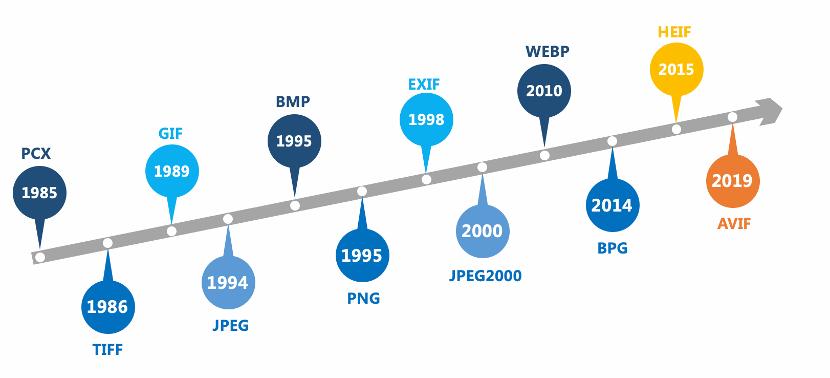
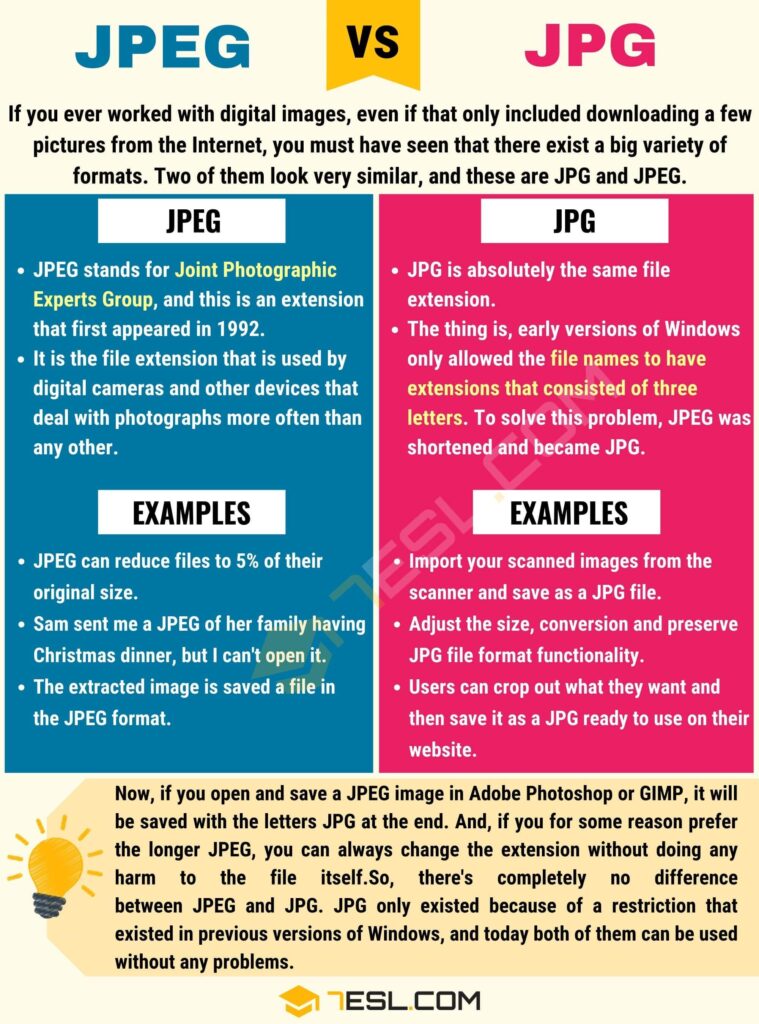
JPEG stands for Joint Photographic Experts Group, the committee that created this image compression standard back in 1992.
The goal was simple. They wanted a file format that could compress photographic images without making them look terrible. And honestly, they nailed it.
JPEG became the go-to format for digital cameras, websites, social media, and printing, all within a decade. It was built to handle real-world photos with complex colors, gradients, and natural detail.
So Why Does JPG Even Exist?
Here is where history gets a little funny. Early versions of Windows (specifically MS-DOS and Windows 3.x) had a file system called FAT16. This system only allowed file extensions with a maximum of three characters.
JPEG has four letters. That was a problem.
So Microsoft shortened it to JPG. Just three characters, no drama, same format underneath. Meanwhile, Unix and Mac systems never had this limitation, so they kept using .jpeg just fine.
When Windows eventually moved to modern file systems, the three-character limit disappeared. But JPG had already become so common that it stuck around forever.
Is JPG and JPEG the Same Thing?
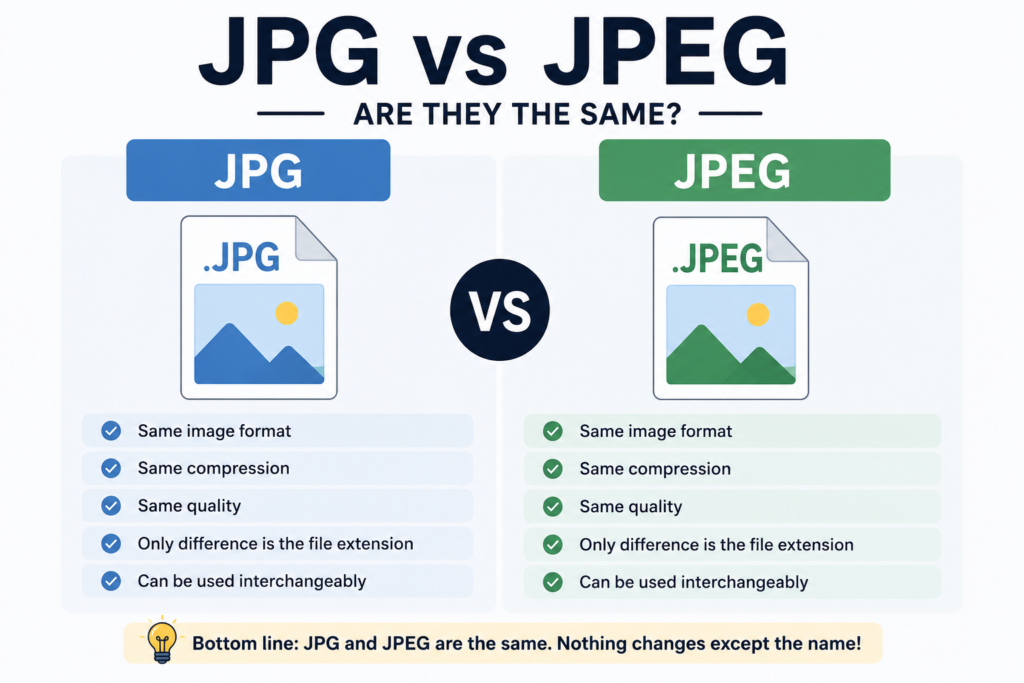
Yes, completely. JPG and JPEG are the same image format. The file extension is just a label. What matters is the data inside the file, and both .jpg and .jpeg files use identical compression algorithms, color encoding, and image data structure.
You can rename a .jpeg file to .jpg and open it without any issue. No data changes. No quality loss. Nothing breaks.
Think of it like calling the same person by two different nicknames. The person does not change, only the name you use.
Can I Rename JPEG to JPG Without Losing Quality?
Absolutely. Renaming a file does not touch the image data inside it. Quality loss in JPEG happens during compression, not during renaming.
The only time you lose quality is when you open a JPEG, edit it, and re-save it. Each re-save applies compression again, which degrades the image slightly. This is called generation loss.
So: rename freely, but avoid repeatedly opening and re-saving JPEG files if quality matters.
Does File Extension Affect JPG vs JPEG File Size Difference?
No, the extension alone does not affect file size. A .jpg and a .jpeg file saved at the same quality setting will be identical in size.
File size in JPEG images is controlled by:
- The compression level (quality setting, typically 1 to 100)
- The image dimensions
- The complexity of colors in the photo
A simple photo with a blue sky will compress to a smaller size than a detailed street market shot. That is just how JPEG compression works. The extension has zero role in any of this.
How Does JPEG Compression Actually Work?
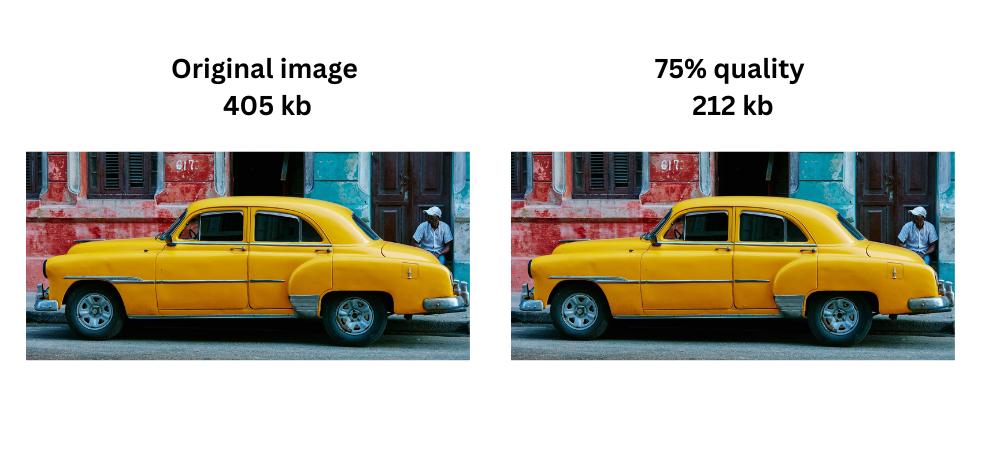
JPEG uses lossy compression. It removes image data your eye is less likely to notice, particularly fine color variations.
It works through a process called Discrete Cosine Transform (DCT). The image is broken into 8×8 pixel blocks. Each block is analyzed for color frequency patterns. Less noticeable details are reduced or removed.
The result is a much smaller file that still looks great to the human eye. At quality settings of 80 to 90, most people cannot spot the difference between a compressed JPEG and the original.
This is exactly why JPEG became the dominant format for photos. It balances visual quality and small file size better than most alternatives.
JPG vs JPEG Compression Quality Comparison
There is no compression quality difference between .jpg and .jpeg. They are the same format with the same quality options.
What does matter for compression quality is your software’s quality slider when saving. In Photoshop, Adobe uses a 1 to 12 scale. In most other tools, it is 1 to 100. Higher numbers mean better quality and larger file size.
For web images, quality between 70 and 85 is the sweet spot. You get sharp-looking images without bloating your page size.
For print, you want to stay above 90, ideally using 300 DPI resolution alongside a high quality setting.
Does JPG or JPEG Load Faster?
Neither loads faster based on the extension alone. Page load speed depends on the actual file size, your server response time, and whether you have implemented image optimization.
That said, JPEG images in general load faster than PNG files for photographic content, because JPEG files are typically much smaller at comparable visual quality.
If you want faster loading images, the extension is not your lever. Focus on:
- Compressing images before uploading
- Using modern formats like WebP where browser support allows
- Enabling lazy loading for images below the fold
- Using a CDN to serve images from servers closer to your users
JPG vs JPEG for Web Design
For web design, both .jpg and .jpeg work identically in browsers. Every modern browser reads both extensions without any issue.
JPEG is the right format for photographs and complex images on the web. It keeps file sizes manageable while preserving visual richness.
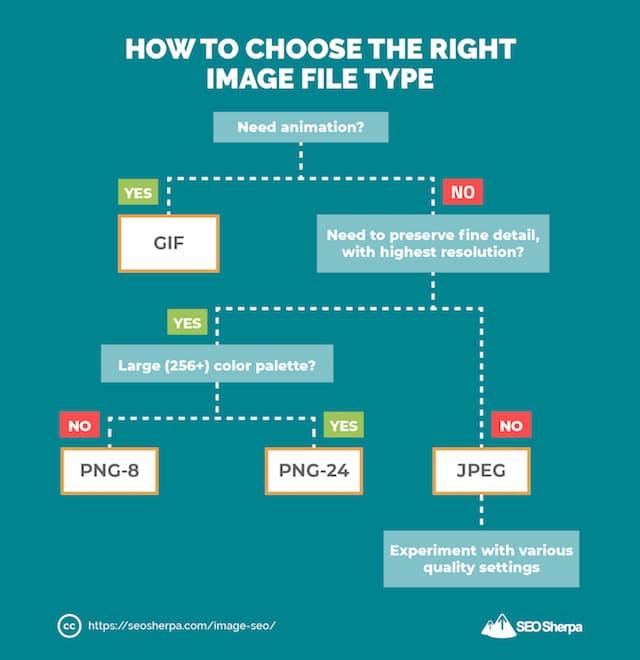
For flat graphics, logos, icons, and images that need transparency, PNG or SVG will serve you better. JPEG does not support transparency, which is a real limitation for certain design elements.
For web design workflows:
- Use JPEG for hero images, product photos, and blog thumbnails
- Use PNG for logos, icons, and UI elements with transparent backgrounds
- Use SVG for icons and illustrations at any screen size
JPG vs JPEG for Social Media Upload
Social media platforms process your uploaded images through their own compression pipelines, regardless of whether you upload a .jpg or .jpeg file. The extension makes no difference.
What does matter is the quality and resolution of the image you upload.
Facebook, Instagram, and Twitter all re-compress your uploads. If you upload a heavily compressed JPEG, the platform re-compresses it again, and quality drops visibly.
Best practice: upload the highest quality JPEG you have. Let the platform do its compression from a good starting point. You will get better-looking results compared to uploading an already degraded image.
JPG vs JPEG for Printing Quality
For printing, again, the extension does not influence quality. What influences print quality is:
- Resolution: Print needs at least 300 DPI. Web images are typically 72 to 96 DPI.
- Color mode: Print usually requires CMYK. JPEG files saved in RGB may need conversion before sending to a professional printer.
- Compression quality: Use 90 or above for print-ready files.
If you are sending images to a professional print service, ask them for their exact specifications. Most will accept high-quality JPEG files without any issue, but some workflows prefer TIFF for archival or commercial print use.
Which Is Better: JPG or JPEG for Photos?
Neither is better. They are the same format. Asking which is better between JPG and JPEG is like asking whether km/h or kilometers per hour is faster. Same thing, different label.
What you should actually think about when saving photos:
- Is this for web use? Save at 75 to 85 quality.
- Is this for print? Save at 90 to 100 quality at 300 DPI.
- Will I keep editing this file? Save a working copy in a lossless format like TIFF or PNG, and export JPEG only as the final output.
When Should You NOT Use JPEG?
JPEG is not the right choice for every situation. Avoid it when:
- You need transparency in your image (use PNG or WebP instead)
- You are working with text-heavy graphics, charts, or screenshots (PNG preserves sharp edges better)
- You plan to edit and re-save the image multiple times (use TIFF or PSD to avoid generation loss)
- You are dealing with line art or simple color blocks (PNG or SVG will compress better with no quality loss)
JPEG shines for photos. It struggles with anything that has sharp, flat edges or transparency.
JPEG vs Modern Formats: Where Does It Stand Today?
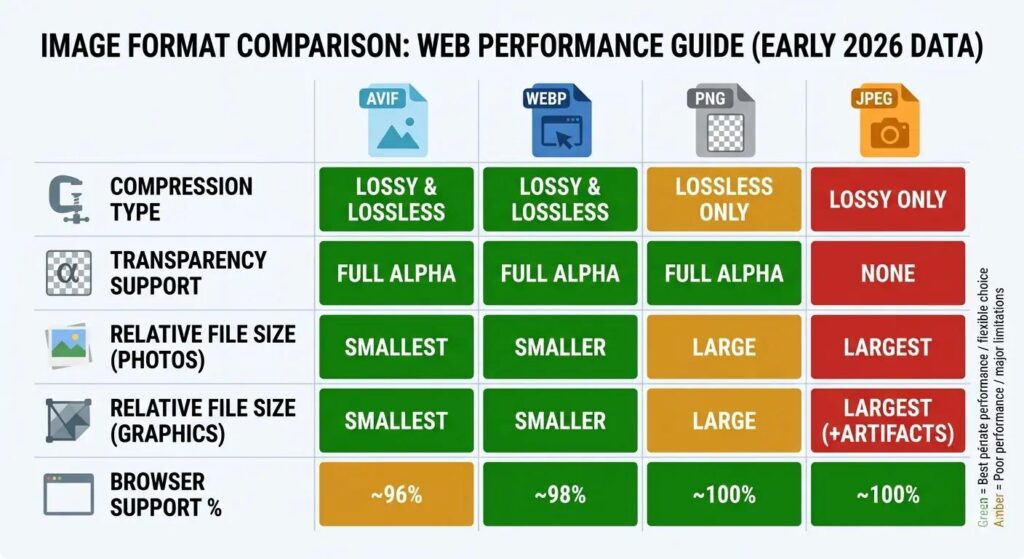
JPEG is over 30 years old, and newer formats have emerged to challenge it.
WebP, developed by Google, offers roughly 25 to 34 percent smaller file sizes than JPEG at comparable visual quality. Browser support for WebP is now excellent across Chrome, Firefox, Safari, and Edge.
AVIF is even newer and can achieve even better compression, though encoding is slower and some older browsers still do not support it fully.
Despite this, JPEG remains dominant. It works everywhere, requires no special handling, and is deeply integrated into cameras, printers, editing software, and publishing workflows worldwide.
For most people, JPEG is still the practical choice. If you are building a performance-focused modern website, exploring WebP alongside JPEG makes sense.
Why Do Some Systems Still Show JPEG and Others Show JPG?
It comes down to the operating system and software defaults.
Windows traditionally saves images as .jpg. macOS and many Linux-based applications often default to .jpeg. Some cameras use .jpg in their firmware. Others use .jpeg.
There is no industry standard on which extension to use. Both are equally valid. Most software accepts both without any configuration.
If you are working in a team or with a content management system, it can be helpful to standardize on one extension for consistency. But from a technical perspective, it does not matter which you choose.
Frequently Asked Questions
Is JPG and JPEG the same thing?
Yes, JPG and JPEG are the same thing. They use the same image format, compression method, and quality settings. The only difference is the file extension name.
Why are there two file extensions JPG and JPEG?
There are two file extensions because older Windows operating systems allowed only three-letter extensions. Developers shortened “.jpeg” to “.jpg” for compatibility.
Does JPG or JPEG have better quality?
No, JPG and JPEG offer the same image quality. Both use the same compression technology, so quality depends on how the image is saved.
Is there a JPG vs JPEG file size difference?
No, there is no file size difference between JPG and JPEG if both images use the same compression settings and resolution.
Does JPG or JPEG load faster?
Neither loads faster by default. Loading speed depends on image size, optimization, compression, and website performance.
Can I rename JPEG to JPG without losing quality?
Yes, you can rename JPEG to JPG without losing quality. Changing the file extension does not modify the image itself.
Is JPG or JPEG better for printing?
Both work equally well for printing. Print quality depends more on image resolution and export quality than the extension.
Is JPG or JPEG better for websites?
Both are equally good for websites. What matters most is image optimization, compression, file size, and proper SEO practices.
Which format should I use for social media, JPG or JPEG?
You can use either JPG or JPEG for social media uploads because platforms support both formats and compress images automatically.
The Bottom Line on JPG vs JPEG
JPG and JPEG are the same image format. The difference is purely historical: a three-character limit from old Windows systems created the shorter extension, and it never went away.
There is no difference in quality, file size, load speed, or compatibility between the two. You can rename files freely without any impact on the image.
Focus your energy on what actually affects your images: compression quality settings, resolution for the intended use, and choosing the right format for the job. JPEG is excellent for photos. Not great for logos, transparency, or repeated editing.
Understanding this removes one small but surprisingly persistent source of confusion in design, photography, and web work. And now you know exactly what to say the next time someone asks.