If you’ve spent even a few minutes looking for the best SEO plugin for WordPress, you’ve probably come across Yoast SEO. It’s one of the oldest and most widely used SEO plugins, powering millions of WordPress websites worldwide.
But popularity doesn’t always mean it’s the right choice.
Over the past few years, WordPress users have seen strong alternatives enter the market. Plugins like Rank Math, AIOSEO, and SEOPress now offer competitive features, AI-powered tools, and different pricing models. That naturally raises one important question:
Is Yoast SEO still worth using in 2026?
To answer that, we tested the plugin on a WordPress website, reviewed its latest features, compared the free and Premium versions, and evaluated how it performs for beginners, bloggers, businesses, and SEO professionals.
This Yoast SEO Review focuses on practical experience rather than marketing claims. We’ll explain what the plugin does well, where it falls short, and whether upgrading to Yoast SEO Premium makes sense for your website.
Whether you’re launching your first blog or managing a growing business website, this review will help you decide if Yoast SEO deserves a place in your WordPress toolkit.
Our Testing Methodology
A trustworthy review should be based on real usage, not feature lists copied from a sales page.
For this review, we installed the latest version of Yoast SEO on a WordPress test website and evaluated how it performs during everyday SEO tasks. We focused on areas that directly affect content creation, technical SEO, and overall website optimization.
Our evaluation included:
- Installation and setup experience
- SEO analysis and content optimization
- Readability analysis
- Meta title and meta description management
- XML sitemap generation
- Canonical URL controls
- Schema markup implementation
- Google Search Console integration options
- Website performance impact
- Free vs Premium features
- Ease of use for beginners
We also compared Yoast SEO with other leading WordPress SEO plugins to understand where it excels and where competitors offer more value.
Rather than chasing a perfect SEO score, we evaluated whether the plugin genuinely helps users build search-friendly websites while following Google’s best practices.
Yoast SEO
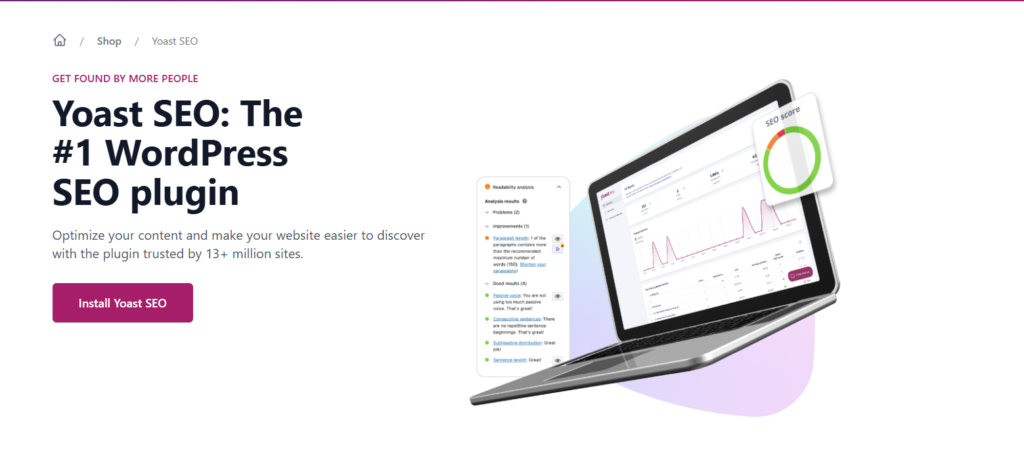
Yoast SEO is a WordPress SEO plugin designed to help website owners optimize their content for search engines without requiring advanced technical knowledge.
The plugin assists with many important on-page SEO tasks, including:
- Writing optimized SEO titles
- Creating effective meta descriptions
- Managing XML sitemaps
- Setting canonical URLs
- Controlling robots meta settings
- Improving content readability
- Implementing structured data (Schema markup)
- Managing breadcrumbs
- Optimizing social media previews
Instead of changing Google’s ranking algorithm, Yoast helps website owners follow SEO best practices. It acts like an experienced editor sitting beside you while you create content.
Think of it this way: Yoast won’t magically move your article to the first page of Google, but it can help you avoid common SEO mistakes that often prevent good content from performing well.



Yoast SEO Features
One reason Yoast SEO remains popular is its broad feature set. Even the free version includes many tools that website owners need for day-to-day SEO.
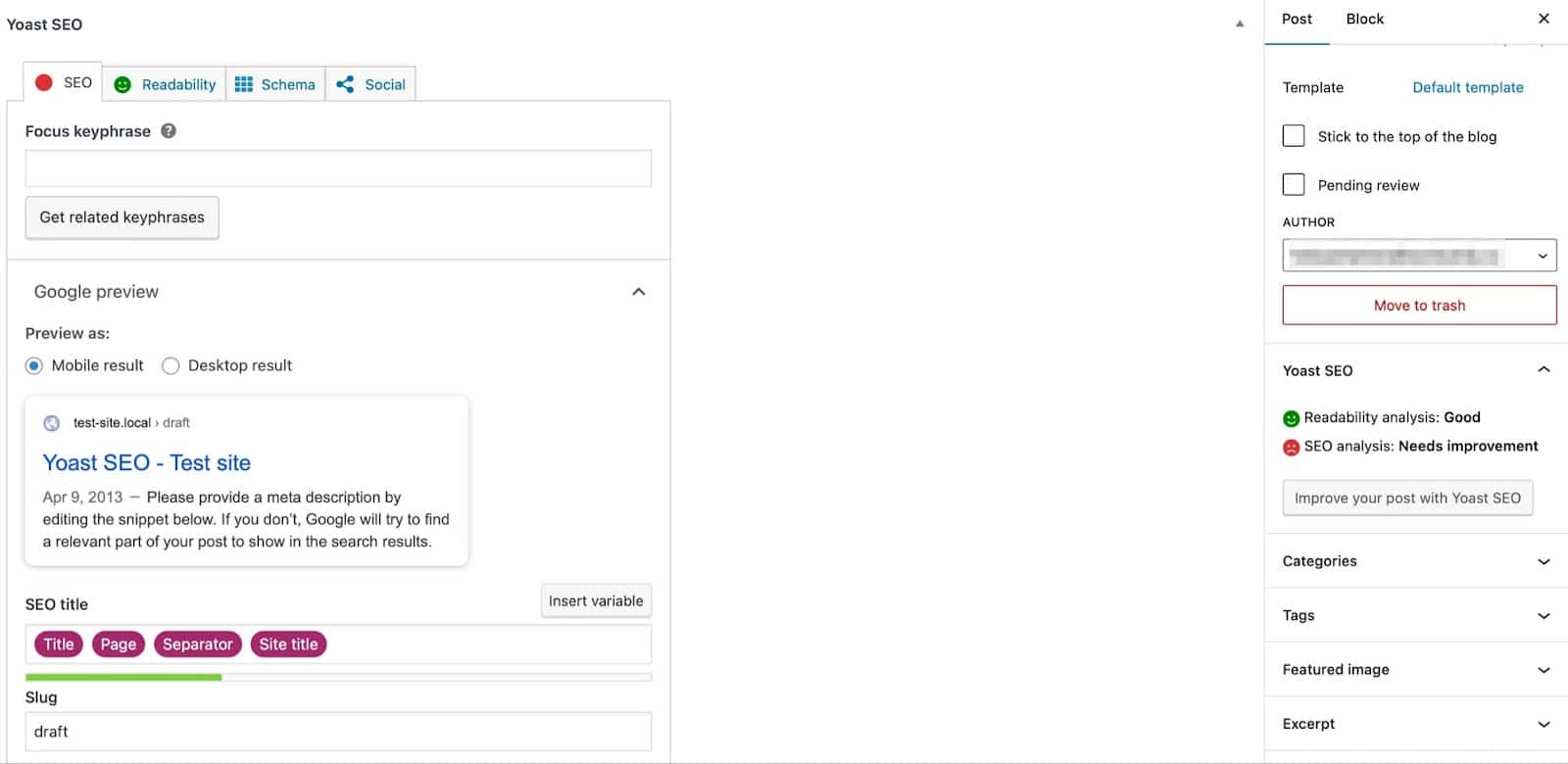
Let’s look at the most useful features.
SEO Analysis
The SEO Analysis tool evaluates your page against your selected focus keyphrase.
It checks important optimization signals such as:
- Keyword usage
- SEO title
- Meta description
- Internal links
- Outbound links
- Image alt text
- Heading structure
- Content length
- Keyphrase density
Instead of assigning an arbitrary score, Yoast provides practical suggestions that help improve your content.
For beginners, these recommendations make on-page SEO much easier to understand.
Experienced SEO professionals, however, should remember that Google’s ranking systems evaluate far more than plugin recommendations. It’s best to treat these suggestions as guidance rather than strict rules.
Readability Analysis
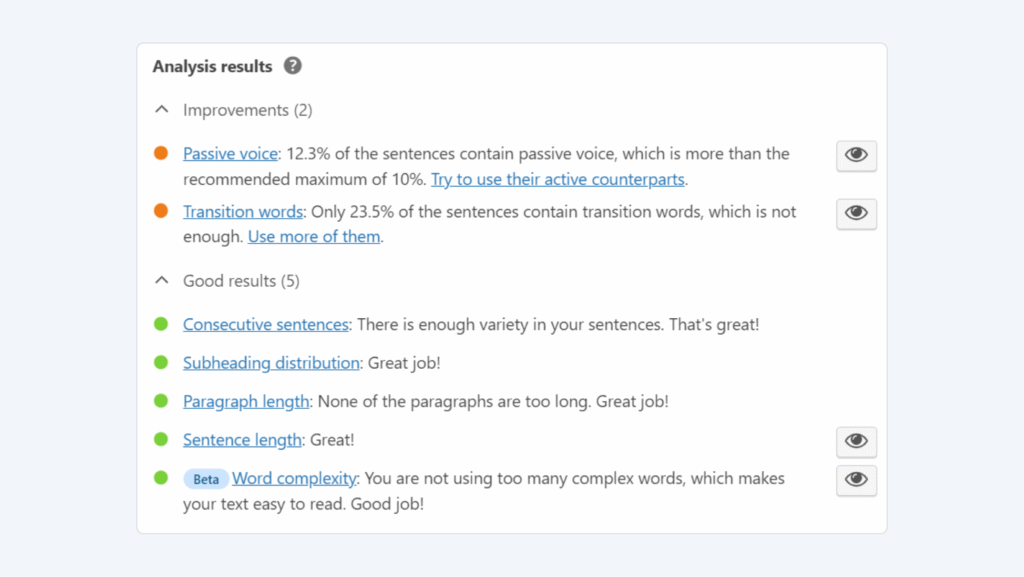
One feature that sets Yoast apart from many competitors is its Readability Analysis.
Good SEO starts with content people actually enjoy reading.
Yoast checks several readability factors, including:
- Sentence length
- Paragraph length
- Transition words
- Passive voice
- Heading distribution
- Consecutive sentence patterns
- Flesch Reading Ease
These recommendations encourage shorter paragraphs and clearer writing, making articles easier to scan on both desktop and mobile devices.
It’s a helpful feature, especially for beginners who tend to write large blocks of text.
That said, don’t chase green bullets at the expense of natural writing. Sometimes breaking a grammar rule improves the reader’s experience—and readers matter more than plugin indicators.
Focus Keyphrase Optimization
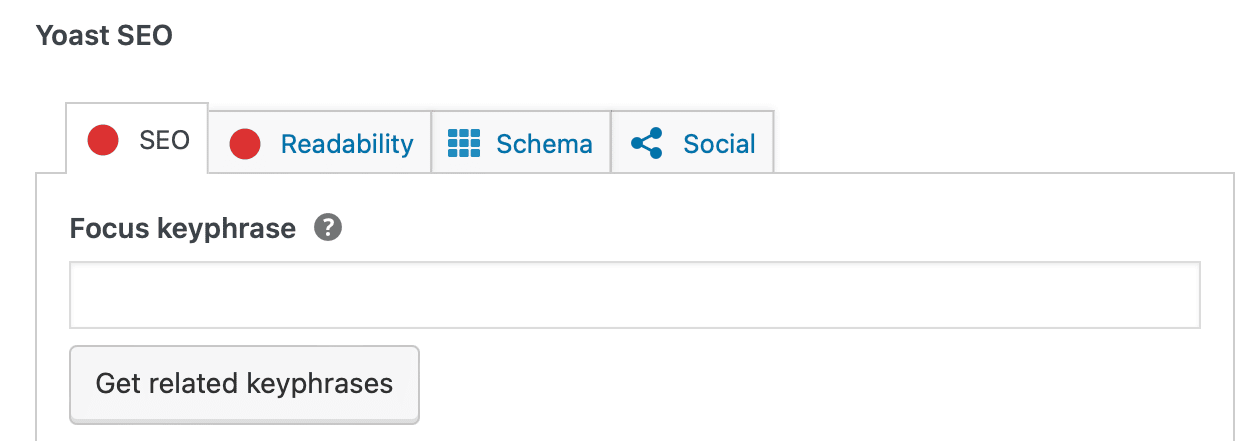
The Focus Keyphrase feature helps ensure your primary topic appears naturally throughout the page.
Yoast checks whether your keyword is used in important locations such as:
- SEO title
- URL slug
- Introduction
- Headings
- Meta description
- Image alt text
- Body content
This feature helps maintain consistency without encouraging obvious keyword stuffing.
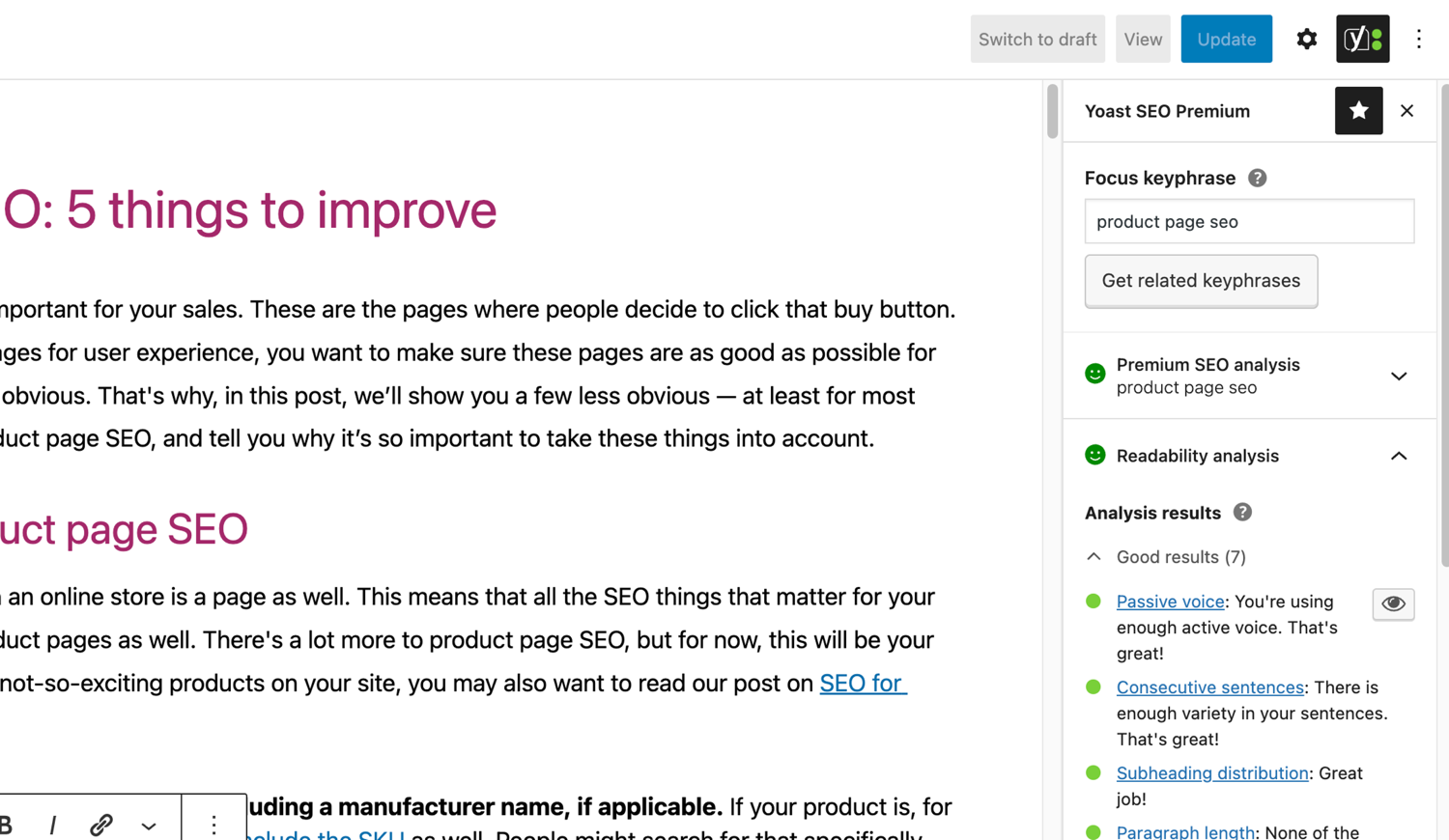
Remember, Google understands context much better today than it did years ago. Writing naturally while covering a topic thoroughly is often more valuable than repeating the exact keyword dozens of times.
XML Sitemap Generation
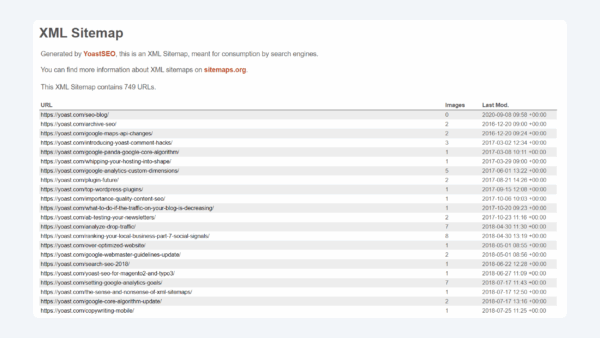
Creating an XML sitemap manually isn’t anyone’s idea of a fun afternoon.
Fortunately, Yoast handles it automatically.
The plugin generates XML sitemaps that help search engines discover your website’s important pages more efficiently.
Whenever you publish or update content, Yoast automatically updates the sitemap without requiring manual work.
This feature supports faster content discovery and simplifies website maintenance, especially for growing blogs and business websites.
Schema Markup
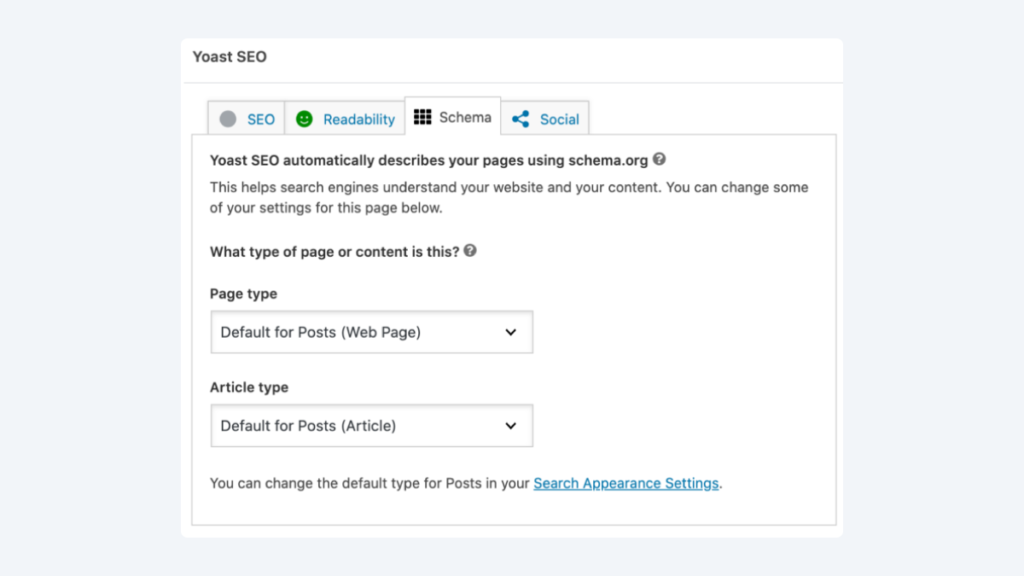
Structured data plays an important role in helping search engines understand your website.
Yoast automatically adds Schema markup to many types of content, including:
- Articles
- Pages
- Authors
- Organizations
- Websites
- Breadcrumbs
The plugin follows Schema.org standards and builds connected structured data rather than isolated snippets.
For most website owners, this removes much of the complexity involved in implementing technical SEO.
If you’re running a standard blog, business website, or content-focused site, Yoast’s built-in Schema implementation covers many essential requirements without additional configuration.
Canonical URLs and Technical SEO Controls
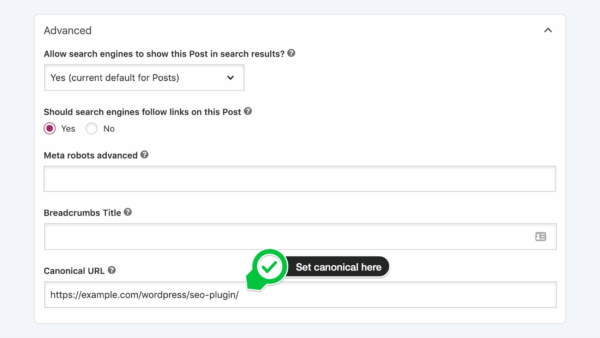
Duplicate content can confuse search engines.
Yoast allows you to define canonical URLs, helping Google understand which version of a page should be indexed.
The plugin also gives users control over:
- Robots meta tags
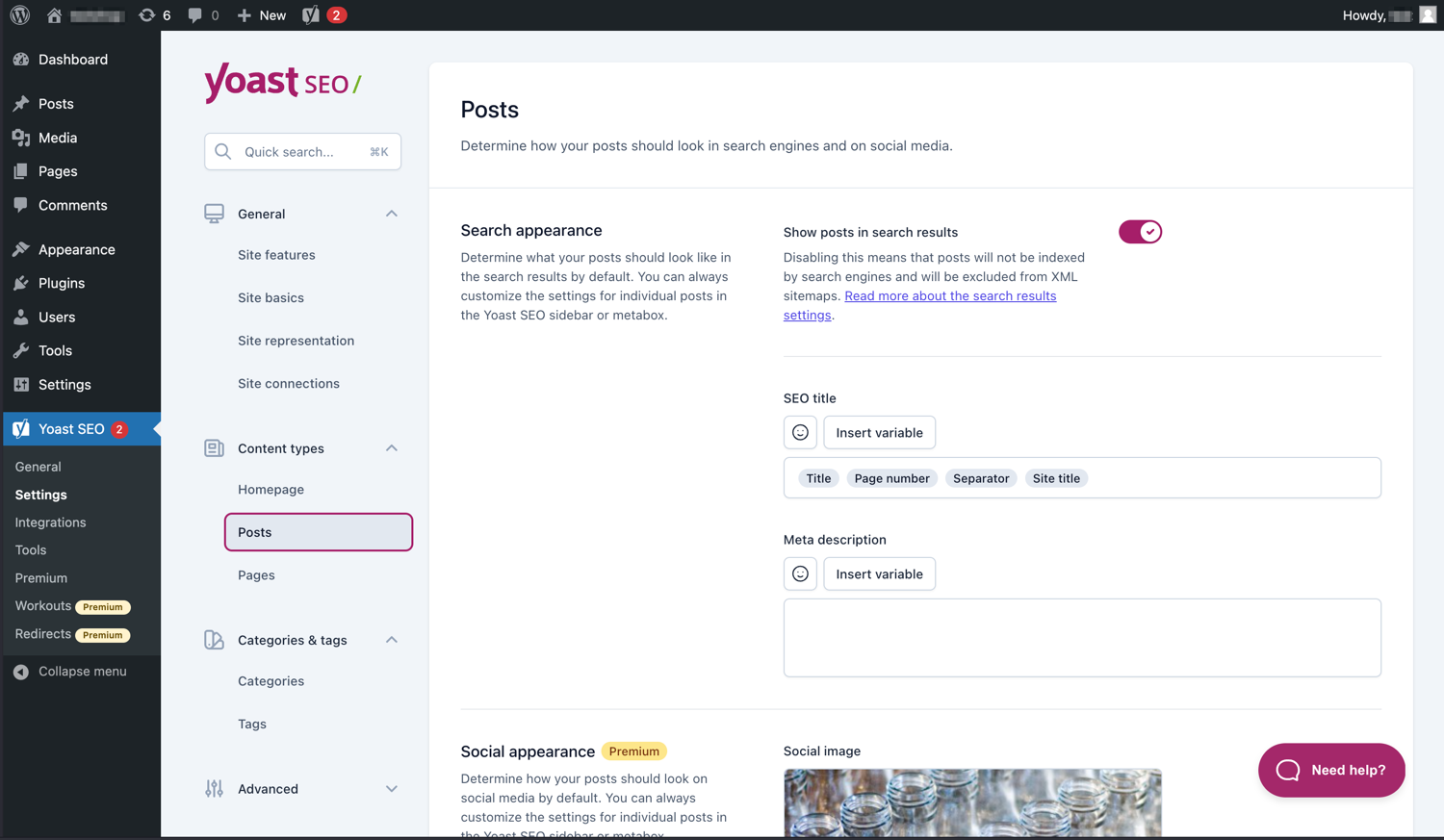
- Search appearance
- Indexing preferences
- Breadcrumb settings
- RSS optimization
- Archive settings
These technical SEO options are organized within an easy-to-navigate interface, making advanced configurations accessible even for users without coding knowledge.
Social Media Previews
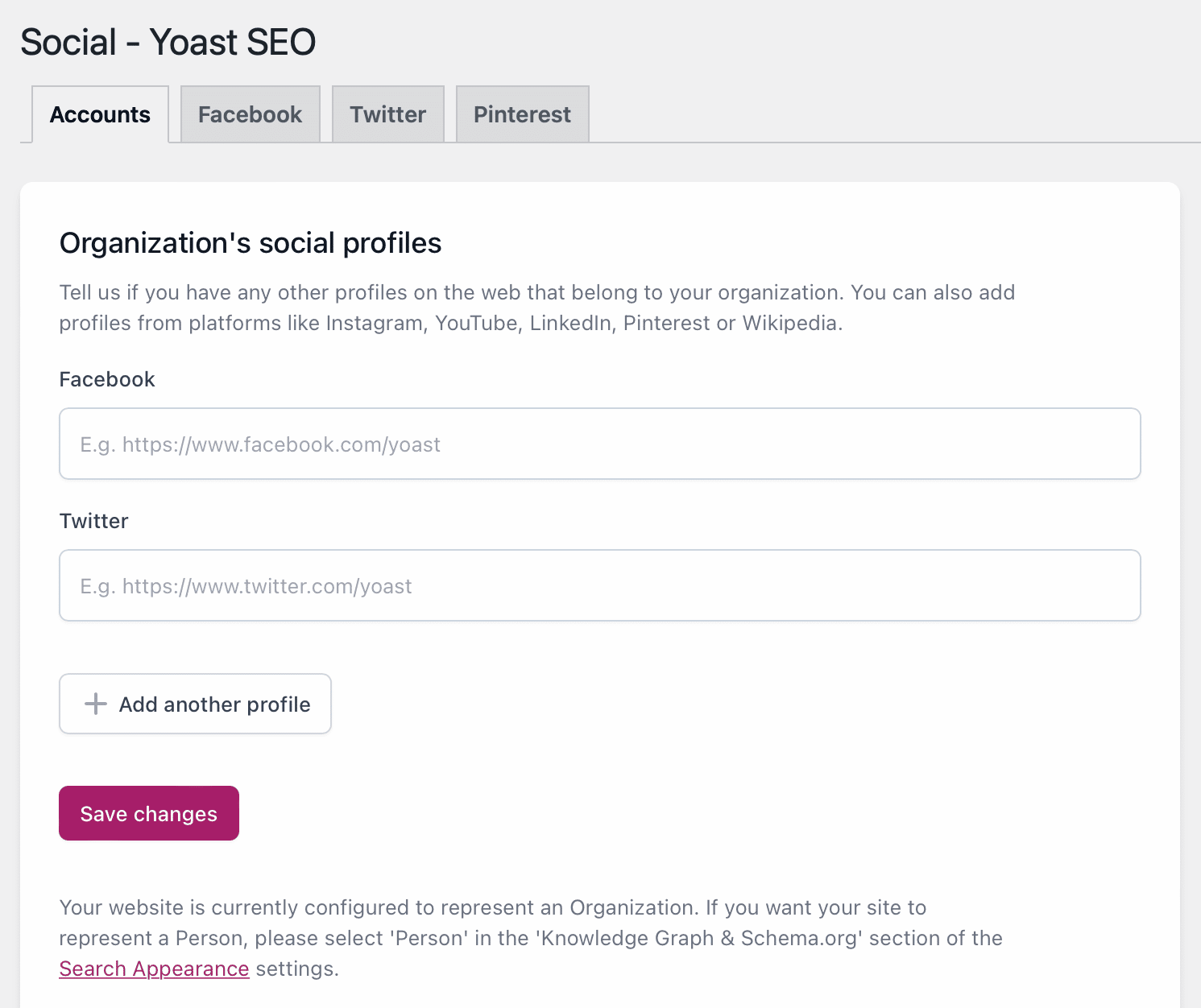
Sharing a page on Facebook or LinkedIn only to see the wrong image appear is frustrating.
Yoast helps prevent that.
The plugin supports Open Graph metadata and social previews, allowing you to customize how your pages appear when shared across major social platforms.
This improves branding consistency and can increase click-through rates from social media traffic.
User Experience and Setup
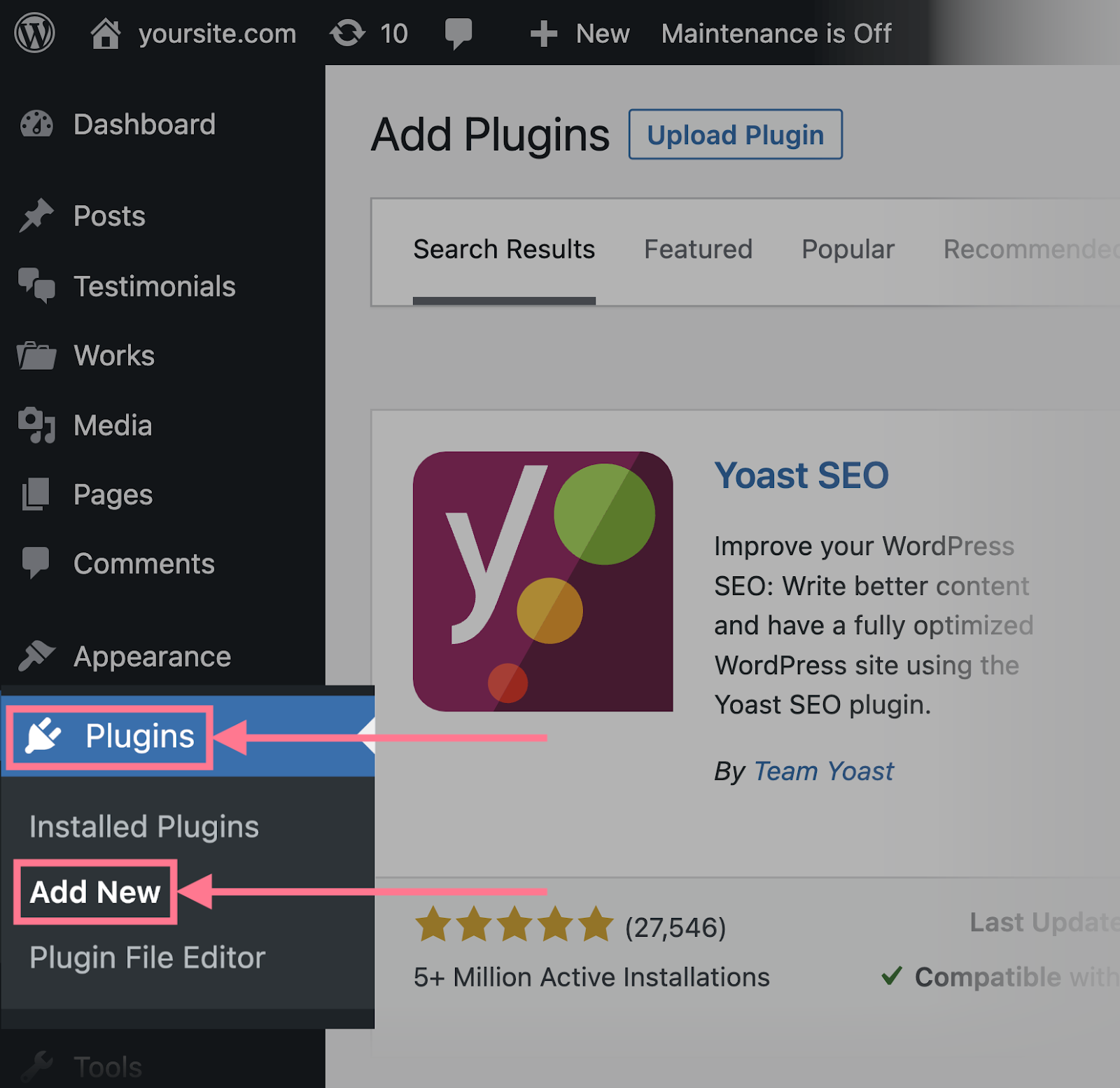
One of Yoast SEO’s biggest strengths is its beginner-friendly setup process.
After installation, the configuration wizard walks users through essential settings, including:
- Website type
- Organization or personal profile
- Search engine visibility
- Search appearance preferences
- XML sitemap configuration
- Basic indexing options
Most users can complete the initial setup in just a few minutes.
The dashboard is clean, logically organized, and supported by helpful explanations throughout the interface. Even users with limited SEO knowledge can understand what each setting controls without feeling overwhelmed.
For experienced professionals, Yoast also provides advanced options for fine-tuning technical SEO settings while keeping the default configuration sensible for new users.
Yoast SEO Free vs Premium: What’s the Difference?
One of the biggest questions people ask before installing the plugin is whether the free version is enough or if Yoast SEO Premium is worth paying for.
The answer depends on your website, your SEO goals, and how much time you want to spend optimizing content manually.
For many personal blogs and small websites, Yoast SEO Free provides everything needed to build a solid SEO foundation. You get on-page SEO analysis, readability checks, XML sitemaps, schema markup, canonical URLs, breadcrumbs, and control over important search appearance settings.
However, if you’re managing a content-heavy website or working with clients, the Premium version offers tools that can save time and improve your workflow.
Yoast SEO Free Includes
- SEO analysis
- Readability analysis
- Focus keyphrase optimization
- XML sitemap generation
- Basic Schema markup
- Canonical URL management
- Meta titles and meta descriptions
- Open Graph and social previews
- Breadcrumb controls
For many beginners, these features are more than enough to publish search-friendly content.
Yoast SEO Premium Includes
The Premium version builds on the free plugin with several productivity-focused features, including:
- Multiple related keyphrases
- Internal linking suggestions
- Redirect manager
- Orphaned content detection
- AI-powered title and meta description suggestions (supported environments)
- Social preview enhancements
- Premium support
- Automatic redirect creation after URL changes
These features won’t magically improve rankings, but they can make content management much easier—especially for larger websites.
Is Yoast SEO Premium Worth It?
This is probably the most searched question about the plugin.
Is Yoast SEO Premium worth buying?
The honest answer is: it depends on how you use WordPress.
Premium is a smart investment if you:
- Publish content regularly
- Manage a large blog
- Have hundreds of indexed pages
- Need redirect management
- Want internal linking suggestions
- Prefer built-in workflow improvements
- Don’t want multiple SEO plugins
The free version is usually enough if you:
- Run a personal blog
- Have a small business website
- Publish occasionally
- Already use separate redirect or internal linking plugins
- Are comfortable handling technical SEO manually
In other words, Premium improves efficiency rather than replacing good SEO practices.
Yoast SEO Pricing
Yoast offers both free and paid versions of its plugin.

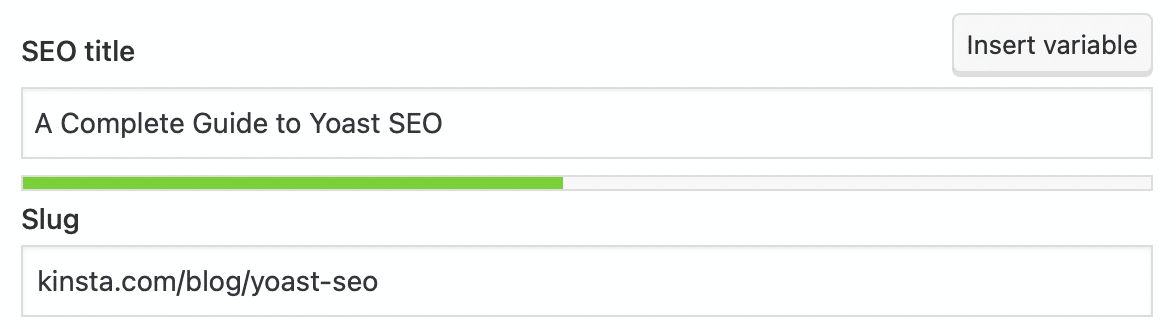
The free version is available directly from the WordPress plugin repository and covers most essential SEO tasks.
The Premium version is sold through an annual subscription, which includes updates, new features, and customer support. Pricing may change over time, so it’s always best to check the official Yoast website before purchasing.
When comparing cost, don’t just look at the subscription price. Consider how much time the Premium features could save if you manage multiple websites or publish content frequently.
Yoast SEO Performance
Another common concern is whether SEO plugins slow down WordPress.

Does Yoast Slow Down WordPress?
In our testing, Yoast SEO had very little impact on overall website performance.
Most of its processing happens inside the WordPress dashboard while you’re creating or editing content. Visitors browsing your website typically won’t notice any difference caused by the plugin itself.
Website speed is usually influenced more by factors like:
- Poor hosting
- Heavy themes
- Large images
- Too many plugins
- Inefficient caching
- Excessive third-party scripts
Removing Yoast alone is unlikely to make a slow website suddenly fast.
If performance matters—which it always should—focus on your hosting, image optimization, caching, and Core Web Vitals before blaming your SEO plugin.



Yoast SEO AI Features
Artificial intelligence has become a major trend in SEO software, and Yoast has started introducing AI-powered capabilities.
Depending on your plan and supported environments, Yoast offers AI assistance for generating SEO titles and meta descriptions.
These suggestions can help overcome writer’s block and speed up content creation, but they should never replace human editing.
AI can draft a title.
You should decide whether that title accurately reflects your content and encourages clicks.
Google continues to reward helpful, original content, so AI should assist your writing—not control it.
Yoast SEO Pros and Cons
No SEO plugin is perfect, and Yoast is no exception.
Pros
- Beginner-friendly interface
- Excellent readability analysis
- Strong technical SEO foundation
- Automatic XML sitemaps
- High-quality Schema implementation
- Reliable updates
- Helpful documentation
- Trusted by millions of WordPress users
- Clean integration with WordPress
Cons
- Some useful features require Premium
- Single focus keyword in the free version
- Green traffic lights can encourage over-optimization if followed blindly
- Premium pricing may not suit small websites
- Competitors now include features that Yoast charges extra for
The key is to treat Yoast as an SEO assistant rather than an SEO rulebook.
Yoast SEO vs Rank Math
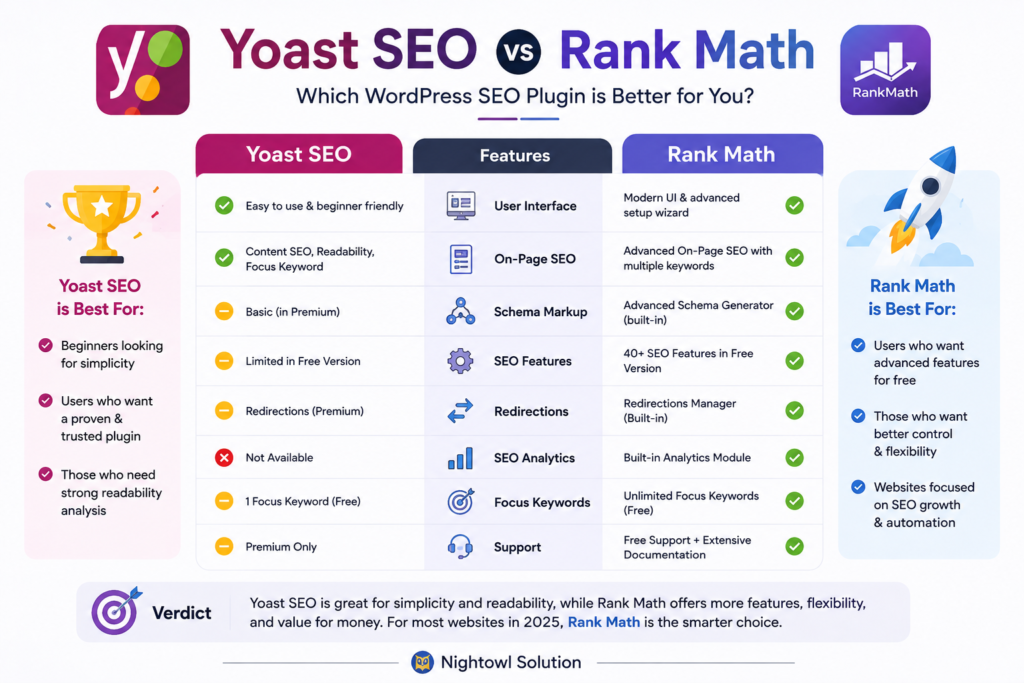
The comparison between Yoast SEO vs Rank Math has become one of the hottest debates in the WordPress community.
Both plugins are excellent, but they target slightly different users.
Yoast focuses on simplicity, stability, and a guided experience.
Rank Math offers more built-in features, extensive customization, and a generous free version.
Choose Yoast if you value:
- Simplicity
- Long-term stability
- Excellent documentation
- Easy onboarding
- Reliable updates
Choose Rank Math if you want:
- More advanced features in the free version
- Multiple focus keywords
- Detailed Schema controls
- Modular feature activation
- Greater customization
Neither plugin guarantees better rankings.
Your content quality, website authority, user experience, and backlinks will always matter far more.

Yoast SEO vs AIOSEO
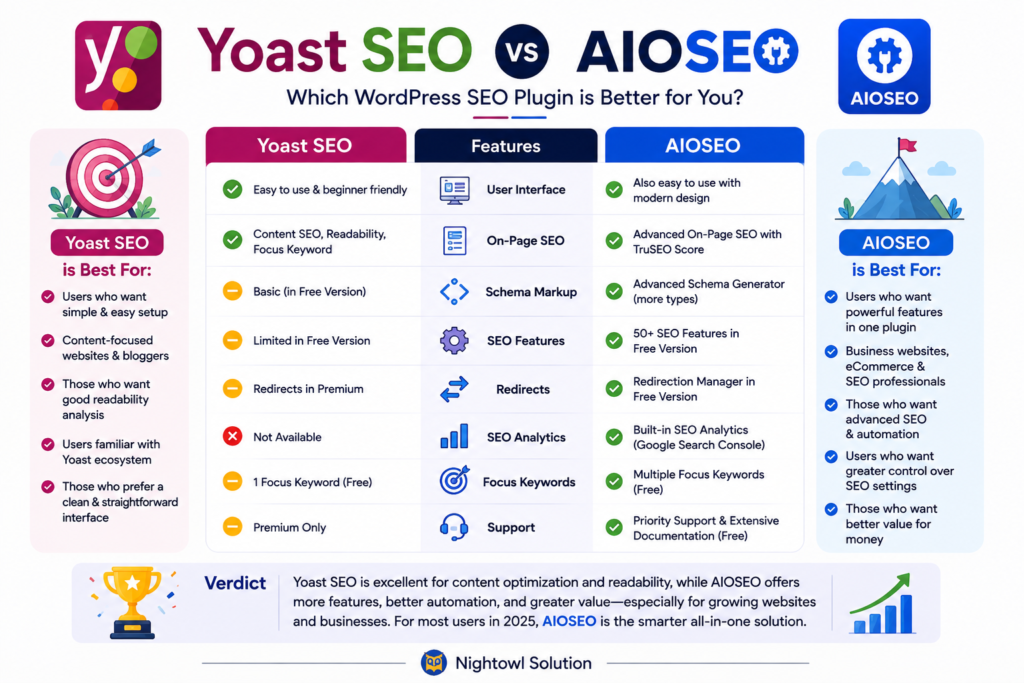
AIOSEO takes a different approach by focusing on business owners and marketers who want extensive automation.
Compared to Yoast, AIOSEO includes more marketing-focused tools and flexible configuration options.
Yoast, however, keeps its interface cleaner and easier for beginners.
If simplicity is your priority, Yoast remains an excellent choice.
If you need advanced automation and additional marketing integrations, AIOSEO deserves consideration.
Yoast SEO vs SEOPress
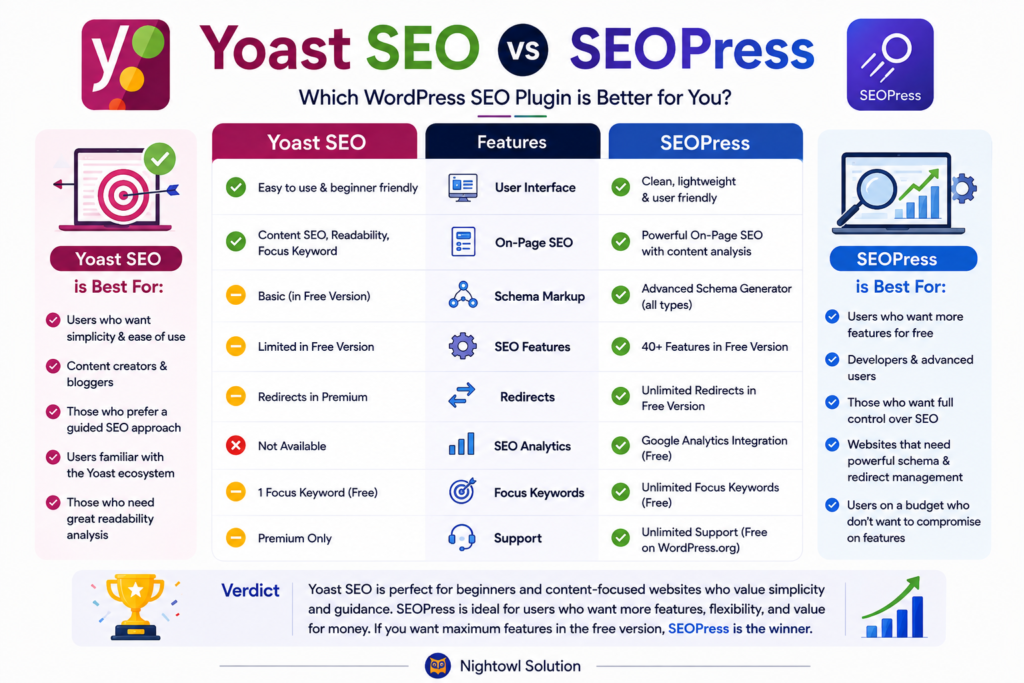
SEOPress has become increasingly popular among developers and agencies.
It offers many Premium-level features at a competitive price while maintaining a lightweight interface.
Compared with Yoast, SEOPress provides greater flexibility for advanced users.
Yoast, on the other hand, still offers one of the smoothest onboarding experiences and arguably the strongest educational resources for beginners.
Yoast SEO Alternatives
If you’re comparing several SEO plugins before making a decision, these are the most popular alternatives:
- Rank Math
- AIOSEO
- SEOPress
- Slim SEO
- Squirrly SEO
Each plugin has strengths and weaknesses.
Instead of asking which plugin is “best,” ask which one fits your workflow, experience level, and website goals.
For most users, switching plugins every few months provides no SEO advantage.
Consistency matters far more than constantly chasing new features.
Does Yoast SEO Improve Rankings?
This question deserves a clear answer.
No SEO plugin can directly improve your Google rankings.
Yoast doesn’t have special access to Google’s algorithm.
What it does provide is a framework for following SEO best practices.
It helps you:
- Write better titles
- Improve meta descriptions
- Organize headings
- Generate XML sitemaps
- Implement Schema markup
- Avoid common technical SEO mistakes
- Improve readability
- Manage indexing settings
When combined with high-quality content, strong internal linking, fast page speed, and a positive user experience, these improvements can contribute to better search visibility over time.
Think of Yoast as a navigation system.
It shows you the recommended route, but you’re still the one driving.
Frequently Asked Questions
Is Yoast SEO worth it?
Yes, for most WordPress users, Yoast SEO is worth using. The free version includes essential SEO tools such as XML sitemaps, schema markup, readability analysis, meta tag management, and SEO analysis. If you’re new to WordPress or want a reliable SEO plugin with a clean interface, Yoast remains a strong choice.
Is Yoast SEO Premium worth buying?
It depends on your workflow. If you regularly publish content, manage multiple websites, or want built-in tools like internal linking suggestions, a redirect manager, and orphaned content detection, Yoast SEO Premium can save time. For hobby blogs or small websites, the free version is often sufficient.
Is Yoast SEO free?
Yes. Yoast offers a free version through the WordPress Plugin Directory. It includes many core SEO features that help optimize pages and posts for search engines. Premium is an optional upgrade that adds advanced productivity features and dedicated support.
Can beginners use Yoast SEO?
Absolutely. One reason Yoast has remained popular for so many years is its beginner-friendly interface. The setup wizard walks users through the initial configuration, while the SEO and readability checks explain improvements in plain language. Even if you’ve never optimized a website before, you can start using Yoast within minutes.
Does Yoast SEO really help rankings?
Not directly. No SEO plugin can guarantee higher rankings because Google doesn’t rank websites based on a plugin. What Yoast does is help you implement SEO best practices. It encourages better page structure, clearer metadata, proper indexing, structured data, and improved readability—all of which support a stronger SEO strategy.
Is Yoast better than Rank Math?
Neither plugin is objectively “better.” Yoast focuses on simplicity, stability, and ease of use. Rank Math includes more advanced features in its free version and offers greater customization. If you want a guided experience, Yoast is an excellent choice. If you enjoy tweaking settings and need more built-in tools, Rank Math may suit you better.
What are the disadvantages of Yoast SEO?
The main drawbacks include:
Several advanced features require Premium.
The free version supports only one focus keyphrase.
Following every optimization suggestion too strictly can lead to unnatural writing.
Some competing plugins include similar features at no extra cost.
These limitations don’t make Yoast a poor plugin, but they are worth considering before upgrading.
Which SEO plugin is best for WordPress?
There isn’t a universal answer.
The best SEO plugin depends on your experience level and website goals.
Yoast SEO is ideal for beginners and content-focused websites.
Rank Math suits users who want more built-in features.
AIOSEO works well for businesses and marketers.
SEOPress is a great option for developers and agencies.
The most important factor isn’t the plugin itself—it’s how consistently you apply SEO best practices.
Does Yoast slow down WordPress?
In most cases, no.
Yoast has a minimal impact on frontend performance. A slow website is usually caused by poor hosting, unoptimized images, excessive plugins, or inefficient themes rather than the SEO plugin itself.
Keeping WordPress updated and following performance best practices will have a much greater effect on site speed.
Our Final Words
After testing the plugin and comparing it with today’s leading WordPress SEO solutions, it’s easy to understand why Yoast SEO continues to be one of the most trusted names in WordPress optimization.
It doesn’t promise instant rankings.
Instead, it helps users build a technically sound website, write better content, and avoid common SEO mistakes.
That’s exactly what a good SEO plugin should do.
The free version offers enough functionality for many bloggers, small businesses, and content creators. Premium becomes valuable when you’re managing larger websites or want features that improve your publishing workflow.
Could some competitors offer more features for the price?
Yes.
Does that make Yoast outdated?
Not at all.
Its consistent updates, strong documentation, beginner-friendly interface, and reliable implementation of technical SEO best practices continue to make it a dependable choice.
Overall Rating
| Category | Rating |
|---|---|
| Ease of Use | ⭐⭐⭐⭐⭐ |
| SEO Features | ⭐⭐⭐⭐⭐ |
| Technical SEO | ⭐⭐⭐⭐⭐ |
| Readability Tools | ⭐⭐⭐⭐⭐ |
| Performance | ⭐⭐⭐⭐☆ |
| Value for Money (Free) | ⭐⭐⭐⭐⭐ |
| Value for Money (Premium) | ⭐⭐⭐⭐☆ |
| Beginner Friendly | ⭐⭐⭐⭐⭐ |
Overall Score: 4.8/5 ⭐
Who Should Use Yoast SEO?
Yoast SEO is a great fit if you:
- Own a WordPress website.
- Publish blogs or educational content regularly.
- Want an easy-to-use SEO plugin.
- Prefer a clean interface over endless settings.
- Need reliable technical SEO features without coding.
Who Might Consider an Alternative?
You may prefer another plugin if you:
- Want more advanced features in the free version.
- Need highly customizable Schema controls.
- Manage dozens of client websites with specific workflows.
- Prefer a modular plugin with extensive configuration options.
Plugins like Rank Math, AIOSEO, or SEOPress may better match those requirements.
Final Thoughts
Yoast SEO has earned its reputation over many years, and it’s still one of the safest recommendations for WordPress users in 2026.
The plugin won’t replace a solid content strategy, quality backlinks, or a fast website. However, it does simplify many technical SEO tasks that often confuse beginners.
If you’re looking for a dependable WordPress SEO plugin with excellent documentation, regular updates, and a straightforward user experience, Yoast SEO remains an easy recommendation.
Rather than chasing every new SEO trend, focus on creating genuinely helpful content. Pair that with a well-configured plugin like Yoast, and you’ll have a strong foundation for long-term organic growth.